Glossy
- Model
- Flux 2 Klein
- Image
- 576 × 1024 px
Prompt
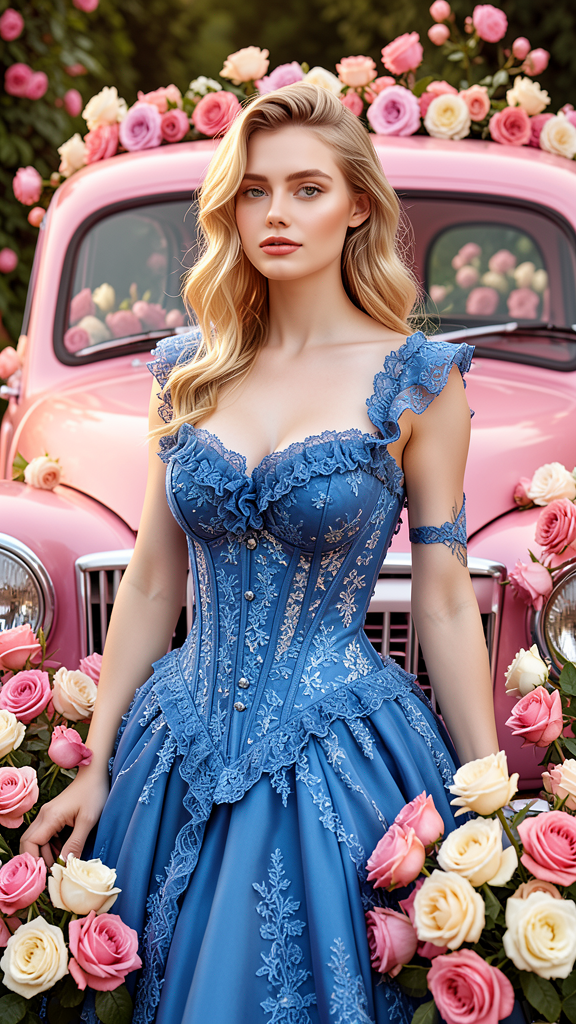
The subject posing in front of a vintage pink car while wearing an elaborate blue corset dress decorated with lace and ruffles. Preserve exact facial features and identity from the reference image. Abundant pink and cream roses surround the scene, creating a romantic and luxurious atmosphere. Soft flattering lighting emphasizes the textures of the dress, flowers, and vintage car. Elegant fashion editorial composition with rich floral styling.
Any aspect ratio
Overview
The "Glossy" template is a sophisticated AI Image Editor tool designed to create elegant, fashion-forward imagery. Using the power of the flux-2-klein model, this template captures the essence of luxury and romance through stunning visuals and soft, flattering lighting. It's ideal for fashion editorials and high-end creative projects.
What It Does
The template enables users to transform a regular photo into a breathtaking fashion editorial shot. It maintains the subject's exact facial features while integrating them into a scene with a vintage pink car and an elegant blue corset dress. The environment is richly styled with pink and cream roses, adding a romantic touch, all enhanced by soft lighting to bring out textures and details.
Who It's For
The "Glossy" template is perfect for creative professionals, including fashion photographers, magazine editors, and marketers looking to enhance their product launch visuals. It's also suited for personal projects, such as creating unique, polished portraits with a high-fashion flair.
Summary
Overall, "Glossy" offers a premium image editing experience by leveraging the capabilities of the AI Image Editor and the flux-2-klein model. This setup allows seamless creation of high-quality images suitable for a wide range of applications, from editorial spreads to social media content.
How to Use
Choose the Template

Customize Your Inputs

Generate and Download

Use Cases
Fashion Editorials
- Create magazine-ready images
- Set your portfolio apart with professional visuals
Social Media Campaigns
- Showcase products with style
- Enhance brand aesthetics and storytelling
Personal Imagery
- Create memorable portraits
- Customize special occasion images
Best Practices
Choose High-Quality Reference Images
Ensure your reference images are clear and of high quality to achieve the best results.Leverage the Rich Floral Styling
Make use of the abundant roses to enhance the romantic and luxurious atmosphere.Experiment with Lighting
Adjust lighting settings to complement the textures of the dress and flowers for a more dynamic composition.