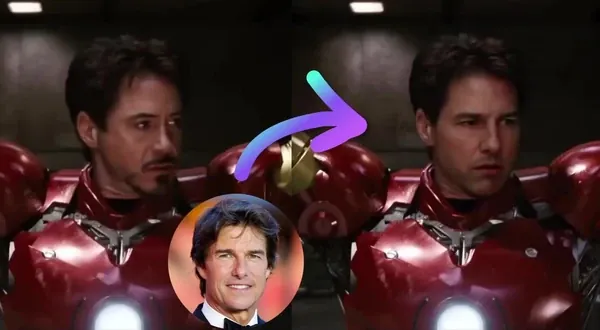
Free AI Body Swap
Replace the person in a photo with someone else using AI — free, no sign up.
Trusted by teams at
How AI Body Swap Works
Replace the person in a photo with someone else in three simple steps
- 1

Upload Original Scene
Upload the image that shows the scene. The body in this image will be replaced. - 2
Upload Person to Swap In
Upload the person you want in the scene, or choose from the preset list. - 3
Swap Bodies
Click "Swap Bodies" to start. When it's ready, download your image with no watermark.


AI Body Swap Tutorial
More face swap modes
Pick your swap
From a single portrait to a full group shot, every mode runs on the same engine. Jump between formats without losing your spot.
Single face swap
Replace one face in a portrait, clip, or reaction GIF — a quick single faceswap.
Multiple face swap
Swap every face in a group shot or cast scene at once.
- Open Head swap
Head swap
Replace the whole head, keep the body and pose.
Body swap
Put a new person in the scene—body, outfit, framing.
AI Body Swap Use Cases
See how body swap can be used across photos, memes, and creative projects.

Use body swap to drop yourself or a friend into classic meme templates and reaction stills. The result feels personal instead of generic—great for Twitter, Reddit, Discord, and group chats. Turn the still into motion later with our image to video workflow if you want a clip.
Put yourself or someone else into famous movie and TV stills while keeping the original lighting, framing, and mood. Useful for fan edits, concept art, thumbnails, and pitch decks where you need a believable "what if this person were in this shot?" mockup.
Create playful swaps for group photos, vacation pictures, and portraits—drop someone into a scene they missed, or re-stage a shot for birthdays, holidays, and events. Easy to share in chats and on social without a long edit session. To swap only heads while keeping the body, try AI head swap.
Test how a person reads in a finished scene before a full shoot. Swap talent into key art, posters, and ad layouts to compare options and align stakeholders, then move to higher production when the concept lands.
Place a real person into fantasy, sci-fi, or game-inspired scenes for cosplay promos, character sheets, and portfolio pieces. Helps you preview a look in-context without hand-compositing every layer in Photoshop.
Swap someone into highlight stills or team photos for fan campaigns, fantasy leagues, and shareable "you in the moment" graphics—especially when the goal is fun, recognizable social content rather than a forensic match.
Why Creators Love AI Body Swap
Free body swap photos with no watermark—no sign up needed. Upload your images and get clean, realistic results for memes, content, and client work.
No watermark on images
Download clean body swap photos—no watermark, no sign up. Ready to use in decks, social, and client reviews.
No advanced editing required
Skip manual cutouts and layer stacks in Photoshop. Upload your scene, upload the person, swap—often in under a minute.
Better realism with less cleanup
Automatic alignment and blending reduces rough edges and mismatched lighting—so you spend less time fixing masks and color.
Create variants without reshoots
Generate multiple versions from the same scene to compare talent, wardrobe, or direction—ideal for UGC-style ads and fast feedback rounds.
Commercial-ready outputs
Use results in marketing and client work where your license allows, with an API path when you need higher volume or automation.
Testimonials
Hear what our users have to say
"Magic Hour is the fastest way I've found to go from an idea to a polished image or video. It's simple, the results are consistent, and it's easy to iterate. It feels like a real creator tool."

Vishal Sankhat
Instagram Creator (534K followers)
"Magic Hour is a powerful AI tool for creating video, photo, and even voice content all in one place. Being able to generate videos up to 60 seconds from a single prompt is something most similar platforms still don't offer."

Daniel Davidson
YouTube Creator (194k subscribers)
"Magic Hour is one of the few AI tools I genuinely trust. Most tools are hit or miss, but Magic Hour feels reliable. I know what I'm going to get, which makes it easy to use regularly for social content."

Nasion Patriotik
Social Media Creator (1.8M followers)
"Most AI tools look impressive at first, but they're hard to rely on once you use them regularly. Magic Hour has been different for me. It's easy to use, the results are consistent, and I can get something polished without spending time fixing or redoing things. It fits naturally into how I create, which is why I keep coming back to it."

Lisa Li
Multimedia Designer at Rakuten Viki
AI Body Swap Features
Swap a person into any scene — free, no sign up, no watermark


Smart swaps in seconds
Upload an original scene and the person to swap in—get a polished still fast.
Manual masking and compositing replaced by automatic AI alignment and blending.

Pro results, less cleanup
Automatic masking and blending keeps edges natural and cuts down on artifacts.
Spend less time fixing halos and color mismatch in your photo editor.

Sized for every platform
Export 1:1, 9:16, 16:9, and more—ready for social, ads, or web.
Match feed posts, stories, and landing pages without redoing the whole comp.


Endless variations
Generate multiple looks and versions quickly until the character feels right in the scene.
Ideal for creative direction, A/B tests, and last-minute swaps before publish.
For Developers
Body Swap API
Swap bodies in any photo with AI.
From $0.047 / image
50M+ API calls99.9% uptimeFirst API call in ~5 min
from magic_hour import Client
from os import getenv

client = Client(token=getenv("MAGIC_HOUR_API_KEY"))
res = client.v1.body_swap.generate(
    assets={
        "person_file_path": "/path/to/person.png",
        "scene_file_path": "/path/to/scene.png",
    },
    resolution="1k",
    name="My Body Swap image",
    wait_for_completion=True,
    download_outputs=True,
    download_directory=".",
)200 OKExample responseFrom 50 credits / image
AI Body Swap FAQ
Yes, AI body swap is free with no sign up required. You get 3 free body swaps per day — no account needed. Sign up for free to unlock account-specific credits and rewards, saved projects, and access to more tools. Upgrade for more credits, priority processing, and advanced features.
No. AI body swap works in your browser with no account, no sign up, and nothing to install. Sign up for free to unlock account-specific credits, rewards, and saved projects.
No watermark on body swap photos for all users, including free users with no sign up.
Magic Hour does not use your prompts, uploads, or generated outputs to train AI models. Automated systems and contracted service providers process content only to provide, secure, and support the service. Magic Hour may use aggregated or de-identified usage data that excludes your prompts, uploads, and outputs to debug and improve the product. Magic Hour personnel do not routinely review customer content; authorized access is limited to support, security, legal, or policy needs. Retention varies by workflow, and you can delete saved assets from your account.
Upload two images: an original scene (the image you want to change) and a person to swap in (who should appear in that scene). Use images you own or have permission to use.
For the person to swap in, use a clear, well-lit photo with a visible face — straight-on or slight angle usually works best. For the original scene, choose an image where the subject you are replacing is visible and not covered by hands, hair, or heavy shadows. Avoid tiny crops, heavy filters, and very low resolution.
Paid subscribers and credit-pack customers may use body swap outputs for commercial purposes, subject to our Terms and applicable law. Users without either purchase may use outputs for personal, non-commercial use only. You must have the rights to all source images and any recognizable people shown.
Upload your original scene, upload the person to swap in, then click Swap. Your image is usually ready in seconds. No advanced editing experience is required.
This body swap tool is built for still images and one swap per generation. For video face swap, GIF swap, or multi-face workflows, use the other Magic Hour tools from the product menu or your dashboard.
Body swap is legal when you follow the rules: use content you have rights to, get consent before using someone's likeness, and do not use the tool to impersonate, harass, or deceive. Do not create non-consensual intimate imagery or other prohibited content. You are responsible for complying with applicable laws and platform policies.
We Value Your Privacy & Data Security, Always
Commercial use, training, deletion, retention (1 day), and security. Retention:1 day
Commercial use
Subscriptions and credit packs permit commercial use of outputs. Users without either purchase are limited to personal, non-commercial use.
No training
We do not use your uploads or outputs to train our models.
Delete anytime
You can delete your content or account at any time. Deletion removes content from active storage immediately.
Security
Encrypted in transit and at rest. Access is restricted for operations and support.