Free AI Background Remover
Remove image backgrounds and download transparent PNGs — free, no signup, no watermark.
Use Background Remover API:
Fast, easy, and scalable
Trusted by teams at
How AI Background Remover Works
- 1

Upload Your Image
Choose a JPG or PNG with a clearly visible foreground subject. No signup required. - 2
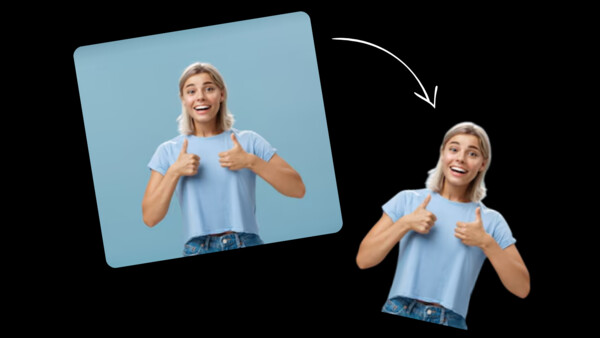
Remove the Background
The AI separates the subject from the background. Clear edges and good contrast work best. - 3

Download the Transparent Image
Download the transparent cutout, or keep editing it in the AI image editor.

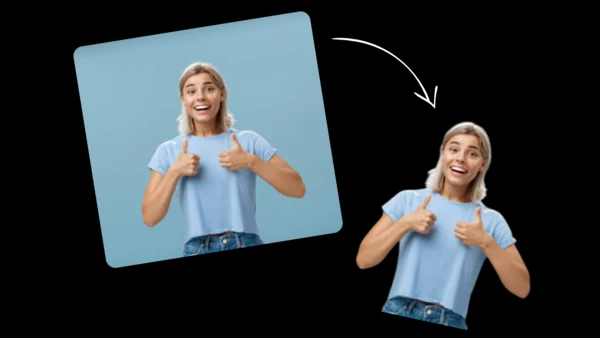

AI Background Remover Use Cases
See how our free AI image background remover can be used in different scenarios.

Use our free AI background remover to create clean product cutouts for Shopify and marketplaces. Swap outfits with our AI clothes changer. Use the transparent result in your preferred layout or background-editing tool.
Remove background from headshots with our AI tool. Get clean backdrops for LinkedIn, resumes, and team pages - no signup required to try.
Use our instant AI background remover to isolate subjects for thumbnails and banners. Make the main person or object pop on mobile.
Remove background from listing photos for eBay, Craigslist, and Facebook Marketplace with our free AI background remover. Cleaner images often get more clicks.
Remove background from images for slides, posters, and one-pagers without tedious masking. Build cleaner layouts for pitch decks and marketing.
Use our AI to remove background from people and objects, then place them into new scenes. For more edits, try our AI image editor or AI clothes changer. Create collages, posters, and ad creatives faster.
Remove background from photos to get sticker-ready assets. Our free AI background remover is great for creators building sticker packs and merch graphics.
Why Creators Love AI Background Remover
Create a transparent cutout without manual masking. Results depend on source quality, contrast, and the complexity of edges such as hair, fur, or translucent objects.
Stop manual cutouts
Start with automatic subject isolation instead of tracing every edge with a pen or mask tool.
Keep detailed subject edges
Use a clear, high-contrast source for the best chance of preserving hair, fur, and product details.
Speed up product and marketing workflows
Prepare transparent assets for ecommerce, ads, thumbnails, and social posts.
API access when you need automation
Connect the background-remover API to a workflow that handles your own queue and review process.
Continue editing the cutout
Take the transparent image into the AI image editor or another design tool to add a new background.
Testimonials
Hear what our users have to say
"Magic Hour is the fastest way I've found to go from an idea to a polished image or video. It's simple, the results are consistent, and it's easy to iterate. It feels like a real creator tool."

Vishal Sankhat
Instagram Creator (534K followers)
"Magic Hour is a powerful AI tool for creating video, photo, and even voice content all in one place. Being able to generate videos up to 60 seconds from a single prompt is something most similar platforms still don't offer."

Daniel Davidson
YouTube Creator (194k subscribers)
"Magic Hour is one of the few AI tools I genuinely trust. Most tools are hit or miss, but Magic Hour feels reliable. I know what I'm going to get, which makes it easy to use regularly for social content."

Nasion Patriotik
Social Media Creator (1.8M followers)
"Most AI tools look impressive at first, but they're hard to rely on once you use them regularly. Magic Hour has been different for me. It's easy to use, the results are consistent, and I can get something polished without spending time fixing or redoing things. It fits naturally into how I create, which is why I keep coming back to it."

Lisa Li
Multimedia Designer at Rakuten Viki
Free Transparent Background Generator
Use the transparent background generator to make a JPG or PNG background transparent and download the clean cutout. The free browser tool requires no signup and adds no watermark to image outputs.


Prepare a Clean Cutout for Further Editing
Use the transparent result in product listings, profile graphics, thumbnails, or composites. Open it in the AI photo editor when you want to add a new scene or make another prompt-based edit.
Use the API for Automated Workflows
The page handles one image at a time. For a programmatic workflow, use the background-remover API and build batching, retries, and review around your own requirements.


For Developers
Background Remover API
Remove image backgrounds instantly with AI.
From $0.005 / image
50M+ API calls99.9% uptimeFirst API call in ~5 min
from magic_hour import Client
from os import getenv

client = Client(token=getenv("MAGIC_HOUR_API_KEY"))
res = client.v1.image_background_remover.generate(
    assets={
        "background_image_file_path": "/path/to/1234.png",
        "image_file_path": "/path/to/1234.png",
    },
    name="Background Remover image",
    wait_for_completion=True,
    download_outputs=True,
    download_directory="."
)200 OKExample responseFrom 5 credits / image
AI Background Remover FAQ
Yes, AI background remover is free with no sign up required. You get 5 free images per day — no account needed. Sign up for free to unlock account-specific credits and rewards, saved projects, and access to more tools. Upgrade for more credits, priority processing, and advanced features.
No. AI background remover works in your browser with no account, no sign up, and nothing to install. Sign up for free to unlock account-specific credits, rewards, and saved projects.
No watermark on AI background remover results for all users, including free users with no sign up.
An AI background remover is a tool that uses artificial intelligence to detect and remove the background of an image, giving you a clean cutout with a transparent background. Magic Hour's free AI background remover works on any photo in seconds.
A transparent background generator automatically isolates the subject of an image and removes everything behind it. Magic Hour exports the result as a transparent PNG you can place over another color, image, or design.
The browser page processes one image at a time. The background-remover API can be integrated into a workflow where you manage batching, retries, and review.
Switch to the Change Background tab above the uploader and describe the color you want, like "plain white background." You can also download the transparent PNG and place it over any color in your own design tool.
Switch to the Change Background tab above the uploader, upload your photo, and describe the new background. The subject stays the same and only the background changes.
Upload a JPG or PNG. Magic Hour detects the foreground, removes the background, and gives you a transparent PNG to download—free, with no signup or watermark.
Processing time depends on the uploaded image and current demand. The form shows generation progress while the foreground cutout is created.
We Value Your Privacy & Data Security, Always
Commercial use, no AI training, deletion controls, and feature-specific retention. Trust & privacy
Commercial use
Subscriptions and credit packs permit commercial use of outputs. Users without either purchase are limited to personal, non-commercial use.
No training
We do not use customer prompts, uploads, or outputs to train AI models. This covers free, paid, and API use.
Delete anytime
Delete saved projects or request account deletion. Retention varies by feature; account deletion has a separate 14-day restoration period.
Security
Encrypted in transit and at rest. Access is restricted for operations and support.