Free AI Photo Editor
Upload a photo, describe the edit, and download it free—no sign up or watermark.
Examples of what you can create


Remove someone from a photo
View prompt
Remove the person in the background. Keep everything else unchanged.


Remove the background


Expand beyond the frame

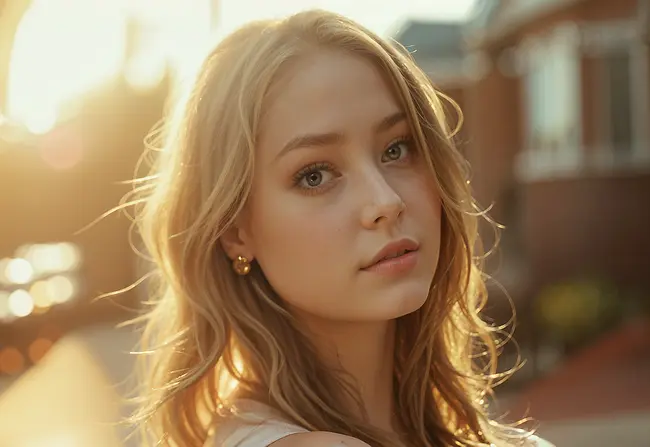
Upscale to higher resolution
Trusted by teams at
How AI Photo Editor Works
- 1
Upload your image
Choose the photo or graphic you want to edit, or try a sample image. - 2
Describe the edit
Tell the AI what to change, then click “Edit photo.” For example: “Remove the sign and keep the rest of the photo unchanged.” - 3
Preview and download
Review the edited image and download the result. Adjust your prompt and try again if it needs another change.


Edit Images with Top AI Models
Use frontier models for AI Photo Editor.

Qwen Edit
Edit images with Qwen Edit — a fast AI image editor for prompt-based inpainting, object removal, background changes, and precise photo edits. Upload an image, describe the change, and get clean, natural results.

Nano Banana Pro
Edit an uploaded image with Nano Banana Pro. Describe changes to objects, backgrounds, lighting, or style for product photos and creative visuals.

Flux 2 Klein
Edit and generate images with Flux 2 Klein — Black Forest Labs' fast model in Magic Hour for sub-second prompt-led edits, quick generations, and low-cost iteration at 640px through 2K.

GPT Image 2
Edit and generate images with GPT Image 2 — OpenAI's image model in Magic Hour for natural-language editing, strict prompt adherence, and premium-resolution output up to 4K.

Seedream
Edit photos with Seedream using text prompts and image references. Refine backgrounds, lighting, and details for portraits, product photos, and marketing assets.

Nano Banana
Use Nano Banana to edit photos with natural-language prompts. Change objects, backgrounds, or visual style and compare the result with your source image.

Nano Banana 2
Edit images with Nano Banana 2. Use a prompt to retouch a photo, replace a background, or explore a new look from your uploaded image.
Seedream 4
Use Seedream 4 for prompt-based photo editing. Upload an image and describe changes to its setting, appearance, or details.
Free AI Photo Editor Tutorial
AI Photo Editor Use Cases

Remove distracting people, signs, wires, and clutter from travel, property, or product photos without using clone stamps or selection tools.
Replace the background in a portrait, product shot, or listing photo with a studio, lifestyle, or branded setting. For a transparent cutout, start with our transparent background generator.
Add space around a subject for marketplace listings, profile photos, thumbnails, and social posts with our AI image expander.
Clean up dust, wrinkles, reflections, and background clutter in ecommerce photos. To change an outfit while keeping the model, use our AI clothes changer.
Create background, lighting, prop, or framing variations from one product or lifestyle photo for listings, ads, and social posts. Turn the finished photo into a clip with our image to video generator.
Polish profile pictures and social photos by changing lighting, cleaning the background, or correcting small distractions with simple text prompts.
Repair small damage, reduce noise, and improve faded photos. Add natural color with our photo colorizer or increase resolution with the AI image upscaler.
Why Creators Love AI Photo Editor
Edit photos with text prompts. Retouch portraits, clean product photos, remove distractions, and adjust lighting without layers or manual masking.
Replace slow manual photo editing
Skip touch-ups and sliders. Describe the change, generate a new version, and review the result before downloading.
Retouch photos without pro skills
Remove blemishes, reduce glare, smooth flyaways, and refine details with simple prompts. Review skin and facial details at full size.
Remove objects and distractions fast
Erase people, clutter, or unwanted elements without clone-stamping. Review filled areas for artifacts.
Create photo variations
Generate background, lighting, and framing variations for product photos or portraits without arranging another shoot.
Prepare photos for social and ecommerce
Download edited photos for listings, ads, profile photos, and posts.
AI Photo Editor Features
Edit Images with Text Prompts
Upload an image and describe what to change. Make photo edits with AI without layers or manual masking.
Remove Unwanted Objects
Remove people, signs, wires, or clutter from photos. Tell the editor what to remove and review the result before downloading.
Change Photo Backgrounds
Replace a background with a studio, lifestyle, or outdoor scene. Describe the setting you want for your portrait or product photo.
Retouch Photos and Adjust Lighting
Describe changes to skin, glare, shadows, or color. Refine portraits and product photos with an editable text prompt.
Reference Images in the Full Editor
Supported models accept multiple reference images to guide your edits. The free browser tool starts with one uploaded image.
Character and Style References
Use reference images to guide a character's appearance or visual style across edits for storyboards, campaigns, and creative projects.
Choose an Image Editing Model
The full editor offers multiple models for prompt-based image editing. Choose a supported model for your photo or creative task.
Compare Edit Variations in the Full Tool
Supported paid models can produce up to 16 images in one run. Compare different edits; the free browser tool produces one image per click.
Generate, Then Edit
Start with an AI-generated image or an existing photo, then refine it with editing prompts in the same workspace.
Suggested Editing Prompts
Try an editing preset or a suggested prompt based on your uploaded image. Adjust the instruction before generating another edit.
Upscale Your Edited Photo
Use AI Image Upscaler to increase resolution up to 4K for printing, product listings, or larger displays.
Animate Your Edited Image
Use Image to Video to turn your edited photo into a short video for social posts, product promotions, or creative projects.
What AI Photo Editor Users Say
"I put off launching my shop for a year because my product photos looked terrible. I edited 200+ images in one weekend with this. Made my first sale two days after going live. Wish I'd found it sooner."

Lisa Li
Etsy Shop Owner
"We switched from Photoshop for most client work. That sentence would've sounded crazy to me six months ago, but here we are. My team actually prefers it now for anything that's not super complex."

Brandon Kosasih
Creative Lead at Apex Digital
"My editing time went from 3 hours to 20 minutes per shoot. I kept checking the results thinking I missed something. Nope, just actually good. Finally have my evenings back."

Rachel Thompson
Freelance Photographer
"I'm not a designer and I definitely can't use Photoshop, but people keep asking if I hired someone for my Instagram. Feels good to post stuff I'm not embarrassed by for once."

Kim T. Brigitte
Blogger
AI Photo Editor in Action
See how prompt-based photo editing handles common photography workflows.

Retouch Photos With a Prompt
Describe the touch-up you want without brushes, masks, or sliders.

Clean Up Portraits and Products
Refine details, lighting, objects, and backgrounds in a few clicks.

Ready for Listings and Social
Prepare polished photos for stores, profiles, ads, and posts.

Try New Backgrounds and Lighting
Create photo variations without starting over or reshooting.
For Developers
AI Image Editor API
Edit images with natural-language prompts.
From $0.009 / image
50M+ API calls99.9% uptimeFirst API call in ~5 min
from magic_hour import Client
from os import getenv

client = Client(token=getenv("MAGIC_HOUR_API_KEY"))
res = client.v1.ai_image_editor.generate(
    assets={"image_file_paths": ["/path/to/1234.png"]},
    style={"prompt": "Give me sunglasses"},
    name="Ai Image Editor image",
    wait_for_completion=True,
    download_outputs=True,
    download_directory="."
)200 OKExample responseFrom 10 credits / image
AI Photo Editor FAQ
Yes, AI photo editor is free with no sign up required. You get 3 free edits per day — no account needed. Sign up for free to unlock account-specific credits and rewards, saved projects, and access to more tools. Upgrade for high-res exports and priority processing.
No. AI photo editor works in your browser with no account, no sign up, and nothing to install. Sign up for free to unlock account-specific credits, rewards, and saved projects.
No watermark on AI photo editor results for all users, including free users with no sign up.
Magic Hour does not use your prompts, uploads, or generated outputs to train AI models. Automated systems and contracted service providers process content only to provide, secure, and support the service. Magic Hour may use aggregated or de-identified usage data that excludes your prompts, uploads, and outputs to debug and improve the product. Magic Hour personnel do not routinely review customer content; authorized access is limited to support, security, legal, or policy needs. Retention varies by workflow, and you can delete saved assets from your account.
Yes. Paid subscribers, credit-pack customers, and customers with separately agreed paid usage-based billing arrangements have full rights to use their edited photos commercially. This includes social media, product design, client work, and more. Users without one of these paid arrangements can use outputs for personal, non-commercial projects.
The AI Photo Editor lets you edit, enhance, or transform any photo using simple text prompts. You can type things like "add a sunset," "remove glare," or "make it look like an oil painting" to get instant edits. It's built for creators who want powerful photo editing without needing Photoshop skills.
The tool uses advanced image generation models trained on large datasets to make realistic edits based on your prompt. You simply type what you want to add or change. Within seconds, the AI fills in your request with natural-looking results.
The free Photo Editor downloads PNG files. Remove Background mode returns a transparent PNG for free, without sign up.
No. You don't need to brush or highlight any part of the photo before making an edit. Just type your prompt - like "add a rainbow" or "make it winter" - and the AI will decide where and how to apply it. This makes the editing process faster and more intuitive.
You can add or remove objects, change backgrounds, adjust styles, or apply artistic effects - all by typing what you want. Some common examples include "add a tattoo," "change sky to sunset," or "make it Pixar-style." The editor supports both subtle retouching and bold creative transformations.
You can transform your photo into a wide range of styles, including Pixar, Studio Ghibli, sketch, anime, cyberpunk, or classic art. Style prompts can be typed manually or selected from a preset list. It's an easy way to match your photo to a specific aesthetic or mood.
We Value Your Privacy & Data Security, Always
Commercial use, no AI training, deletion controls, and feature-specific retention. Trust & privacy
Commercial use
Subscriptions and credit packs permit commercial use of outputs. Users without either purchase are limited to personal, non-commercial use.
No training
We do not use customer prompts, uploads, or outputs to train AI models. This covers free, paid, and API use.
Delete anytime
Delete saved projects or request account deletion. Retention varies by feature; account deletion has a separate 14-day restoration period.
Security
Encrypted in transit and at rest. Access is restricted for operations and support.
More Free AI Tools
Want to create, edit, and transform images in one place? Switch between all three in our free AI image generator.


