Free AI Voice Changer
Upload or record a clip, then choose from 400+ voices and download the audio. Free, no signup.
Trusted by teams at
How AI Voice Changer Works
Three simple steps
- 1

Upload or record a clip
Upload an audio or video file, or record in your browser. Select 1 to 120 seconds of speech. - 2
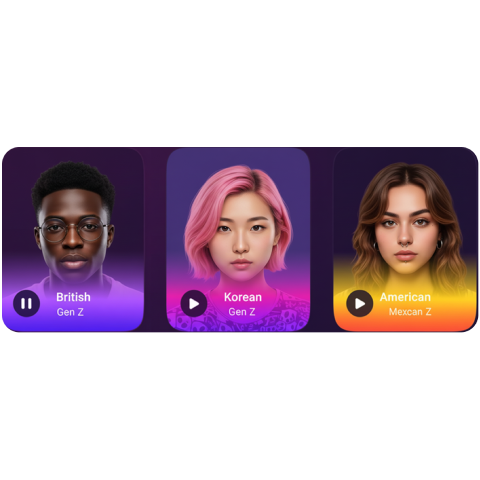
Choose a voice
Select from 400+ preset voices, accents, and styles. - 3

Generate
Preview and download the converted audio.


AI Voice Changer Use Cases
See how our free online voice changer can be used in different scenarios.

Use an AI voice changer to create distinct character voices for skits and storytelling. Pair with AI face swap video for fully transformed characters. Create a new spoken performance in your selected voice.
Change the voice in a recorded gameplay clip or stream highlight before sharing it.
Use a voice changer to protect your identity while keeping your message clear. Helpful for creators who want separation between personal and public.
Use AI voice changes to make comedic clips, prank-style edits, and meme audio. Pair with captions for high-share content.
Use voice change to match a new style or persona when re-voicing a clip. For lip-synced video, upload your video and new audio to our lip sync tool. Useful for repurposing content across channels.
Use a voice changer to adjust tone for narration and improve consistency. Create a more polished sound without re-recording.
Use voice changes to fit a consistent brand sound across campaigns. Keep your scripts but align delivery to a defined voice style.
Why Creators Love AI Voice Changer
Try a different accent, character, or delivery on a recording you already have.
No re-recording to change tone
Try a different delivery without recording the same lines again.
Keep characters consistent
Use the same voice across episodes, skits, and series—without hiring voice actors.
Explore accents and styles
Preview different voices to find one that fits your project.
Simplify audio editing
Skip complicated tools. Upload, choose, generate—no DAW required.
Faster turnaround for content
Create alternate takes from the same recording before you publish.
Testimonials
Hear what our users have to say
"I've stopped all other AI subscriptions and just stick with Magic Hour for everything content related. It's literally all in one: audio, image, and video gen tools plus you can find all the best models."
"My editing time went from 3 hours to 20 minutes per shoot. ... Finally have my evenings back."

"I've been able to create more ads and marketing content, as well as create assets for my applications. The user experience is quite good as well especially for making and iterating on my ads. I primarily use Text to video, Image generator, and Image editor."
"The output is high-fidelity enough to use in actual projects without a ton of editing."

AI Voice Converter and Voice Changer Features
Convert uploaded audio or video into a male, female, character, or accented voice using 400+ presets.

Explore voices, accents, and styles
Create new content without re-recording to match any mood, persona, or audience. Access 400+ realistic high-quality voices today.

Start with an existing recording
Upload an audio or video clip and download the converted audio for your edit.

Try different voices
Preview the converted audio and try another voice if you want a different take.

Try character voices
Pick a character voice for a skit, story, or voiceover.

AI Voice Changer FAQ
Yes, AI voice changer is free with no sign up required. You get 3 free voice changes per day — no account needed. Sign up for free to unlock account-specific credits and rewards, saved projects, and access to more tools. Upgrade for more credits, priority processing, and advanced features.
No. AI voice changer works in your browser with no account, no sign up, and nothing to install. Sign up for free to unlock account-specific credits, rewards, and saved projects.
Magic Hour does not use your prompts, uploads, or generated outputs to train AI models. Automated systems and contracted service providers process content only to provide, secure, and support the service. Magic Hour may use aggregated or de-identified usage data that excludes your prompts, uploads, and outputs to debug and improve the product. Magic Hour personnel do not routinely review customer content; authorized access is limited to support, security, legal, or policy needs. Retention varies by workflow, and you can delete saved assets from your account.
Magic Hour's AI Voice Changer is a free online voice changer that creates new speech in your chosen voice from your recording. Upload or record speech, select a voice, and download the generated audio. Original timing, cadence, and emotion may change.
A free voice changer online lets you change your voice in the browser without downloading software. Magic Hour's AI voice changer online creates a new spoken version of your recording in your chosen voice. Original timing, cadence, and emotion may change.
The process is simple:
- Upload audio/video or record your voice.
- Choose from a wide range of realistic AI-generated voices.
- Download your audio with a transformed voice.
Nothing to install - it runs in your browser.
No. Magic Hour's voice changer runs entirely in your browser. It is a free online voice changer with no installation required.
We support most popular audio and video formats, including mp4, mov, mp3, wav, and flac.
Yes. Magic Hour supports a wide variety of voices across genders, ages, and accents. You can sound younger, older, or switch between masculine and feminine voices while maintaining natural tone and clarity.
Yes. Sign in, open the Voice Changer creator, choose Use My Voice, then record or upload a sample and save it for reuse. If you want the voice to say new words from a script, use AI Voice Cloner.
Yes. Upload a video with speech, choose a voice, and download the converted audio. Add the new audio to your video in an editor.
Our AI Voice Changer has many applications:
- Content creation - voiceovers for TikTok, YouTube, Reels, and shorts.
- Gaming and stream highlights - change the voice in a recorded clip.
- Marketing & ads - create unique branded voiceovers without hiring actors.
- Podcasts & audiobooks - experiment with multiple voices effortlessly.
- Privacy - disguise your real voice when needed.
Magic Hour stands out with:
- Realism: Voices are powered by next-generation AI for lifelike emotion and cadence.
- Customization: Choose a target voice and adjust speaking speed.
- Custom voices: Sign in to record or upload a voice sample and save it for reuse.
Visit magichour.ai/products/ai-voice-changer to try it free. Upload or record a clip, pick a voice, and download the converted audio.
We Value Your Privacy & Data Security, Always
Commercial use, no AI training, deletion controls, and feature-specific retention. Trust & privacy
Commercial use
Subscriptions and credit packs permit commercial use of outputs. Users without either purchase are limited to personal, non-commercial use.
No training
We do not use customer prompts, uploads, or outputs to train AI models. This covers free, paid, and API use.
Delete anytime
Delete saved projects or request account deletion. Retention varies by feature; account deletion has a separate 14-day restoration period.
Security
Encrypted in transit and at rest. Access is restricted for operations and support.
