Free AI Face Editor
Free online face expression editor - change face expression in photos in seconds
Use Face Editor API:
Fast, easy, and scalable
Trusted by teams at
How AI Face Editor Works
- 1

Upload a face photo
Upload a clear photo with a visible face, and the AI detects its facial features. - 2

Tweak expressions in real time
Use sliders to adjust eye gaze, eyebrow height, smile, and more, and see each change instantly. - 3

Download your edited image
Save your edited face photo with one click for avatars, profile pictures, or creative projects.


AI Face Editor Tutorial
Watch our AI Face Editor tutorial:
AI Face Editor Use Cases
See how our AI Face Editor can be used in different scenarios.

Open half-closed eyes, soften a frown, or add a slight smile to a portrait you already like. Everything else in the photo stays the same.
Use face editing to make YouTube and TikTok thumbnails pop without heavy Photoshop work. Widen the eyes, open the mouth, or raise the eyebrows so the reaction reads on a small screen.
Make a smiling, pouting, surprised, or serious version of the same photo. Useful for posts, stickers, and reaction images when you only have one shot.
Point the eyes at the camera and adjust head tilt, turn, and nod when the subject looked away. Good for group shots and candid photos.
Give profile photos the same expression and head angle so they match across platforms. For face swaps, try our face swap tool. Create consistent visuals across X, Discord, and newsletters.
Show the original photo next to an edited expression or pose. Make several versions quickly for posts, ads, and landing pages.
Fix a blink, straighten a tilted head, or add a friendly smile to client photos for agents, coaches, and freelancers. Generate headshots with our AI headshot generator or AI selfie generator. Deliver a cleaner, more professional portrait without reshoots.
Why Creators Love AI Face Editor
Adjust facial expressions, eye gaze, and head pose with simple sliders. Fix awkward photos in seconds, save reshoots, and create 10+ expressive variants for avatars, thumbnails, and posts—without Photoshop.
Fix awkward expressions without reshoots
Turn a neutral or off-timing face into a confident smile or better gaze in seconds using real-time controls.
Micro-expression control without complex tools
Fine-tune eyebrows, eyes, mouth, and head angle with sliders—often saving 30–60 minutes per photo.
Consistent faces for avatars and thumbnails
Make portraits look intentional and on-brand across profile photos, thumbnails, and character art—at scale.
Faster iterations for creative work
Adjust, preview, and regenerate in seconds so you can try 10+ moods and pick the best.
Polished results with one click
Enhance the face and download immediately for memes, animations, and social posts.
Testimonials
Hear what our users have to say
"Magic Hour is the fastest way I've found to go from an idea to a polished image or video. It's simple, the results are consistent, and it's easy to iterate. It feels like a real creator tool."

Vishal Sankhat
Instagram Creator (534K followers)
"Magic Hour is a powerful AI tool for creating video, photo, and even voice content all in one place. Being able to generate videos up to 60 seconds from a single prompt is something most similar platforms still don't offer."

Daniel Davidson
YouTube Creator (194k subscribers)
"Magic Hour is one of the few AI tools I genuinely trust. Most tools are hit or miss, but Magic Hour feels reliable. I know what I'm going to get, which makes it easy to use regularly for social content."

Nasion Patriotik
Social Media Creator (1.8M followers)
"Most AI tools look impressive at first, but they're hard to rely on once you use them regularly. Magic Hour has been different for me. It's easy to use, the results are consistent, and I can get something polished without spending time fixing or redoing things. It fits naturally into how I create, which is why I keep coming back to it."

Lisa Li
Multimedia Designer at Rakuten Viki
Edit Facial Expressions Instantly
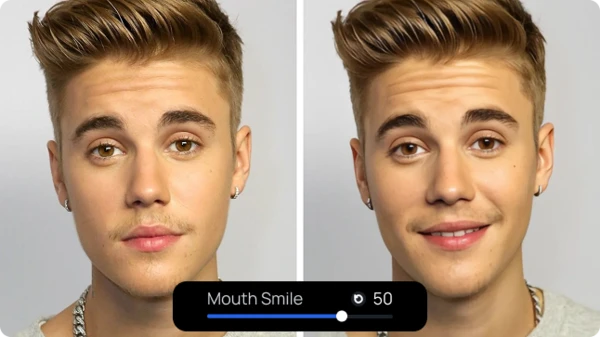
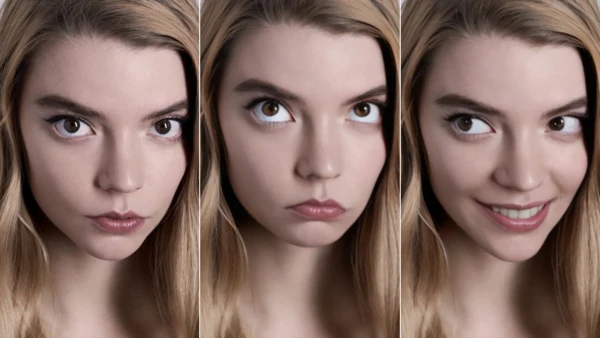
Upload any face photo and adjust its expression in seconds. With sliders for eyes, mouth, and head position, you can create anything from a subtle smirk to a full-on laugh - no Photoshop or editing experience required.
Total Control Over Emotion and Mood
Go beyond filters - manipulate micro-expressions with precision. Whether you want to shift a neutral face into surprise, anger, or joy, the editor gives you real-time feedback and fine-grained control over facial features.
Bring Static Images To Life
Turn still portraits into dynamic shots with a few simple adjustments. Whether you’re enhancing avatars, building characters, or just playing around, the AI-powered face editor breathes new life into your images by letting you reshape emotion with ease.

For Developers
AI Face Editor API
Edit facial expressions and features with AI.
From $0.001 / image
50M+ API calls99.9% uptimeFirst API call in ~5 min
from magic_hour import Client
from os import getenv

client = Client(token=getenv("MAGIC_HOUR_API_KEY"))
res = client.v1.ai_face_editor.generate(
    assets={"image_file_path": "/path/to/1234.png"},
    style={
        "enhance_face": False,
        "eye_gaze_horizontal": 0.0,
        "eye_gaze_vertical": 0.0,
        "eye_open_ratio": 0.0,
        "eyebrow_direction": 0.0,
        "head_pitch": 0.0,
        "head_roll": 0.0,
        "head_yaw": 0.0,
        "lip_open_ratio": 0.0,
        "mouth_grim": 0.0,
        "mouth_position_horizontal": 0.0,
        "mouth_position_vertical": 0.0,
        "mouth_pout": 0.0,
        "mouth_purse": 0.0,
        "mouth_smile": 0.0,
    },
    name="Face Editor image",
    wait_for_completion=True,
    download_outputs=True,
    download_directory="."
)200 OKExample responseFrom 1 credits / image
AI Face Editor FAQ
Yes, AI face editor is free with no sign up required. You get 20 free edits per day — no account needed. Sign up for free to unlock account-specific credits and rewards, saved projects, and access to more tools. Upgrade for higher resolution and priority processing.
No. AI face editor works in your browser with no account, no sign up, and nothing to install. Sign up for free to unlock account-specific credits, rewards, and saved projects.
No watermark on AI face editor photos for all users, including free users with no sign up.
Magic Hour does not use your prompts, uploads, or generated outputs to train AI models. Automated systems and contracted service providers process content only to provide, secure, and support the service. Magic Hour may use aggregated or de-identified usage data that excludes your prompts, uploads, and outputs to debug and improve the product. Magic Hour personnel do not routinely review customer content; authorized access is limited to support, security, legal, or policy needs. Retention varies by workflow, and you can delete saved assets from your account.
An AI face expression changer lets you alter the expression in a face photo using AI. Ours is a facial expression editor with sliders for eyes, mouth, eyebrows, and head position so you can change face expression online without Photoshop. You get precise control instead of fixed filters.
The AI Face Editor is a free online face expression editor and expression changer. Upload a face photo and fine-tune its expression using detailed sliders. Adjust facial parameters like gaze, mouth shape, and head tilt to get the exact look or emotion you want. No design or Photoshop skills needed.
When you upload a face image, the AI detects key landmarks and gives you sliders to adjust each part of the face - like eyebrow tilt, eye openness, lip shape, and head position. You can combine these to simulate expressions such as smiling, frowning, or surprise. All edits are non-destructive and update in real time.
While it doesn’t animate images frame-by-frame, the tool lets you make static portraits feel more dynamic by adjusting expressions and posture. However, you can use our image-to-video or talking photo products to turn your portrait into a video, ideal for avatars, storytelling, and personal messages.
The editor works best with clear, front-facing photos of a single person. It supports a variety of faces, but results are more accurate when facial features are unobstructed and well-lit. Stylized or artistic images may work, but with reduced precision.
No. The tool doesn't apply emotions like “happy” or “sad” directly. Instead, it gives you precise control over facial components so you can build expressions yourself. This allows for more creative freedom and subtlety compared to automatic filters or presets.
No. The interface is simple and slider-based, so anyone can explore and edit expressions with no learning curve. You'll see instant visual feedback, making it easy to understand how each parameter affects the face.
Upload your photo to our AI face editor. Use the sliders to adjust eye gaze, eyebrow direction, mouth smile or pout, and head pose. You can change face expression online in seconds - from neutral to smile, surprise, or any look you want. Download when done. Works in your browser, no app needed.
You can control over a dozen parameters, including eyebrow direction, eye gaze, lip openness, mouth curvature, and head tilt. These allow you to subtly or dramatically alter a face's expression or pose. Whether you're aiming for a slight smirk or an exaggerated reaction, the editor gives you full flexibility.
Unlike apps that use prebuilt filters or templates, this editor gives you granular, real-time control over how each facial feature behaves. That means you're not limited to one-click effects - you can experiment, combine, and refine facial changes exactly how you want, just like a video game character builder screen. It's built for precision and creativity.
We Value Your Privacy & Data Security, Always
Commercial use, training, deletion, retention (1 day), and security. Retention:1 day
Commercial use
Subscriptions and credit packs permit commercial use of outputs. Users without either purchase are limited to personal, non-commercial use.
No training
We do not use your uploads or outputs to train our models.
Delete anytime
You can delete your content or account at any time. Deletion removes content from active storage immediately.
Security
Encrypted in transit and at rest. Access is restricted for operations and support.


