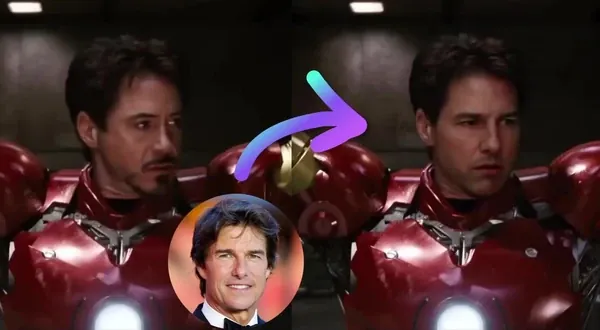
Free Head Swap AI
Swap heads in any photo with AI. Free, no sign up, no watermark.
Trusted by teams at
How Head Swap AI Works
Create a head swap photo in three easy steps
- 1

Upload Original Photo
Upload the photo with the head you want to replace (original photo). - 2
Upload Head
Upload the head you want to use, or choose one from presets. - 3
Swap Heads
Click "Swap Heads" to start. Once it's ready, download your high-quality photo.


More face swap modes
Pick your swap
From a single portrait to a full group shot, every mode runs on the same engine. Jump between formats without losing your spot.
Single face swap
Replace one face in a portrait, clip, or reaction GIF — a quick single faceswap.
Multiple face swap
Swap every face in a group shot or cast scene at once.
Head swap
Replace the whole head, keep the body and pose.
- Open Body swap
Body swap
Put a new person in the scene—body, outfit, framing.
Head Swap Tutorial
Watch our Head Swap tutorial:
Head Swap AI Use Cases
Use head swap AI to swap heads in different scenarios - content remixes, group photos, or put a head on another body.

Use head swap to remix existing content without re-shooting. Swap your head into dance poses or lifestyle photos while keeping the original body posture, framing, lighting, and visual composition intact. For face-only swaps in stills, try our AI face swap.
Create playful head swaps with friends, partners, and family by swapping full heads in group photos, travel shots, and portraits. Make the perfect birthday edits, inside jokes, holiday cards, and shareable collages in private chats or social posts. When each person needs a different face in a group photo, use multiple face swap.
Blend your head into red-carpet photos or editorial-style portraits while keeping hair, head tilt, and lighting consistent. For face-only swaps in videos, try our face swap tool. Results polished enough for profile photos, fan edits, or parody content.
Use head swap to place yourself into iconic scenes while preserving the actor's body language, blocking, and cinematography. Want motion from a still? Animate your head-swapped photo with our image to video tool.
Swap your head onto athletes in highlights while maintaining the original body motion and camera dynamics.
Replace a poorly angled head, closed eyes, or outdated hairstyle in otherwise great photos. For AI-generated headshots, try our AI headshot generator. Useful for LinkedIn headshots, team pages, speaker profiles, or portfolio images without reshooting.
Head swap is ideal for body-led content like tutorials or POV shots. Creators can reuse high-quality body footage and swap in updated heads to test variations or maintain brand consistency.
Why Creators Love Head Swap AI
Free head swap photos with no watermark — no sign up needed. Upload your images and get clean, realistic results for memes, content, and client work.
No watermark on head swaps
Download clean head swap photos — no watermark, no sign up. Ready to use anywhere.
No advanced editing required
Skip Photoshop. Upload, swap, download — in seconds.
Automatic alignment
AI matches angle, position, and lighting to avoid unnatural edges and mismatched blending.
Revisions without reshoots
Swap in a new head to update concepts, iterate on ideas, or handle last-minute changes.
Scale variants fast
Generate multiple versions quickly for A/B tests, thumbnails, and posting schedules.
Testimonials
Hear what our users have to say
"Magic Hour is the fastest way I've found to go from an idea to a polished image or video. It's simple, the results are consistent, and it's easy to iterate. It feels like a real creator tool."

Vishal Sankhat
Instagram Creator (534K followers)
"Magic Hour is a powerful AI tool for creating video, photo, and even voice content all in one place. Being able to generate videos up to 60 seconds from a single prompt is something most similar platforms still don't offer."

Daniel Davidson
YouTube Creator (194k subscribers)
"Magic Hour is one of the few AI tools I genuinely trust. Most tools are hit or miss, but Magic Hour feels reliable. I know what I'm going to get, which makes it easy to use regularly for social content."

Nasion Patriotik
Social Media Creator (1.8M followers)
"Most AI tools look impressive at first, but they're hard to rely on once you use them regularly. Magic Hour has been different for me. It's easy to use, the results are consistent, and I can get something polished without spending time fixing or redoing things. It fits naturally into how I create, which is why I keep coming back to it."

Lisa Li
Multimedia Designer at Rakuten Viki
Head Swap AI Features
Swap heads in photos — free, no sign up, no watermark

Smart Edits in Seconds
Upload two photos and get a clean result fast.

Pro Results, Less Cleanup
Automatic masking and blending keeps edges natural and reduces artifacts.

Sized for Every Platform
Export 1:1, 9:16, 16:9, and more - ready for social, ads, or web.

Endless Variations
Generate multiple looks and versions quickly until it's exactly right.
For Developers
Head Swap API
Swap heads in any photo with realistic results.
From $0.009 / image
50M+ API calls99.9% uptimeFirst API call in ~5 min
from magic_hour import Client
from os import getenv

client = Client(token=getenv("MAGIC_HOUR_API_KEY"))
res = client.v1.head_swap.generate(
    assets={
        "body_file_path": "/path/to/body.png",
        "head_file_path": "/path/to/head.png",
    },
    max_resolution=1024,
    name="My Head Swap image",
    wait_for_completion=True,
    download_outputs=True,
    download_directory=".",
)200 OKExample responseFrom 10 credits / image
Head Swap AI FAQ
Yes, head swap is free with no sign up required. You get 3 free head swaps per day — no account needed, no watermark. Sign up for free to unlock account-specific credits and rewards, saved projects, and access to more tools. Upgrade for more credits, priority processing, and advanced features.
No. Head swap works in your browser with no account, no sign up, and nothing to install. Sign up for free to unlock account-specific credits, rewards, and saved projects.
No watermark on head swap photos for all users, including free users with no sign up.
Magic Hour does not use your prompts, uploads, or generated outputs to train AI models. Automated systems and contracted service providers process content only to provide, secure, and support the service. Magic Hour may use aggregated or de-identified usage data that excludes your prompts, uploads, and outputs to debug and improve the product. Magic Hour personnel do not routinely review customer content; authorized access is limited to support, security, legal, or policy needs. Retention varies by workflow, and you can delete saved assets from your account.
1. Upload the base photo. 2. Upload the head photo or choose a preset. 3. Click Swap Heads. 4. Download your result.
Use high-resolution images with clear, unobstructed faces and similar angles. Matching lighting, camera distance, and head orientation between the two photos typically produces the most natural result.
Head swap replaces the entire head region (not just facial features), which is useful for changing identity, angle, or hairstyle while keeping the original body and scene. Face swap focuses more tightly on the face area.
Yes. Paid subscribers and credit-pack customers can use outputs for commercial purposes. Always make sure you have the rights to use the original photos and any likenesses included in your projects.
Yes. Upload any two photos — one for the body/scene and one for the head. Most common image formats (PNG, JPG, JPEG, WebP) are supported. No editing skills required.
Yes. Use head swap as a photo editor to place one person's head onto another body — no Photoshop or manual editing needed. Upload the body photo and the head photo, click render, and download the result in seconds. For broader edits — retouching, backgrounds, and object removal — open your result in our AI photo editor.
This usually happens when angles, lighting, or resolution don't match. Try a source head photo with similar pose and lighting, use higher-resolution inputs, and avoid heavy filters or compression on either image.
We Value Your Privacy & Data Security, Always
Commercial use, training, deletion, retention (1 day), and security. Retention:1 day
Commercial use
Subscriptions and credit packs permit commercial use of outputs. Users without either purchase are limited to personal, non-commercial use.
No training
We do not use your uploads or outputs to train our models.
Delete anytime
You can delete your content or account at any time. Deletion removes content from active storage immediately.
Security
Encrypted in transit and at rest. Access is restricted for operations and support.