Grocery Shops Through Time
ai-image-editor
Any aspect ratio
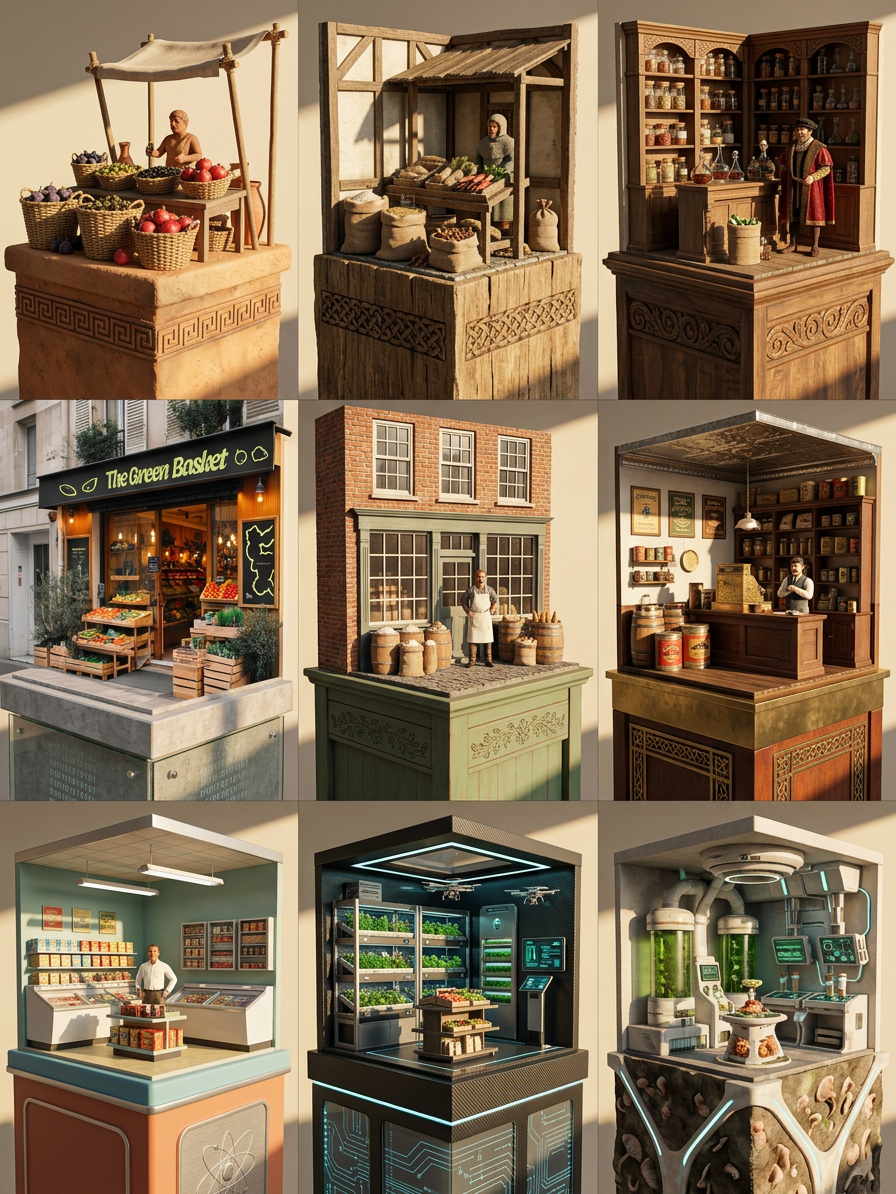
Subject transforms into a 3x3 grid of ultra-detailed 3D miniature dioramas (1:12 scale), each panel depicting a grocery shop from a different era—300 BC, 1000 AD, 1500 AD, 1700 AD, 1900 AD, 1950 AD, 2000 AD, 2100 AD, and 2500 AD. Each scene sits on a refined pedestal with AI-inferred materials and engraved motifs matching its time period. Environments evolve from ancient market stalls to medieval shops, early modern stores, industrial-age grocers, mid-century markets, modern supermarkets, near-future automated stores, and far-future speculative food systems. Warm afternoon sunlight enters from the right, casting sharp, intimate shadows across all panels, unifying the composition. Ultra-detailed textures, cinematic lighting, 12K quality, cohesive historical progression with a refined miniature aesthetic.
AI Image Editor Template: Instantly Transform and Remix Any Image
Use this template to quickly edit, enhance, and reimagine images with the AI Image Editor. It’s built for creators, marketers, and founders who need production-quality visuals fast—without manual Photoshop work or complex prompts.
What This Template Is For
This template is ideal if you want to:
- Clean up or fix photos (remove objects, people, text, or backgrounds)
- Change style, lighting, or mood (e.g., brand style, cinematic, “product shoot”)
- Replace or redesign elements in an image (clothes, backgrounds, faces, props)
- Turn a rough idea into polished creative assets for campaigns, decks, or products
- Rapidly A/B test variations of the same visual concept
Under the hood, it uses diffusion-based image editing (a technique now common in tools like Stable Diffusion and DALL·E) to preserve structure but change content and style. That means you can keep composition while radically transforming what’s in the frame.
How to Use and Remix This Template in Magic Hour
You can create your own version of this template in a few minutes. Here’s the high-level workflow you’d typically follow in Magic Hour:
Start from this template
- Open the template in Magic Hour.
- Click to duplicate / remix it into your own project so you can adapt it for your brand or workflow.
Upload or select your base image
- Use a product photo, portrait, illustration, or any reference image you want to transform.
- For best results, start with a reasonably clear, well-lit image. If needed, you can first enhance it with the AI Image Upscaler or Unblur Image.
Define what you want to change vs. keep
- Use this template to edit only specific regions (e.g., background, clothing, props) while preserving faces, pose, and layout.
- Think in terms of:
- “Keep the subject, change the environment”
- “Keep the composition, change the style”
- “Keep the layout, clean up distractions”
Describe your desired result in natural language
- Instead of manual masking and layering, you guide the editor with text:
- “Replace the background with a minimalist studio backdrop.”
- “Turn this outfit into a modern streetwear look.”
- “Remove the extra person on the left and fill in the background.”
- For more complex changes (e.g., outfit changes, headshots), you can combine this with other tools like the AI Clothes Changer or AI Face Editor.
- Instead of manual masking and layering, you guide the editor with text:
Iterate quickly
- Generate multiple options and keep the ones you like.
- Use the kept result as a new input image and rerun the template again to refine style, correct small issues, or produce additional variants for testing.
Export and reuse
- Download the final image for campaigns, ads, thumbnails, product pages, or decks.
- Reuse your remixed template as a repeatable workflow for future images.
Practical Use Cases for Creators and Teams
This template is designed for real production needs, not just experiments. Common workflows include:
1. Marketing and Growth Teams
- Ad creatives: Instantly generate multiple versions of a hero image with different backgrounds, color palettes, or creative angles for A/B testing.
- Landing pages & LP testing: Keep the same product composition while iterating on visual style to match different audiences or segments.
- Social content: Turn one photoshoot into dozens of unique assets by changing settings, props, and vibes.
You can pair this with:
- Thumbnail Maker for YouTube or course thumbnails
- AI Meme Generator for on-brand, fast meme content
- AI Logo Generator and Album Cover Generator for campaign-specific visual identity tests
2. Product & Startup Teams
- Pitch and investor decks: Create polished visuals, mockups, and conceptual imagery quickly—even without a design team.
- Feature previews: Overlay UI, simulate product environments, or mock “future features” with realistic visuals.
- Founders and team branding: Use the AI Headshot Generator alongside this template to standardize portraits across your team, then refine them with the AI Image Editor.
Related tools worth exploring:
- AI Photo Generator for custom photographic assets
- AI Illustration Generator or AI Art Generator for stylized visuals
3. Creators and Designers
- Content packs: Build full sets of images (characters, scenes, environments) that share consistent style.
- Concept art: Start from sketches or rough renders, then refine with this template for cleaner, high-fidelity outputs.
- Visual IP development: Combine with specialized tools like the AI Character Generator, Animated Characters Generator, or AI Anime Generator, then use the AI Image Editor to polish or unify style.
Combining This Template With Other Magic Hour Tools
To build more advanced workflows, this template plays well with other Magic Hour products:
From static images to motion
- Use Image to Video or Text to Video to animate images after editing.
- If you want animation templates, check out:
- Video to Video for stylized transformations of existing video
- Animation for motion-first workflows
- Lip Sync or Face Swap Video for dynamic talking content.
Face and identity workflows
- Face Swap and Face Swap GIF for meme content, campaigns, or personalization.
- AI Selfie Generator and AI Face Generator for synthetic personas to protect privacy in marketing creative.
Editing and cleanup
- Image Background Remover and Remove Object From Photo to isolate subjects before re-styling them with this template.
- AI Remover and Watermark Remover for distraction-free assets.
- Old Photo Restoration and Photo Colorizer to restore legacy images, then modernize them with the AI Image Editor template.
Advanced Ideas and Patterns
For more technical users and teams, here are patterns this template supports well:
Consistent brand systems
- Define a “brand look” (lighting, color, framing), then repeatedly apply similar editing instructions to different raw inputs.
- Combine with AI Background Generator or AI Fashion Generator to keep brand-consistent atmospheres and outfits.
Persona and character pipelines
- Generate characters with the AI Character Generator or Full Body Generator, then use this template to refine poses, outfits, or scenes for storyboards, comics, or games.
- Extend to creative universes with tools like Comic Book Generator, Fantasy Map Generator, and Dark Fantasy AI.
Niche creative formats
- Design covers with the Book Cover Generator or Album Cover Generator, then refine details via this template.
- Build playful experiences using Pokemon Generator, Disney AI Generator, Optical Illusion Generator, or AI Tattoo Generator, then clean up or adapt them with the AI Image Editor.
Tips for Better Results
Be explicit in your instructions
- Describe the intent (“professional LinkedIn-style headshot”, “high-contrast ecommerce product photo”, “comic-book panel with bold inking”).
- Mention mood, setting, and style: “indoors / outdoors”, “day / night”, “minimalist / busy”, “realistic / illustrated”.
Iterate, don’t chase perfection in one pass
- Use a loop: generate → keep 1–2 → lightly adjust → re-run.
- Treat it like you would a design iteration process: each generation is a draft.
Know when to combine tools
- For heavy background changes, it can help to first strip or replace the background with Image Background Remover.
- For small cleanup (logos, people in the background, items on tables), AI Remover or Remove Object From Photo can simplify the base image before more complex stylization.
Why Use an AI Image Editor Template Instead of Starting From Scratch?
- Speed and repeatability: Once you’ve remixed this template for your workflow, it becomes a reusable system for content production, not a one-off experiment.
- Lower cognitive load: You don’t need to remember complex prompt “recipes” each time—your template encodes them.
- Team collaboration: Non-technical teammates can use your remixed template as a simple, guided tool to produce on-brand images without design bottlenecks.
- Better consistency: Marketing, product, and content teams can stay visually aligned across campaigns and channels.
Remix this AI Image Editor template, adjust it to your brand and workflows, and you’ll have a repeatable, scalable way to go from “rough idea” to polished image assets in minutes.