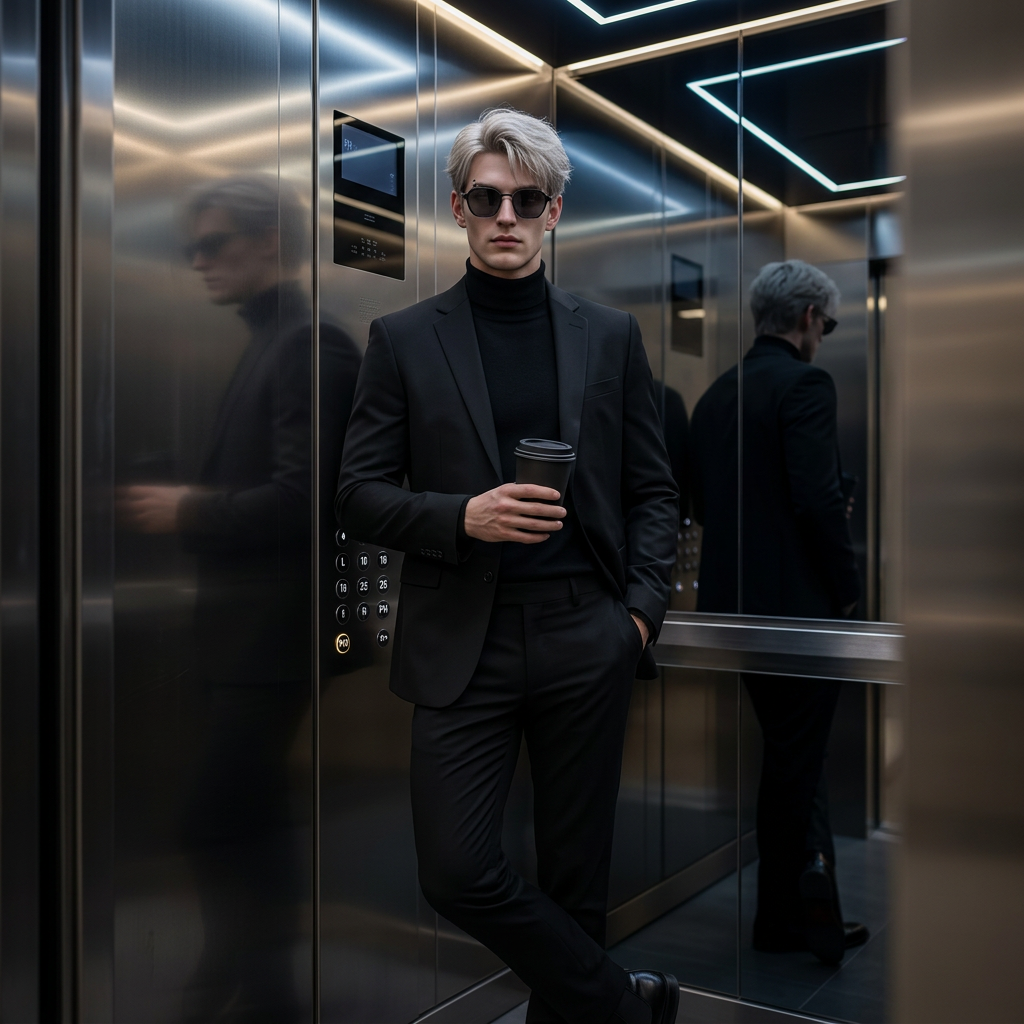
Elevator Noir Portrait

Elevator Noir Portrait

ai-image-editor

1 clip
16 uses

Any aspect ratio

Prompt

Edit the photo: subject standing casually inside a modern elevator with reflective metal walls; elegant, edgy style with a mysterious vibe; wearing an all-black outfit (black suit and trousers), sunglasses, holding a takeaway coffee; dim neon ceiling lights casting soft, subtle shadows; cinematic, photorealistic, high detail.

Tags

popular

AI Image Editor Template: Clean Product Photo Upgrade

Turn an ordinary product shot into a polished, high-converting ecommerce image in seconds with this AI Image Editor–powered template. Perfect for founders, marketers, store owners, and designers who need clean, consistent visuals without a full studio setup.


What this template does

This template uses the AI Image Editor to:

  • Remove cluttered or distracting backgrounds
  • Replace them with clean, on-brand backdrops
  • Refine lighting and contrast for a studio-like look
  • Sharpen details so products stand out in feeds, ads, and storefronts

It’s ideal for:

  • Shopify, Amazon, Etsy, and marketplace product photos
  • Paid ads and social creatives (Meta, TikTok, Google Shopping)
  • Landing pages and pitch decks
  • Quick A/B testing of visual concepts

You can remix this template in Magic Hour to adapt it to your brand colors, style, and channel (web, ads, thumbnails, etc.).


How to use or remix this template in Magic Hour

You can either start from this template or recreate your own version by following a simple workflow inside Magic Hour:

  1. Upload your base product image

    • Use a clear photo of your product (phone snapshot is fine).
    • Avoid heavy shadows or extremely low resolution for best results.
    • If your source is old or blurry, first enhance it with the AI Image Upscaler or Unblur Image.
  2. Open it in the AI Image Editor

    • Go to AI Image Editor.
    • Import your image and start editing directly in the browser.
  3. Clean up the shot (optional but recommended)

  4. Add a clean, branded background

    • Use prompts like:
      • “Minimal white studio background with soft shadows”
      • “Pastel gradient ecommerce background, modern, clean”
      • “Dark matte backdrop with subtle spotlight under the product”
    • Aim for consistency: keep a small set of backgrounds across your catalog so your store looks cohesive.
  5. Refine for ecommerce and marketing use

    • Enhance clarity and contrast using the editor tools.
    • For social or ad creatives, you can layer in extra assets later with:
  6. Export and reuse across channels

    • Download the final image and reuse it across your store, ads, and social content.
    • For video-first channels, you can turn your edited image into motion with:

Once you like the result, save or clone this flow as your “product-photo-cleanup” template inside Magic Hour so your team can repeat it quickly for new SKUs.


Best practices for high-converting product images

Creators and growth teams typically follow a few patterns that you can replicate with this template:

  • Consistency > perfection
    Use the same style of background, framing, and lighting across the catalog. This improves brand recognition and makes category pages feel premium.

  • Design for the thumbnail first
    Most users see your product at small sizes (search results, social feeds). Zoom out and check if your product is recognizable when tiny. If not, increase contrast, simplify the background, or adjust composition.

  • Leave space for copy and overlays
    If you plan to add price, discount labels, or taglines later, keep some clean negative space in the frame. You can generate extra variations with AI Background Generator that reserve one side of the image for text.

  • Optimize for platform rules
    Marketplaces like Amazon and Google Shopping encourage clear product-only images on a white or light background. Use a “plain white studio background” variation for these, and more stylized backgrounds for social ads.

  • Test multiple concepts quickly
    Generate several versions (different colors, minimal vs. lifestyle backdrops) and test them in ads or email. This is where AI shines: low-cost experimentation before committing to large campaigns.


Advanced ways to extend this template

Once you’ve cleaned and enhanced your product image with AI Image Editor, you can layer on additional Magic Hour tools for more complex use cases.

1. Turn static product shots into short videos

  • Use Image to Video to add subtle camera movements (pan, zoom, rotation) or environmental motion around the product.
  • For ad creatives or landing pages, pair this with Auto Subtitle Generator if you’re combining visuals with a voiceover or testimonial.

2. Create spokespeople, explainers, or “founder videos” around the product

3. Generate on-brand variants for different audiences

4. Create supporting brand assets around the same product

From the same base product image, you can generate:


Who this template is for

This AI Image Editor template is especially useful if you are:

  • A founder or solo operator who needs pro-quality visuals without a studio or agency
  • A growth marketer running constant creative experiments across paid and organic channels
  • A designer or creative lead looking to scale visual production while maintaining brand consistency
  • A developer or product manager building internal tools or workflows around automated asset generation

Because everything runs in the browser, it also fits neatly into CI-like creative workflows: programmatically generate product images with AI Photo Generator, refine them with AI Image Editor, and push them into your CMS, ad platform, or app.


Related Magic Hour tools and templates to explore

If you find yourself using this template frequently, these are natural extensions:

  • For more dynamic product visuals

    • Video to Video – restyle existing product videos to different visual languages.
    • Animation – build animated sequences or characters around your product.
  • For people-centric product imagery

  • For restoration and enhancement


How to remix this template for your own brand

When cloning or building your own version of this template in Magic Hour, keep these levers in mind:

  • Input type: product-only images vs. lifestyle shots with models or context.
  • Background style: purely functional (white, light gray) vs. on-brand (gradients, textures, patterns).
  • Output use case: marketplace listing, performance ad, hero banner, or social carousel.
  • Follow-up tools: which downstream tools you’ll consistently pair with it (e.g., Image to Video + Auto Subtitles for ad creatives).

You can save multiple template variants—e.g., “Marketplace White Background”, “Lifestyle Instagram Creative”, “Landing Page Hero”—and reuse them as standard building blocks of your content pipeline.


Use this AI Image Editor template as your foundation, then remix it to match your stack, brand, and funnel. The more you standardize your template flows inside Magic Hour, the faster you can ship high-quality, on-brand visuals at scale.

More Like This

Insufficient credits