Cinematic Graphic Portrait

Cinematic Graphic Portrait

ai-image-editor

1 clip
11 uses

Any aspect ratio

Prompt

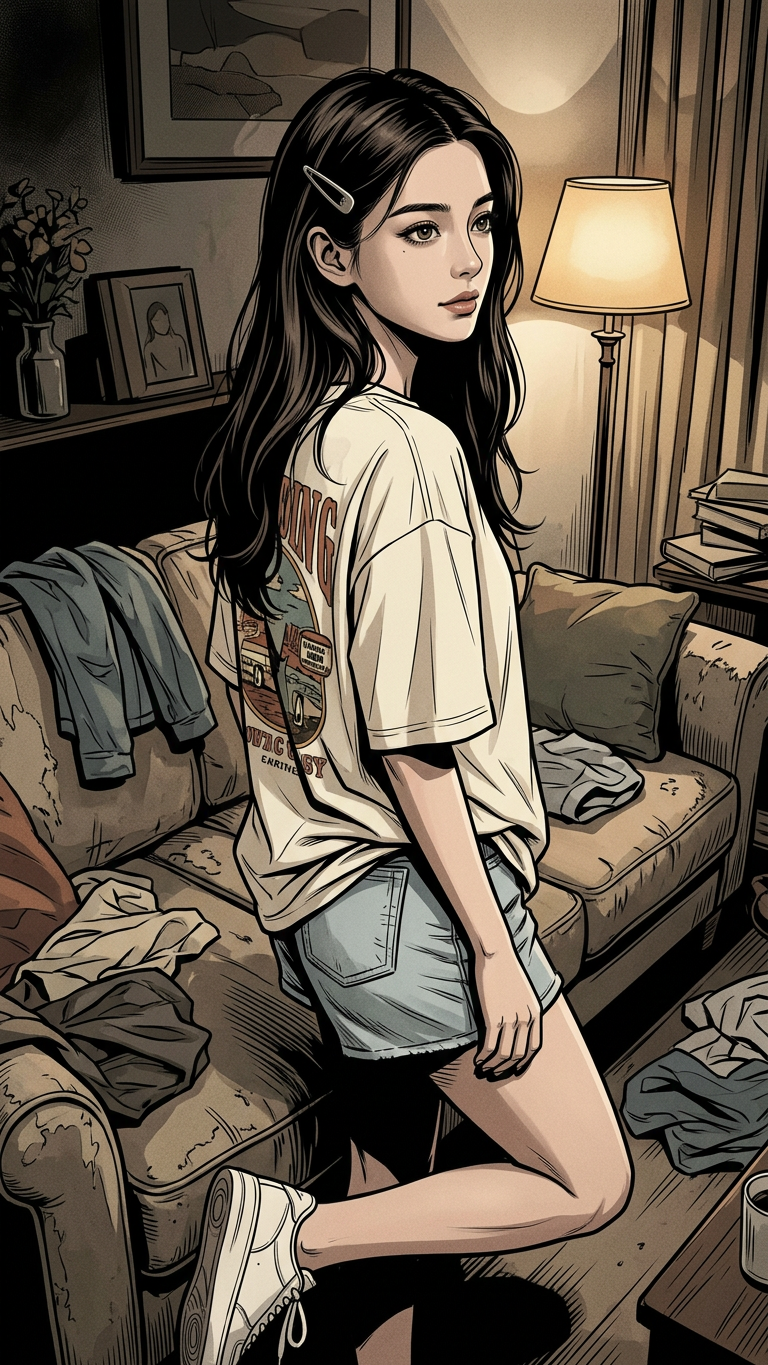
A subject with a simple clip on one side, wearing an oversized cream/off-white t-shirt with a partially visible graphic design on the back and light wash denim shorts with white sneakers. The subject is in a cozy indoor setting with clothes casually scattered around a sofa, creating a relaxed, lived-in atmosphere. Candid, documentary-style portrait with natural behavior and authentic mood. Graphic novel style with a darker, cinematic tone, strong contrast, moody shadows, detailed linework, and a slightly desaturated color palette for a dramatic, storytelling feel.

Tags

styles

AI Image Editor Template: Advanced Photo Editing with Magic Hour

Turn any image into production‑ready creative in minutes. This template showcases what’s possible with the AI Image Editor, and is fully remixable—so you can adapt it for your own brand, campaign, or product.


What this template does

This template is designed as a repeatable workflow for:

  • Object removal & cleanup – Remove logos, people, text, or distractions using AI inpainting (similar to tools like Photoshop’s Generative Fill and research from Nvidia & Adobe on semantic inpainting).
  • Background replacement – Swap plain or cluttered backgrounds for on‑brand scenes (studio setups, lifestyle scenes, product flats).
  • Face & body retouching – Subtle, realistic enhancements (lighting, skin, details) while keeping identity intact.
  • Brand-ready variants – Generate multiple creative variations for ads, landing pages, socials, or product shots.
  • Image restoration & enhancement – Improve resolution, sharpness, and color for older or low‑quality photos.

Under the hood, this template uses the same type of diffusion-based image editing models described in papers like SDEdit: Guided Image Synthesis and Editing with Stochastic Differential Equations and InstructPix2Pix, adapted into an accessible Magic Hour workflow.


How to remix this template in Magic Hour

You can clone this template’s logic and adapt it to your own use case in a few minutes. Here’s a practical way to do it:

  1. Start from the AI Image Editor

    • Open the AI Image Editor.
    • Upload a reference image you’d like to use as your “base” (product shot, portrait, brand scene, etc.).
  2. Define your edit pattern

    • Decide the repeatable operation you want this template to capture, for example:
      • “Remove distracting background and replace with clean studio gradient.”
      • “Turn casual selfies into professional, studio‑style portraits.”
      • “Transform raw product photos into polished ecommerce images.”
    • Use the editor to run through a full “before → after” example that matches your goal.
  3. Create a reusable workflow

    • Once you’re happy with an edited result, treat that as your “reference outcome.”
    • Document the steps that matter:
      • What you chose to keep vs. remove
      • How you changed the background or scene
      • The visual style you aimed for (minimalist, cinematic, editorial, anime, etc.)

    You can now treat these choices as the blueprint for your template and reuse the same approach on:

    • New photos from the same shoot
    • UGC content
    • Customer photos
    • Stock images you want to bring on‑brand
  4. Apply the same pattern to new images

    • Upload any new image into AI Image Editor.
    • Repeat the same edit pattern:
      • Remove or mask the same kinds of elements
      • Replace with similar backgrounds or environments
      • Aim for similar lighting, color, and detail

    After doing this a few times, you’ll have a consistent, on‑brand visual system that behaves like your own private template.

  5. Chain with other Magic Hour tools (optional) For more advanced workflows, combine this template with:


Example use cases for this template

This template is particularly useful for:

1. Product & ecommerce teams

  • Turn basic product shots into marketplace‑ready visuals.
  • Remove cluttered backgrounds and standardize to your brand style.
  • Generate lifestyle versions of product photos using AI Image Editor plus scenes from AI Background Generator.
  • Upscale final creatives for web and print with AI Image Upscaler.

2. Founders, marketers, and growth teams

  • Produce ad creatives and social assets without a design team.
  • Quickly test multiple visual angles from the same base image:
    • Different backgrounds
    • Different moods (minimal, playful, cinematic)
    • Different crops and aspect ratios
  • Generate variants for landing pages, email headers, or thumbnails; then refine in Thumbnail Maker.

3. Creators and personal brands

4. Designers & developers prototyping fast


Turning images into video and motion

Once you’ve standardized your images with this template, you can turn them into motion assets:

These can be chained after your AI image edits to create consistent, multi‑format campaigns across static and video.


Best practices when remixing this template

Based on common patterns from commercial teams and research on human perception of edited images (e.g., work from MIT and Adobe on realism and detection):

  • Keep edits believable for people photos

    • Maintain identity: if you’re editing faces, pair subtle retouching in AI Image Editor with tools like AI Headshot Generator when you need fully synthetic portraits instead of over‑editing real ones.
    • Avoid extreme changes that break proportions or human anatomy unless you’re intentionally going stylized (anime, comic, fantasy).
  • Define a visual system, not one‑off images

    • Pick 1–2 background styles and reuse them.
    • Limit your palette of lighting and color grades.
    • Use the same pattern of cleanup and enhancements across your content to keep everything cohesive.
  • Work at the highest quality you can

    • Start from the best resolution image available.
    • After editing, run final assets through AI Image Upscaler or Unblur Image before sending to print, paid ads, or large displays.
  • Respect rights and privacy

    • Use images you have rights to.
    • For faces and identity, follow your local regulations and your internal policies, especially in commercial or advertising contexts.

Related Magic Hour tools that pair well with this template

If you want to expand this template into a full visual pipeline, consider:


How to adapt this template for your specific workflow

For fast‑moving teams, a good pattern is:

  1. Ideation

  2. Refinement with this template

    • Import your chosen image into the AI Image Editor.
    • Apply your “template pattern” for cleanup, background, and style.
  3. Packaging

  4. Extension into motion & audio (optional)


Use this template as a starting point, then refine it into your own standardized “house style” for images. With the AI Image Editor and the tools linked across this page, you can build an end‑to‑end, repeatable pipeline that turns raw images into consistent, high‑impact creative at scale.

More Like This

Insufficient credits