Escape Contemplation

Escape Contemplation

ai-image-editor

1 clip
1 uses

Any aspect ratio

Prompt

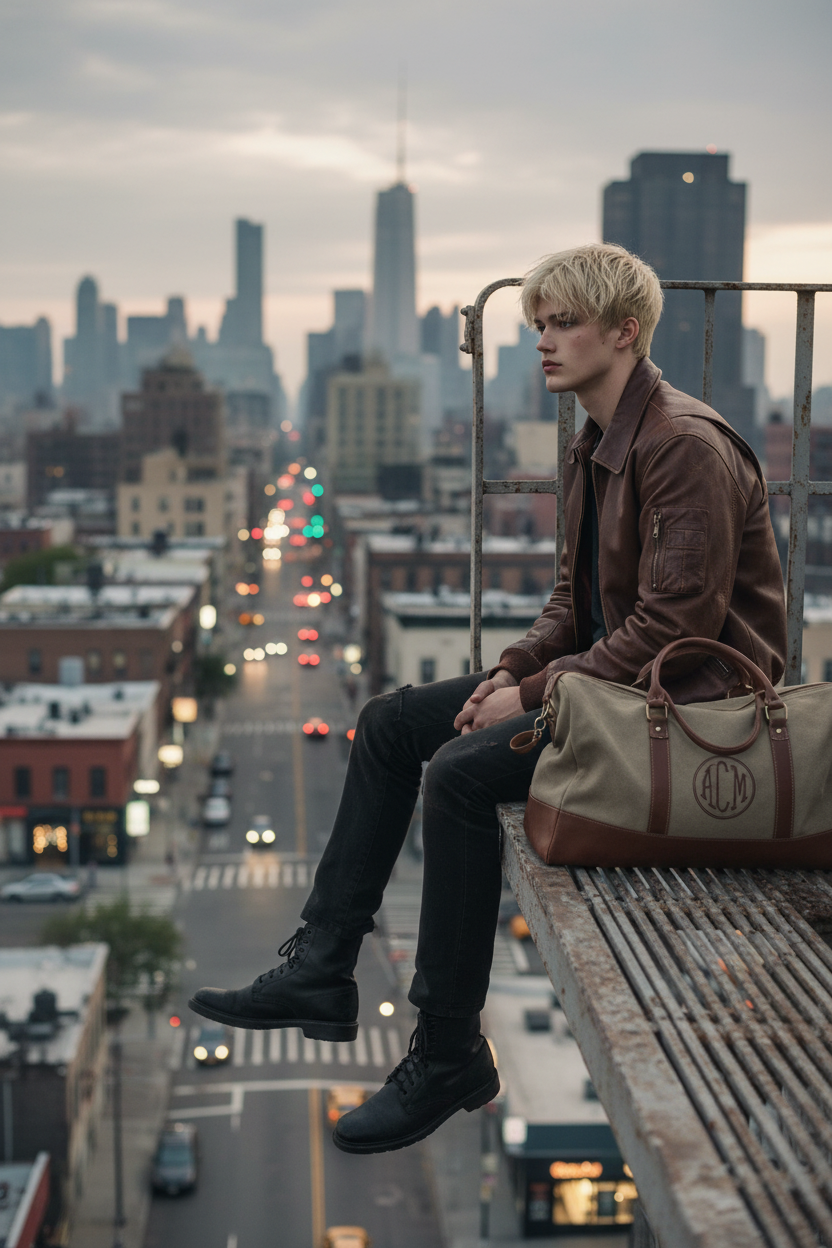
The subject is dressed in a brown bomber jacket and dark trousers, perched on the edge of a fire escape platform. One leg dangles freely while the other is bent. The subject looks contemplatively into the distance. A monogrammed duffel bag rests nearby. The background features an urban street scene with soft ambient lighting, creating a cinematic mood. Keep the subject’s face 100% identical to the uploaded image, with no alteration or blur, ensuring sharp, photorealistic detail.

AI Image Editor Template: Transform Any Image in Minutes

Use this template to instantly remix, enhance, or radically reimagine any image with Magic Hour’s AI Image Editor. It’s designed for creators and teams who need fast, high‑quality visual edits without jumping between multiple tools or learning complex software.


What This Template Is Best For

This AI Image Editor template is ideal if you need to:

  • Clean up and enhance photos

    • Remove objects, distractions, or people from a scene
    • Fix blemishes, wrinkles, or lighting issues
    • Upscale low‑resolution images for social, ads, or print
  • Change or extend what’s in the image

    • Replace backgrounds or environments
    • Add new objects, props, or design elements
    • Extend the canvas (e.g., turn a portrait into a banner or thumbnail)
  • Create on‑brand marketing visuals

    • Quickly generate ad variations or landing page hero images
    • Adapt visuals for different platforms (email, social, paid, product pages)
    • Align style and mood across a campaign
  • Prototype creative concepts

    • Try multiple visual directions from a single photo
    • Test different character styles, outfits, or environments
    • Prepare assets for animation, video, or further AI workflows

How to Remix This Template in Magic Hour

You can treat this template as a starting point and build your own version in a few minutes. A typical remix flow in Magic Hour looks like this:

  1. Open the AI Image Editor
    Go to the AI Image Editor. This template is built on that product, so anything you see here can be reproduced or modified there.

  2. Upload or import your base image
    Use:

    • A product shot (for ecommerce or ads)
    • A portrait or headshot (for profiles or branding)
    • A scene or environment (for design, storytelling, or concept art)
  3. Define what you want to change
    Describe your intent clearly in natural language. Examples:

    • “Remove the person in the background and make the sky more dramatic.”
    • “Turn this photo into a clean studio product shot on a white background.”
    • “Make this portrait look like a cinematic, moody movie still.”
  4. Iterate with targeted edits
    Use the template as a baseline and then:

    • Run multiple variations from the same input
    • Refine prompts to adjust mood, style, or composition
    • Save promising variants and compare side‑by‑side
  5. Export and reuse across Magic Hour tools
    Once you’re happy with the result, you can:


Example Use Cases for Creators and Teams

For marketers and growth teams

  • Generate high‑performing ad creatives from a small set of base photos
  • Localize visuals for different regions (backgrounds, props, color palettes)
  • Build consistent visual systems for newsletters, landing pages, and social posts
  • Prepare ad‑ready assets, then convert them into short clips or GIFs using:

For founders and product teams

  • Create pitch deck illustrations, app mockup backgrounds, or explainer visuals
  • Prototype multiple visual brands from a single product photo
  • Generate professional team headshots with the AI Headshot Generator, then refine them with the AI Image Editor
  • Clean up screenshots and UI previews for your site or launch materials

For designers and visual storytellers


Combining This Template with Other Magic Hour Tools

This AI Image Editor template becomes more powerful when chained with other Magic Hour workflows. Some high‑leverage combinations:


Advanced Ideas for Power Users

If you’re building serious workflows, this template can anchor a full content pipeline:


How to Create Your Own Version of This Template

To build a reusable version of this template for your team:

  1. Decide your primary use case

    • Example: “Clean, consistent product photos for ecommerce”
    • Or: “Stylized, cinematic portraits for personal branding”
  2. Document your preferred patterns

    • The kinds of edits you perform repeatedly
    • The visual style you want (lighting, color, mood, realism vs stylization)
    • Any do’s/don’ts specific to your brand or industry
  3. Use this template as a base and iterate

    • Start in the AI Image Editor
    • Run multiple small experiments on real assets (campaign images, product shots, profile photos)
    • Save the combinations that consistently produce results you like
  4. Integrate with other Magic Hour tools as needed


When This Template Is a Good Fit

Consider starting from this AI Image Editor template if:

  • You want high‑quality edits but don’t want to learn Photoshop or complex tools
  • You frequently repeat similar edits (e.g., product cleanup, background changes, portrait polishing)
  • You’re building a content engine and need reusable, standardized visual workflows
  • You plan to connect images into broader AI pipelines (face swap, lip sync, animation, or video generation)

For many teams, this template becomes the base layer: clean, control, and enhance your images here, then extend them into motion, characters, and campaigns using the rest of the Magic Hour ecosystem.

More Like This