Polaroid Tale
- Model
- Nano Banana 2
- Image
- 1024 × 1040 px
Prompt
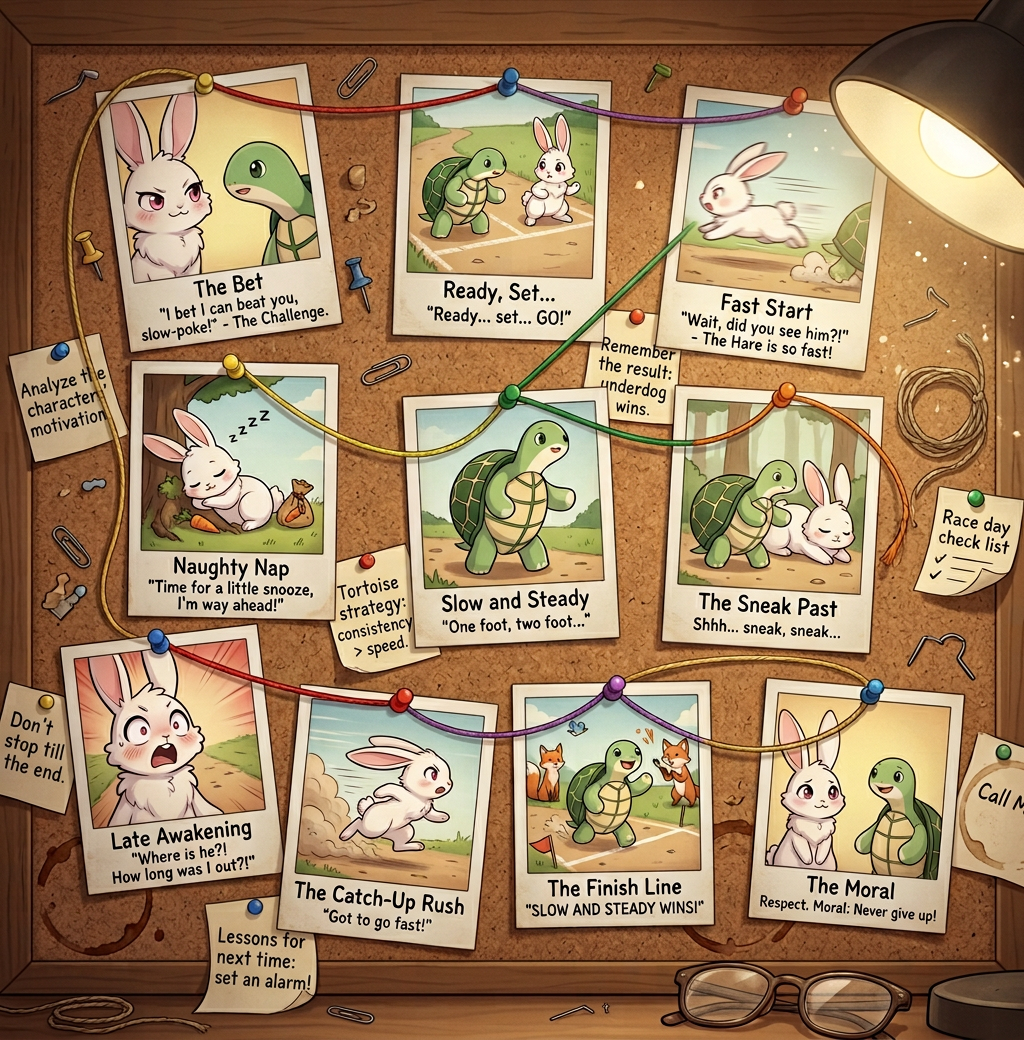
A nostalgic storytelling scene presented as a cork board filled with Polaroid photos retelling “The Tortoise and the Hare.” Each photo captures a key moment in the story with simple handwritten captions beneath. The photos are arranged in a loose chronological path, connected by colored strings to show progression and relationships. Warm, soft lighting creates a cozy, vintage atmosphere. The board includes realistic incidental details such as coffee cup stains, paper clips, pins, and scattered handwritten notes for an authentic, lived-in feel.
Any aspect ratio
Overview
"Polaroid Tale" is an innovative AI Image Editor template designed to bring stories to life. Using the Nano-Banana-2 model, it allows you to craft a nostalgic scene where Polaroid photos, captions, and a vintage atmosphere combine to retell classic tales like "The Tortoise and the Hare." Perfect for storytellers looking to add a visual narrative to their work.
What It Does
This template transforms your text prompts into a visual story displayed as a cork board filled with Polaroid-style images. Each image captures pivotal moments from "The Tortoise and the Hare," arranged chronologically, with handwritten captions and connecting strings for context. The template provides a cozy, vintage look complete with realistic details like coffee stains and paper clips, enhancing the storytelling experience.
Who It's For
"Polaroid Tale" is ideal for educators, storytellers, and marketers who want to create engaging visual stories. It's perfect for anyone needing to illustrate narratives in a compelling, vintage style. Whether you're crafting educational materials or creating content for social media, this template can deliver aesthetically pleasing and meaningful visual stories.
Summary
Utilize "Polaroid Tale" to convert storytelling into an immersive visual experience. With its unique ability to display stories through Polaroid photos and captions, this template is a powerful tool for anyone aiming to blend narrative and visuals seamlessly. Learn more about similar capabilities offered by our AI Video Extender and Character Replace tools.
How-To
Choose Your Template

Customize Your Story

Generate Your Polaroid Board

Use Cases
Educational Storyboarding
- Engage students with visual aids
- Simplify complex narratives
Content Creation for Social Media
- Customize captions and visuals
- Boost engagement with unique storytelling
Creative Marketing Campaigns
- Enhance brand storytelling
- Create a thematic journey through images
Best Practices
Clarify Your Key Moments
Identify and emphasize the most crucial parts of your narrative to maintain the audience's focus.Use Authentic Details
Incorporate personal or brand-related details to make the story more relatable and authentic.Maintain Narrative Flow
Ensure the chronological order and relational strings are clear for easy viewer comprehension.