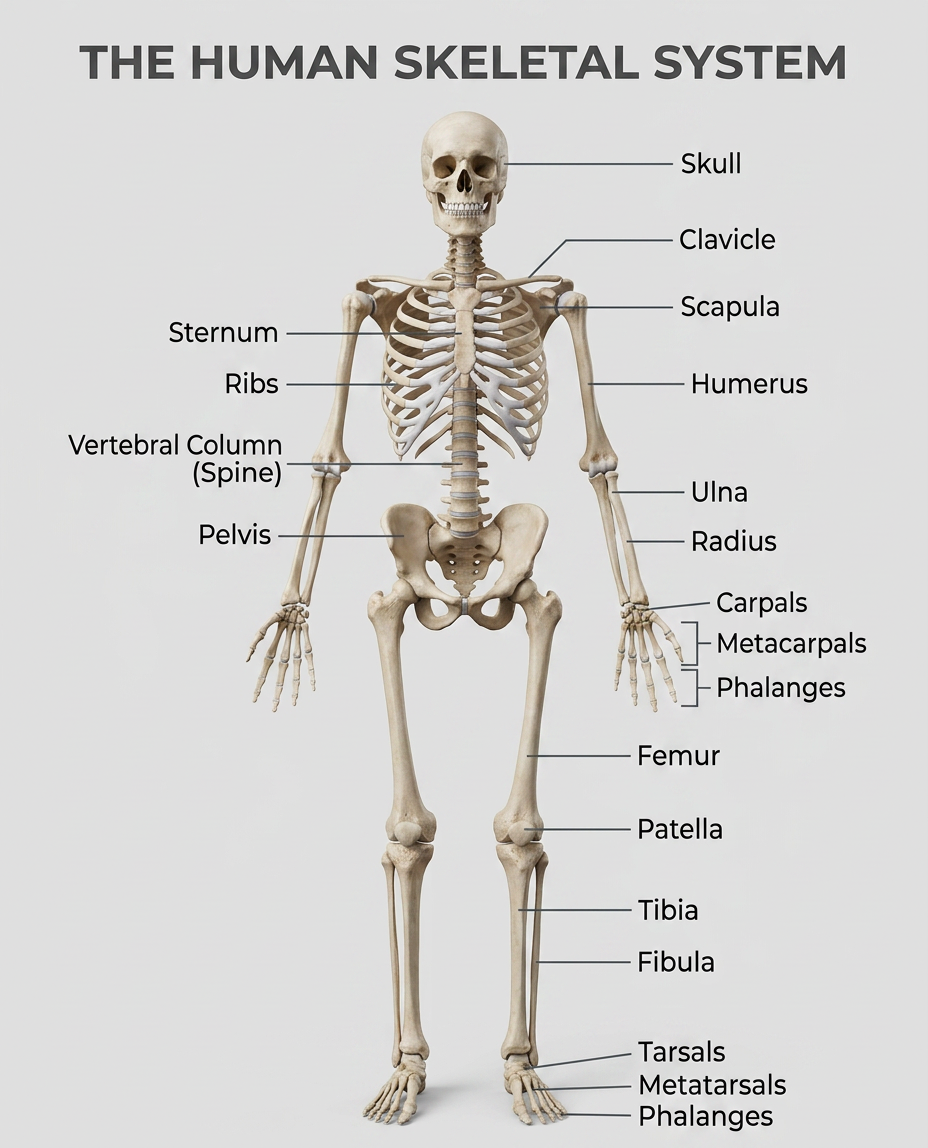
Human Skeletal System Infographic
- Model
- Nano Banana 2
- Image
- 928 × 1148 px
Prompt
A realistic, highly detailed infographic of the human skeletal system. The subject is a full-body human skeleton shown in anatomical position, with clearly labeled major bones such as the skull, clavicle, scapula, ribs, spine, pelvis, humerus, radius, ulna, femur, tibia, and fibula. Clean annotation lines and minimal text labels are used for clarity. Photorealistic rendering with high detail, natural lighting, soft shadows, and a clean, neutral background. Educational, well-organized layout, modern medical infographic style, easy to read and visually clear.
Any aspect ratio
Overview
The Human Skeletal System Infographic template offers an efficient way to create detailed, educational infographics about the human skeleton using our AI Image Editor. This template is designed to provide a photorealistic rendering of the human skeletal system, showcasing major bones with clarity and precision.
What It Does
This template facilitates the creation of a high-quality, well-organized infographic illustrating the human skeletal system. With a focus on anatomical accuracy and modern design aesthetics, the template uses the nano-banana-2 model to deliver clear, educational visual content. The minimal text and clean annotation lines ensure the graphic remains easy to interpret.
Who It's For
This tool is ideal for educators, medical students, and healthcare professionals looking to create engaging educational materials. Its design is perfect for anyone needing to present complex anatomical information in a clear and visually appealing manner, such as in academic presentations or healthcare training sessions.
Summary
Our AI Image Editor template is designed to deliver a detailed and accurate representation of the human skeleton. With precise labeling and a photorealistic finish, it supports users in producing educational content that is both informative and visually striking. This makes it an indispensable tool for anyone involved in the medical or educational fields.
How-To
Choose Template

Customize Inputs

Generate Infographic

Use Cases
Medical Education
- Anatomy classes
- Medical presentations
- Student projects
Healthcare Training
- Training manuals
- Online courses
- Professional seminars
Academic Research
- Research journals
- Conference posters
- Scientific presentations
Best Practices
Focus on Clarity
Ensure labels and annotation lines are clear by using the appropriate font size and color contrast.Use High-Resolution Formats
Generate and download images in high-resolution formats to maintain clarity when printed or displayed on large screens.Consider Your Audience
Tailor the level of detail to match the knowledge base of your audience, whether beginners or experts.