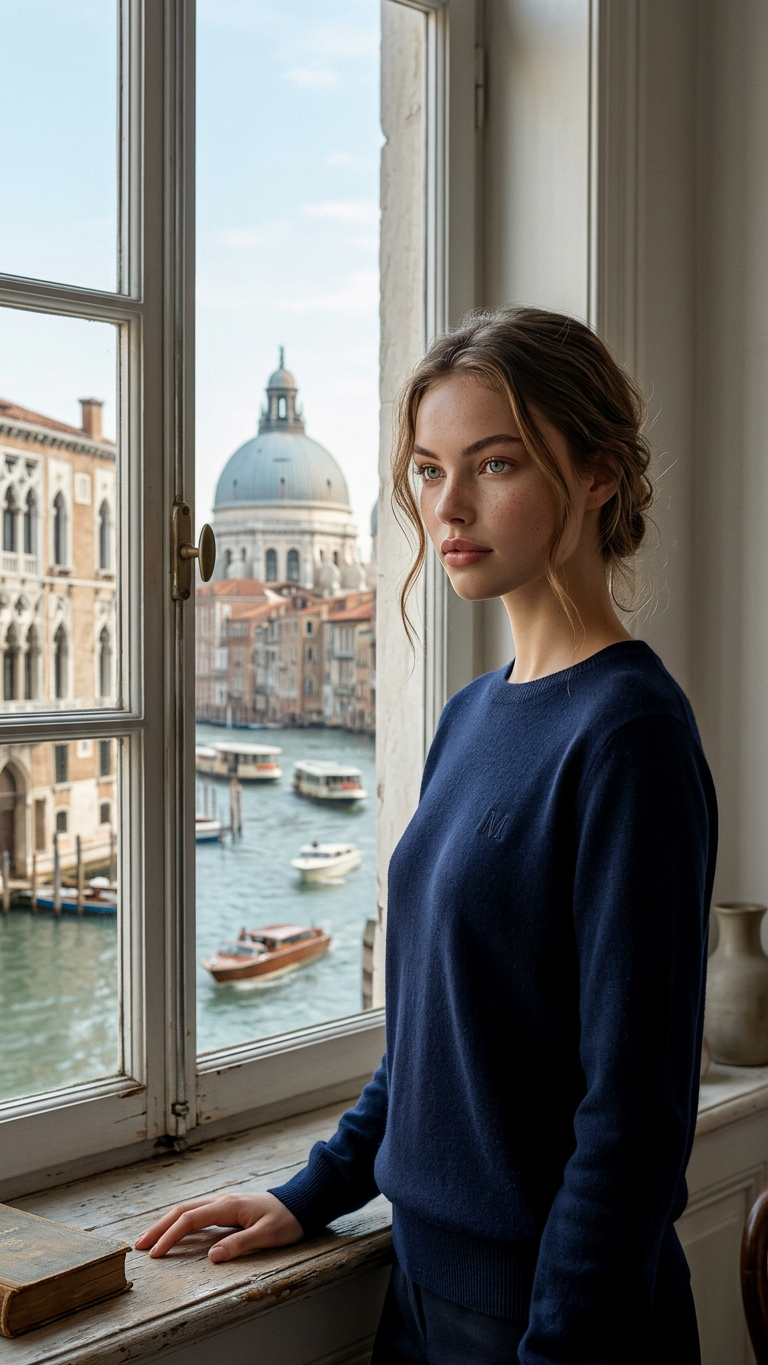
Window Canal Serenity
ai-image-editor
Any aspect ratio
Subject stands near a large window with one hand resting on the windowsill, gazing softly and confidently slightly to the side, wearing a navy sweater with a subtle logo detail. Indoor setting overlooking a canal with classic architecture and a domed roof in the distance, light blue sky, and small boats on the water. Soft natural daylight streams through the window creating gentle highlights and shadows, elegant airy modern portrait style, slightly off-center composition, natural skin texture, serene calm mood, high detail, cinematic soft lighting.
AI Image Editor Template: Transform and Remix Images in Seconds
Use this template to rapidly edit photos and design assets with the AI Image Editor. It’s built for creators, marketers, designers, and founders who need production‑ready visuals fast—without opening Photoshop or writing a single line of code.
What this template is best for
This AI Image Editor–based template is ideal when you need to:
- Clean up or enhance product photos for landing pages, ads, or marketplaces
- Remove distractions, logos, or objects from photos for campaigns or client work
- Re‑style existing assets for A/B tests (colors, backgrounds, aesthetics)
- Turn rough mockups into polished visuals for pitch decks and investor updates
- Adapt one “hero” image into multiple formats for social, email, and app stores
Because it’s built directly on Magic Hour’s AI Image Editor, you can go from raw image → edited visual → campaign‑ready asset in one place.
How to remix this template in Magic Hour
You can clone this template’s workflow and adapt it to your own brand or use case in a few minutes:
Open the template in Magic Hour
- Click “Remix” on the template page inside Magic Hour.
- This creates your own editable copy—no need to start from scratch.
Swap in your own source images
- Replace the example images with:
- Product shots (e‑commerce, SaaS screen mockups, mobile UI)
- Team photos or headshots
- Brand illustrations or app screenshots
- If you don’t have a strong base image yet, generate one first using:
- Replace the example images with:
Edit with the AI Image Editor flow
Use the AI Image Editor for operations like:- Background cleanup or replacement for clean, studio‑style product images
- Object or person removal using tools like AI Remover or Remove Object from Photo
- Face or feature adjustments with AI Face Editor or AI Face Generator
- Retouching and clarity improvements with Unblur Image and AI Image Upscaler
Brand and style customization
- Generate consistent styles across campaigns by pairing this template with:
- AI Background Generator for on‑brand scenes
- AI Illustration Generator for blog and content graphics
- AI Logo Generator for early‑stage brand systems
- Create variant sets for A/B testing (different backgrounds, color palettes, or character styles) in a single session.
- Generate consistent styles across campaigns by pairing this template with:
Export and repurpose your outputs
- Use edited images across:
- Landing pages, ads, and email sequences
- App store screenshots and product hunt launches
- Decks, pitch materials, and social media
- For video‑centric workflows, send the edited images into:
- Image to Video for dynamic clips
- Text to Video for narrative explainers
- AI GIF Generator for lightweight, sharable loops
- Use edited images across:
Example workflows you can build from this template
You can easily extend this template into more complex, multi‑step AI workflows:
Ad creative engine
- Generate a base scene with AI Art Generator
- Edit the hero product and background with AI Image Editor
- Create motion variants with Image to Video or AI GIF Generator
- Localize or personalize with AI Meme Generator
Founder / team branding system
- Clean and standardize team photos using:
- Edit and unify the look with the AI Image Editor template, then convert them into:
- Avatars for Slack, Discord, GitHub
- Talking Photos for intros, explainers, or onboarding
IP / character pipelines for games and media
- Design characters via AI Character Generator, Animated Characters Generator, or AI Anime Generator
- Refine, pose, and clean them with this AI Image Editor template
- Animate them with:
Combining this template with other Magic Hour tools
For more advanced or cross‑media workflows, pair this template with:
Video and audio tools
- Face Swap Video Templates and Face Swap for UGC‑style ads or influencer variations
- Lip Sync Templates for short‑form social content
- Video Upscaler and Auto Subtitle Generator for distribution‑ready clips
- AI Voice Generator and AI Voice Cloner to add narration or cloned voices
Specialized visual generators
- Book Cover Generator for authors and publishers
- Thumbnail Maker for YouTube and podcasts
- Album Cover Generator for music releases
- AI Fashion Generator and AI Outfit Generator for fashion brands and stylists
- AI Interior Design Generator and Architecture Generator for real‑estate and design teams
Restoration and cleanup
- Image Background Remover, Watermark Remover, Old Photo Restoration, and Photo to Sketch
- Then refine the outputs with this AI Image Editor template to make them ready for decks, documentation, or public campaigns.
Best practices for high‑quality results
For consistent, production‑grade outputs with this template:
Start from reasonably clear images
- If the source is low‑res or blurry, run it first through Unblur Image and AI Image Upscaler.
Work from one “hero” asset
- Create or select a single, strong master image (from a shoot or via AI Photo Generator) and then use this template to derive many consistent variations.
Iterate in small steps
- Instead of trying to change everything at once, apply one type of edit at a time (cleanup → background → styling → text overlays), saving intermediate versions for A/B testing.
Think in systems, not single images
- Build a small internal “design system” using the template (hero image, character style, background style, typography) and reuse across ads, landing pages, and product UI.
Who uses workflows like this?
Teams and individuals commonly using AI image editing pipelines include:
- Growth teams and performance marketers iterating on creative for paid channels
- Founders and early‑stage startups who need design‑quality assets before hiring agencies
- Content and media companies building repeatable visual formats for newsletters, YouTube, and social
- Game and IP creators testing visual directions before committing to full production art
This template gives you a reproducible, remixable AI Image Editor workflow inside Magic Hour—so you can go from idea to on‑brand visuals in minutes, and plug those assets directly into broader video, voice, and creative automation pipelines.