Tropical Balcony Serenity
ai-image-editor
Any aspect ratio
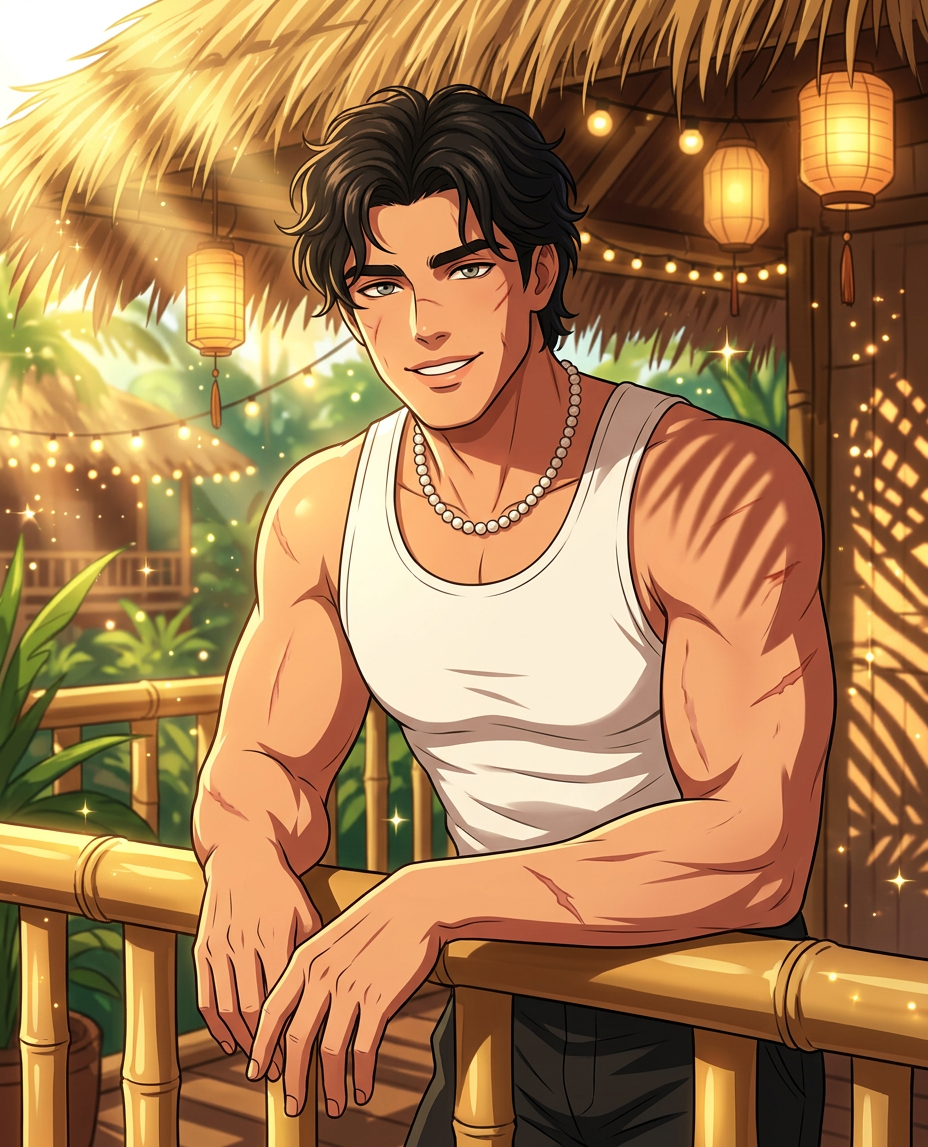
Subject depicts anime style portrait leaning on a bamboo railing with a soft smile and hands resting gently. Composition is a medium shot with a tropical resort balcony in the background. Warm natural sunlight filters through a thatched roof, creating dappled shadows and light rays. Scene features bright vibrant colors with golden hues and sparkling light effects, including hanging lanterns, string lights, lush greenery, and patterned shadows, creating a serene and inviting atmosphere.
Tags
stylesAI Image Editor Template: Remove & Replace Objects in Any Photo
Use this template to quickly remove distracting objects, clean up backgrounds, and replace elements in your photos with AI—without Photoshop or manual masking. Built on Magic Hour’s AI Image Editor, it’s designed for creators, marketers, and product teams who need clean, on-brand visuals fast.
What You Can Do With This Template
Use this AI Image Editor–based template to:
Remove unwanted objects
Clean up photos by removing people, logos, text, clutter, or reflections. For more targeted removal workflows, you can also explore the dedicated AI Remover and Remove Object from Photo tools.Replace objects with AI-generated content
Swap a product, prop, or background element with a new AI-generated version while matching lighting and perspective. If you want to go further into full-scene generation, combine this with the AI Art Generator or AI Photo Generator.Fix and clean product photos
Remove dust, stands, cables, or background noise from product shots. Then upscale for web or print with the AI Image Upscaler and generate variants using the AI Image Generator.Update branding and visual identity
Replace outdated packaging, signage, or UI screens in photos instead of reshooting. Teams doing frequent creative testing can combine this workflow with the Thumbnail Maker and Album Cover Generator for fast iteration.Create campaign-specific versions of the same asset
Localize or personalize a single hero image for multiple markets or audiences by swapping objects, outfits, or backgrounds. For avatar- or character-led campaigns, pair with Avatar Generator, AI Character Generator, or Animated Characters Generator.
How to Remix This Template in Magic Hour
You can use this template as-is or treat it as a starting point to build your own AI image editing workflow inside Magic Hour.
Start from this template
- Open the template in Magic Hour.
- Upload the photo you want to edit (product shot, lifestyle image, portrait, etc.).
Mark what you want to change
- Use the AI Image Editor tools to select or highlight the object, person, or area you want to remove or replace.
- Think in terms of “object-level” edits: individual items, regions of a background, or specific text elements.
Describe the replacement (optional)
- If you’re just removing, keep it simple: e.g., “remove the person in the background and extend the wall.”
- If you’re replacing, specify the new content: e.g., “replace the mug with a matte black ceramic mug on brand, studio lighting.”
Generate, review, and refine
- Generate a few alternatives and pick the one that best fits your project.
- If needed, run a second pass to tweak backgrounds, adjust composition, or clean up artifacts.
Chain this with other Magic Hour tools
- Turn edited photos into short videos or GIFs: use Image to Video or AI GIF Generator.
- Face- and character-driven edits: refine faces with AI Face Editor, generate new faces via AI Face Generator, or create talking photos with AI Talking Photo.
- Elevate quality and consistency: upscale with AI Image Upscaler, fix blur using Unblur Image, and remove watermarks with the Watermark Remover.
Common Use Cases for Creators, Marketers, and Teams
This template is optimized for practical, production-grade tasks:
E‑commerce and marketplaces
- Remove clutter from user-submitted photos.
- Standardize product imagery without reshoots.
- Combine with AI Clothes Changer, AI Outfit Generator, or AI Fashion Generator to test styling and merchandising ideas.
Performance marketing & creative testing
- Quickly generate on-brand variations of a single key visual for A/B tests.
- Edit thumbnails for YouTube, TikTok, and ads using this template plus Thumbnail Maker.
- Turn static creatives into motion using Text to Video or Image to Video.
Founders & product teams
- Update UI mockups, dashboards, or app screens in photos without reshooting.
- Edit pitch deck imagery and marketing site assets to stay consistent with evolving branding.
- Quickly generate on-brand avatars or headshots with AI Headshot Generator and AI Selfie Generator.
Content creators & influencers
- Clean up travel, lifestyle, and event photos by removing crowds, signs, or distractions.
- Turn polished images into Reels, Shorts, or Stories using AI Talking Photo, AI Voice Generator, or AI Voice Cloner.
- Generate consistent visual styles across your feed using AI Anime Generator, Disney AI Generator, or AI Manga Generator.
Turning Edited Images into Videos and Animations
Once your image is cleaned up and edited, you can extend this template into motion content:
Face-swap video content
- Use the edited photo as a reference and create face-swap clips with the Face Swap Video template or Face Swap GIF.
Lip-sync explainer or UGC-style videos
- Turn your edited portrait or character into a speaking asset with the Lip Sync template plus AI Voice Generator or AI Voice Cloner.
Video-to-video transformations
- If you already have raw footage, stabilize your visual style by applying AI transformations with the Video to Video template, after first refining key frames via the AI Image Editor.
Animated characters and loops
- Turn your edited character or product scenes into motion using the Animation template or the AI GIF Generator.
Advanced Creative Workflows You Can Build by Remixing
For more technical users, this template can be a component in larger pipelines:
Brand-safe, editable base shots
- Use AI Art Generator or AI Photo Generator to create a brand-consistent base image.
- Then use this AI Image Editor template to modularly swap elements, update offers, or localize campaigns at scale.
Concept art and worldbuilding
- Generate base scenes with Dark Fantasy AI, Fantasy Map Generator, DND AI Art Generator, or Architecture Generator.
- Refine specific elements (characters, props, signage) with this editing template for precise control.
Specialized generators plugged into this editor
- Use Pokemon Generator, Superhero Generator, AI Tattoo Generator, or AI Icon Generator to create assets.
- Composite and fine-tune those assets into your main scene through this AI Image Editor workflow.
Restoration and enhancement
- Restore and colorize old or damaged photos via Old Photo Restoration and Photo Colorizer.
- Use this template to remove distracting elements or modernize specific details while preserving the core of the original.
Why Use Magic Hour’s AI Image Editor for Object Removal & Replacement?
Modern diffusion and generative models are well-suited for “inpainting” and “outpainting” tasks—filling in or extending parts of an image with convincing detail. Magic Hour’s AI Image Editor wraps these capabilities in a workflow that’s optimized for:
- Speed: Apply complex edits in seconds instead of manual retouching.
- Consistency: Keep lighting, shadows, and perspective coherent with the original photo.
- Flexibility: Combine with other Magic Hour products—such as Image Background Remover, AI Background Generator, or AI QR Code Generator—to build custom creative systems.
How to Adapt This Template to Your Own Use Case
You can easily remix this AI Image Editor–based template into your own:
Product-focused editor
- Start from this template, then consistently use it with product-only shots. Connect it with AI Clothes Changer or Full Body Generator for fashion and apparel workflows.
Brand asset editor
- Use it as your central “brand image fixer” for campaign graphics, presentation images, and social posts. Pair with AI Logo Generator, Comic Book Generator, or AI Illustration Generator to keep visuals aligned with your style.
Creator studio pipeline
- For recurring content:
- Generate avatars with Avatar Generator or AI Face Generator.
- Edit scenes with this template.
- Animate with AI Talking Photo or Animation.
- Add subtitles via Auto Subtitle Generator and upscale with Video Upscaler.
- For recurring content:
By starting from this template and plugging in the relevant Magic Hour tools, you can build a repeatable, efficient AI-powered editing stack that scales with your creative and marketing needs.