Petals in the Breeze
- Model
- Nano Banana Pro
- Image
- 848 × 1264 px
Prompt
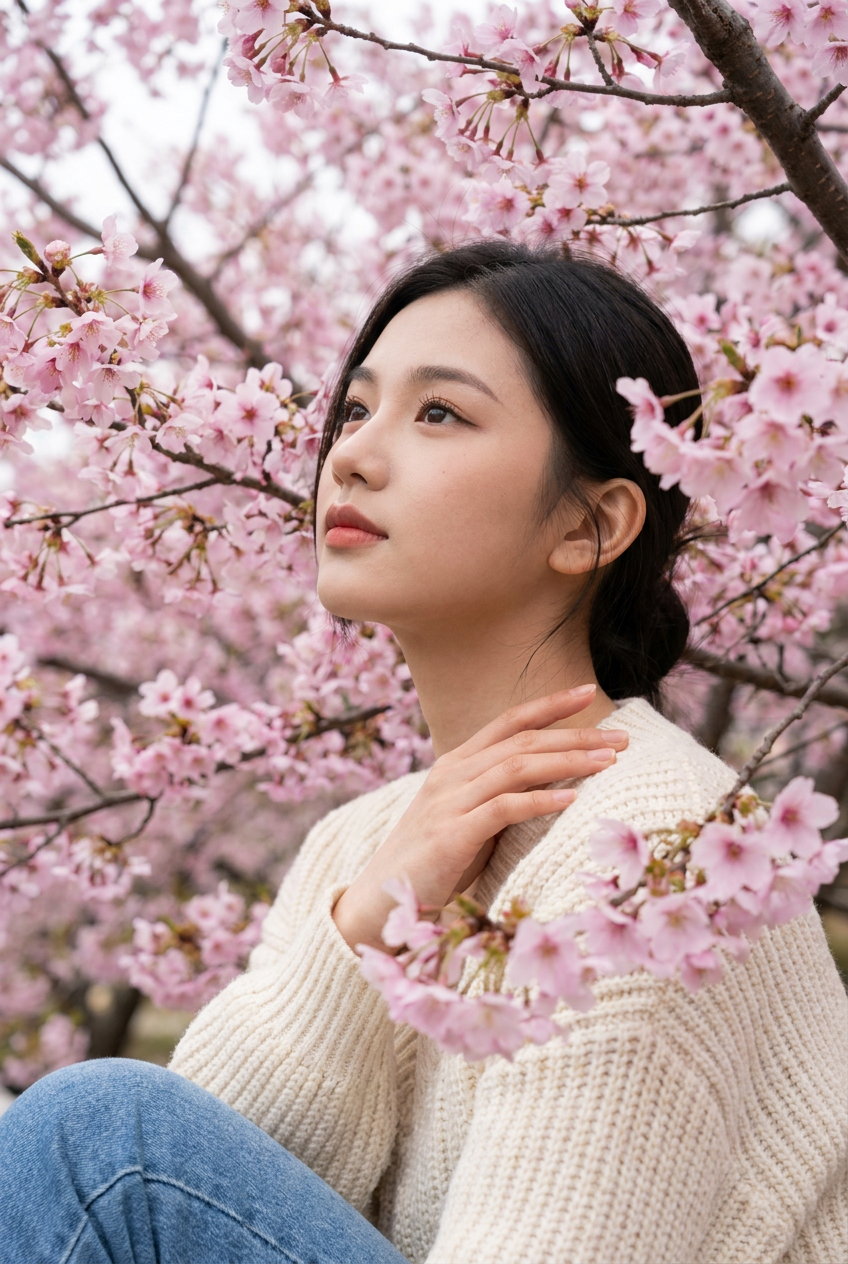
Create an ultra-realistic vertical, medium-shot portrait using the provided reference image strictly for exact face matching. Do not modify, beautify, stylize, exaggerate, or reinterpret the face in any way. Preserve the exact facial structure, proportions, head size, jawline, cheekbones, eye shape and spacing, nose shape, lips, forehead, skin tone, and natural expression from the reference image. Maintain a realistic head-to-body ratio. No facial symmetry changes. The subject is positioned among pink cherry blossom (sakura) branches, with the face remaining unchanged from the reference and only the environment, clothing, pose, and lighting being generated. The woman is shown in a three-quarter profile, gazing upward and slightly to the left with a calm, serene, contemplative expression identical to the reference. Her right hand rests gently on her left shoulder/collarbone, fingers relaxed and natural. She wears a cream or oatmeal-colored chunky knit sweater with a visible vertical ribbed texture, long sleeves, and a relaxed fit. The lower frame shows blue denim jeans. The scene is surrounded by dense pink cherry blossoms, creating a natural floral frame. Use a shallow depth of field, with soft foreground and background blur, keeping the face as the sharpest focal point. Lighting is soft, diffused, and even, similar to an overcast spring day, with no harsh shadows and natural skin texture visible. Color tones are balanced and realistic, dominated by soft pinks and magentas, complemented by warm skin tones and neutral clothing. Ultra-realistic photography, natural textures, no artistic filters, no face alteration.
Any aspect ratio
Overview
Petals in the Breeze offers a profound editing experience through the AI Image Editor toolset, utilizing the nano-banana-pro model. It creates ultra-realistic portraits set against a picturesque backdrop of cherry blossoms without altering the subject's facial features from the reference image.
What It Does
This AI Image Editor template zeroes in on replicating the exact facial details from a reference image, ensuring the facial structure, proportions, and expression remain untouched. It places the subject amid a lush aura of cherry blossoms, adding dynamic elements such as clothing and lighting that highlight the natural beauty without interfering with the original visage.
Who It's For
"Petals in the Breeze" is ideal for photographers, artists, and content creators who demand precision in photo-realistic reproductions while exploring creative compositions. It's also perfect for professionals in AI Product Photography who wish to maintain authenticity in portraits.
Summary
Leverage the power of the nano-banana-pro model to create a stunning and precise portrait that marries human likeness with natural beauty. This template preserves the original face while enriching the scene with exquisite surroundings. It's an exceptional choice when absolute fidelity to the subject's identity is as important as the artistic context.
How-To

Customize Your Inputs

Generate the Image

Use Cases
Portrait Photography
- Professional headshots with appealing backgrounds
- Fashion portraits maintaining model integrity
Creative Marketing
- Brochure and poster designs
- Social media banners
Cinematic Aesthetics
- Movie posters
- Promotional materials
Best Practices
Choose High-Quality Reference Images
Ensure your reference images have clear, well-lit faces to achieve optimal results. The attention to detail requires high-quality input.Consider Scene Harmony
Align the environment and subject’s clothing colors in a way that enhances the overall composition without overshadowing the face.Utilize for Visual Campaigns
Integrate these compelling images into broader visual campaigns where maintaining the integrity of the subject's identity is crucial.