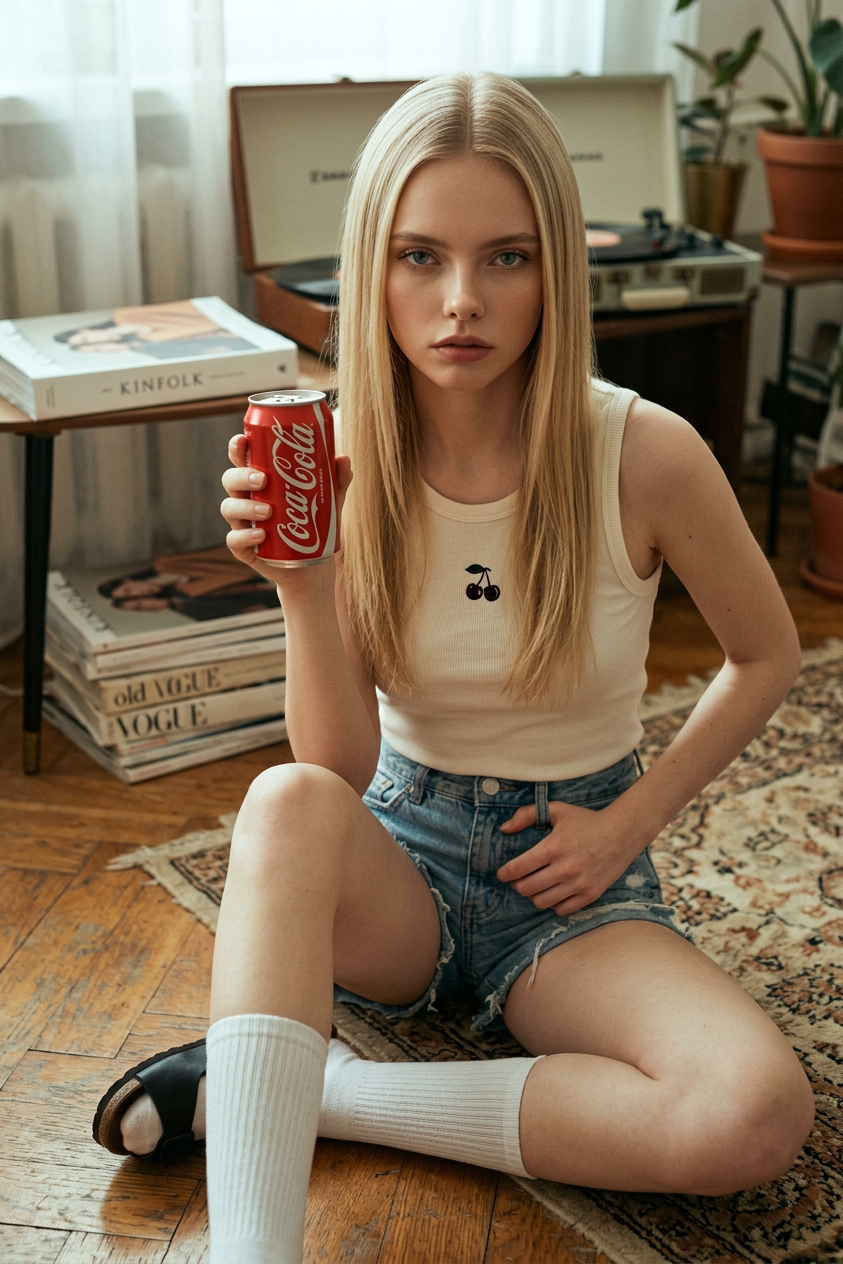
Retro Cola Floor
ai-image-editor
Any aspect ratio
Subject sitting on the floor facing forward with direct eye contact, slightly serious or pensive expression, maintaining original facial features. Wearing an off-white/cream tank top with small dark cherry embroidery, distressed denim shorts, knee-high white socks, and black open-toed sandals or clogs. Holding up a Coca-Cola can as the main focus. Long straight hair with a middle part. Warm, slightly muted retro aesthetic with cool undertones, casual lifestyle mood, soft natural lighting, cinematic composition, beverage-focused advertising style, ultra-realistic, high detail.
AI Image Editor Template: Fast, Precise Image Editing for Creators and Teams
This template is built on the AI Image Editor, designed for fast, high-quality edits without complex tools or manual masking. It’s ideal for creators, marketers, designers, and product teams who need production-ready visuals in minutes.
Use this template as a starting point, then remix it in Magic Hour to match your brand, campaign, or creative workflow.
What You Can Do With This Template
This AI Image Editor template is optimized for:
Product photos
- Clean up e‑commerce shots
- Remove distracting objects or backgrounds
- Generate multiple style variations for A/B tests
- Pair with AI Image Upscaler to upgrade resolution for ads or marketplaces
Marketing and social visuals
- Turn one asset into many: different crops, backgrounds, and formats
- Generate campaign-specific themes (seasonal, industry-specific, or event-based)
- Combine with AI GIF Generator to turn edited images into lightweight animations
Brand and content experimentation
- Test new visual directions without committing to a full redesign
- Quickly prototype visuals for landing pages or decks
- Use with AI Logo Generator or AI Icon Generator to create and refine brand systems
Creator workflows
- Clean up thumbnails, banners, and profile images
- Create consistent aesthetics for a series or channel
- Combine with the Thumbnail Maker and Avatar Generator for a full content stack
How to Remix This Template in Magic Hour
You can create your own version of this template directly in Magic Hour using the same underlying AI Image Editor engine.
1. Start from this template
- Open this template in Magic Hour.
- Duplicate it to create your own remix.
- Rename it for your use case (e.g., “DTC Product Cleanup,” “LinkedIn Banner Generator,” “Podcast Cover System”).
2. Swap in your own source images
- Upload your product shots, portraits, or brand assets.
- Use the template as a reusable workflow: same structure, new inputs each time.
- For teams, save your remixed template and share it internally as your “standard” editing flow.
3. Chain with other Magic Hour tools (optional)
To build more advanced pipelines, you can combine AI Image Editor with other Magic Hour products, for example:
From image to short video or animation
- After editing an image, turn it into motion:
- Use Image to Video for cinematic movements
- Use AI Talking Photo to animate faces
- Use Animation templates to bring characters or scenes to life
- After editing an image, turn it into motion:
From static portrait to dynamic content
- Use AI Image Editor to perfect a portrait or headshot
- Then:
- Create talking videos with AI Talking Photo
- Clone voices with AI Voice Cloner
- Turn still images into videos using Text to Video or Image to Video
From cleaned product image to campaign assets
- Edit and upscale with:
- Then create:
- Social-first creatives with AI Art Generator
- Animated ad variants with AI GIF Generator
- On-brand thumbnails with Thumbnail Maker
Common Use Cases and Example Workflows
Below are practical patterns you can follow or adapt when remixing this template.
1. E‑commerce Product Cleanup & Variations
Goal: Turn raw product photos into clean, high-conversion listings and ads.
Workflow:
- Upload your raw product image into this template.
- Use AI Image Editor to:
- Remove clutter or unwanted objects
- Adjust or replace the background
- Clean edges and refine lighting
- Export:
- Marketplace-ready images (white or neutral backgrounds)
- Creative variations for ads and social
- Optional:
- Upscale final images with AI Image Upscaler
- Create animated product loops using Image to Video
This is especially useful for DTC brands, Shopify storefronts, Amazon sellers, and marketplace operators who need to iterate quickly across platforms.
2. Professional Headshots and Profile Photos
Goal: Generate or refine professional portraits for founders, teams, and personal brands.
Workflow:
- Start with your existing portrait or a generated image from AI Headshot Generator or AI Selfie Generator.
- Use AI Image Editor to:
- Clean the background
- Enhance clarity and details
- Adjust aesthetics to match your personal or company brand
- Optional extensions:
- Animate the headshot with AI Talking Photo for introductions, sales pages, or onboarding emails.
- Create consistent avatars for your team with Avatar Generator.
3. Social Media, Thumbnails, and Content Branding
Goal: Rapidly produce on-brand visuals for YouTube, LinkedIn, TikTok, Instagram, and newsletters.
Workflow:
- Start from this AI Image Editor template.
- Upload base visuals: screenshots, stills, product hero images, or portraits.
- Edit to:
- Remove unwanted elements (AI Remover or Remove Object from Photo)
- Replace or stylize backgrounds using AI Background Generator
- Add or refine graphic elements created via AI Logo Generator or Album Cover Generator
- Optional:
- Turn key visuals into thumbnails with Thumbnail Maker.
- Build short animated loops with AI GIF Generator.
4. Creative Concepts and Visual Prototyping
Goal: Quickly explore new visual directions for brand refreshes, campaigns, or product concepts.
Workflow:
- Start with a core asset: product render, screenshot, brand mark, or hero image.
- In AI Image Editor, experiment with:
- Different stylistic directions (e.g., minimalist, cyberpunk, illustrative)
- Multiple backgrounds or environments generated via:
- Save successful directions as variations of this template so your team can re-use them consistently.
Extending Beyond Static Images
Once you’ve refined your image with this template, you can turn it into richer media:
Face and performance-based content
- Swap faces in media using:
- Create lip-synced content using Lip Sync templates.
- Turn images into talking avatars using AI Talking Photo.
Video pipelines
- Convert static art to animated sequences with Video to Video templates.
- Use Text to Video to generate scenes and refine key frames with AI Image Editor.
- Enhance final video quality with Video Upscaler.
- Add subtitles using Auto Subtitle Generator.
Specialized visuals for niche use cases
- Generate concept art with AI Manga Generator, Dark Fantasy AI, or Comic Book Generator, then polish frames with AI Image Editor.
- Build UGC-style or meme content using AI Meme Generator.
- Design covers and key art with Book Cover Generator or Album Cover Generator, then finalize details in this template.
Who This Template Is For
Founders and startup teams
Ship visuals quickly without waiting on external design cycles. Perfect for landing pages, pitch decks, and investor updates.Performance and growth marketers
Turn a single asset into many variants for rapid creative testing. Use with AI GIF Generator, Text to Video, or AI Voice Generator to build full funnels.Designers and creative leads
Use AI Image Editor as a fast ideation layer. Lock in direction, then refine in your usual tools if needed.Content creators and educators
Build a reusable “visual system” template for your channel or course so every asset feels consistent and on-brand.
Related Magic Hour Tools Worth Exploring
If you’re remixing this template and want to expand your stack, these tools pair well with AI Image Editor:
- AI Image Editor – the core editor behind this template
- AI Image Generator – generate base images to then refine with this template
- AI Photo Generator – produce photorealistic scenes to edit or augment
- AI Clothes Changer – swap outfits, then color-correct and finalize in AI Image Editor
- AI Face Editor and AI Face Generator – create or refine faces before compositing
- Image Background Remover – isolate subjects to then stylize in this template
- Watermark Remover – clean assets where you have the rights but no source file
- Photo to Sketch – convert photos to sketch-style art, then color or adapt with AI Image Editor
- Old Photo Restoration and Photo Colorizer – restore archival images, then retouch in this template
- Unblur Image – recover sharpness before editing final details
- AI QR Code Generator – embed stylized QR codes into key visuals
How to Make This Template Your Own
To build a custom, re-usable system for your team:
- Duplicate this template inside Magic Hour.
- Rename it to reflect the specific use case (e.g., “Brand X PDP Images,” “YouTube Channel Thumbnails,” “SaaS Landing Hero Images”).
- Standardize inputs – define what goes in (e.g., raw product shots, founder photos, app screenshots).
- Document your flow – share simple internal notes like: “Upload > Edit via AI Image Editor > Export > Optional upscale/animation.”
- Iterate – as you find better-looking outputs, update the template so your whole team benefits.
By starting with this AI Image Editor template and gradually remixing it, you can build a durable, scalable visual pipeline that fits your brand and workflow—without needing specialized design resources for every single asset.