Cyan Legs
ai-image-editor
Any aspect ratio
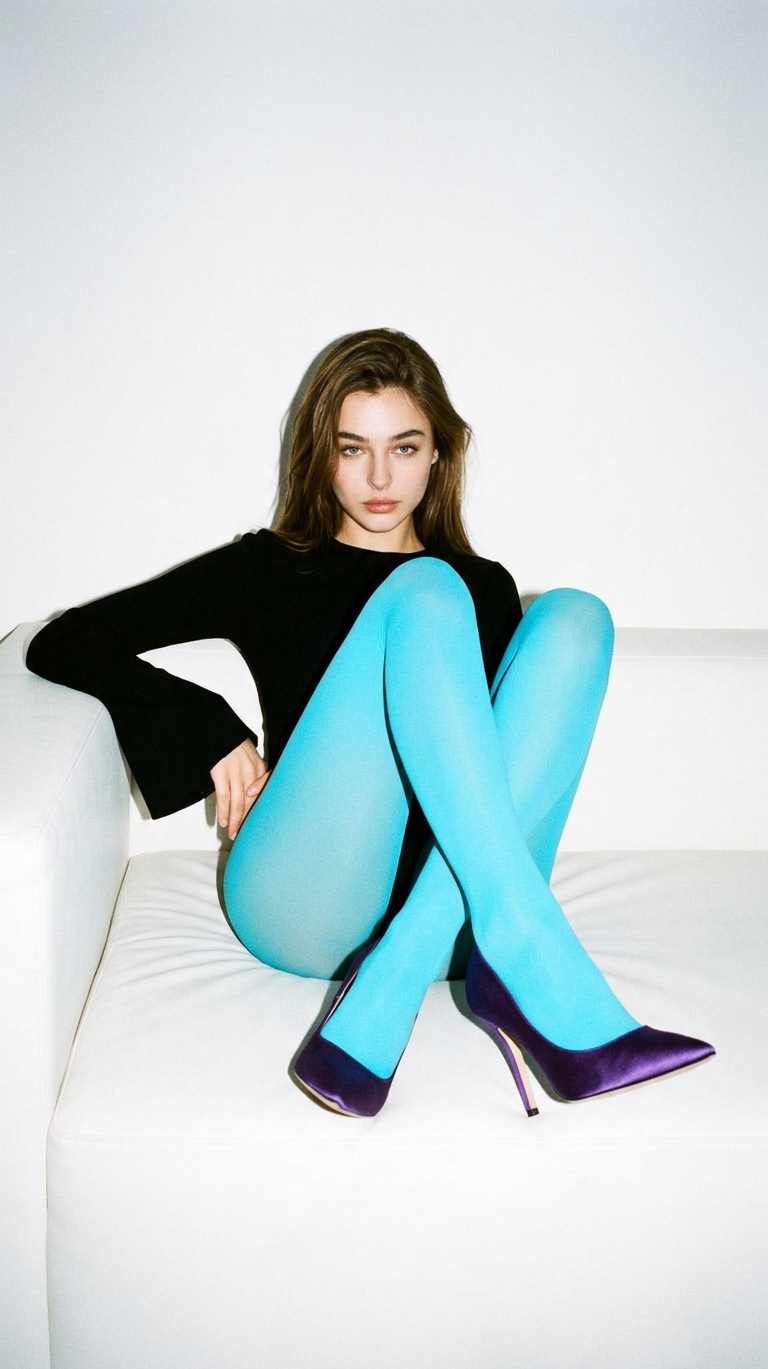
High-fashion editorial portrait with a minimalist 90s aesthetic, shot on 35mm film with visible grain and fine analog noise. A subject with long wavy dark hair sits on a simple white sofa, leaning back with legs pulled up and crossed toward the lens, creating a bold, graphic composition. The subject wears a sleek black long-sleeve top with dramatic bell sleeves, vibrant cyan-blue tights, and pointed deep-purple satin stiletto heels. Calm, slightly moody expression looking directly at the camera. Harsh direct on-camera flash creates strong contrast, vivid color pop, and soft defined shadows on the sofa and plain white wall. Clean, minimal, lo-fi yet high-fashion paparazzi-style aesthetic.
AI Image Editor Template: Instantly Upgrade Any Image With Precise, High-Quality Edits
Use this AI Image Editor–based template to transform photos in seconds—without manual retouching, layers, or complex masking. It’s built for people who care about quality and speed: marketers shipping campaigns, founders iterating on landing pages, designers and creators refining visuals for social, ads, or product shots.
This template runs on the AI Image Editor, so you can:
- Fix or replace specific parts of an image (products, faces, backgrounds, text)
- Remove distractions, logos, or watermarks using AI inpainting
- Enhance quality with upscaling, sharpening, and cleanup
- Re-style images for different channels, audiences, or brand aesthetics
You can also remix this template into your own custom editor for product images, social content, UGC polish, or creative experiments.
What You Can Do With This Template
This AI Image Editor template is optimized for fast, repeatable edits that still look natural. Typical use cases include:
1. Content & Marketing Images
- Clean up product photos and hero images
- Swap backgrounds for landing pages or social posts with the AI Background Generator
- Generate on-brand visuals from rough drafts using the AI Photo Generator or AI Art Generator, then refine them with the editor
- Turn sketches or concepts into polished graphics using Photo to Sketch and then rework with AI editing
2. Creator & Personal Brand Visuals
- Clean up selfies and portraits with the AI Face Editor and AI Selfie Generator
- Generate studio-style profile photos with the AI Headshot Generator, then retouch them in this editor
- Change clothes, styles, or aesthetics using the AI Clothes Changer or AI Outfit Generator, then refine details in the editor
3. Product, App, and Startup Imagery
- Rapidly iterate on landing page hero images using the AI Image Generator, then tweak them with the AI Image Editor
- Design app store graphics, thumbnails, and marketing visuals with the Thumbnail Maker and refine icons via the AI Icon Generator
- Create conceptual mockups and interface scenes with the AI Illustration Generator and polish them in this editor
4. Creative & IP Development
- Generate characters via the AI Character Generator, Animated Characters Generator, or AI Face Generator, then adjust details with the editor
- Build worlds and settings using the Fantasy Map Generator, Architecture Generator, or AI Interior Design Generator, then refine each asset visually
- Design book covers, comics, and album art with specialized tools like Book Cover Generator, Comic Book Generator, and Album Cover Generator, then fine-tune them here
5. Image Cleanup & Restoration
- Remove objects, people, or unwanted elements using Remove Object from Photo and AI Remover
- Remove watermarks with the Watermark Remover, then balance and refine the image in the editor
- Restore and colorize old photos with Old Photo Restoration and Photo Colorizer, then retouch details and sharpen with this template
- Unblur low-quality images using Unblur Image and upscale with the AI Image Upscaler
How to Remix This Template in Magic Hour
You can treat this template as a starting point and build your own workflows around the AI Image Editor. A typical remix flow looks like this:
Start From This Template
- Open the AI Image Editor template in Magic Hour.
- Upload your base image (product photo, selfie, illustration, logo, etc.).
Decide What Should Change vs. Stay the Same
- Identify which areas you want the AI to modify (e.g., background, clothing, lighting, props, facial details).
- Keep composition and key brand elements consistent where needed.
Combine With Other Magic Hour Tools (Optional but Powerful)
Examples:- Generate the base visual with AI Photo Generator, AI Art Generator, or AI Manga Generator, then refine in this editor.
- Convert a static edit into motion with Image to Video or Text to Video.
- Turn your edited image into a talking avatar using AI Talking Photo or AI Meme Generator.
Create Variations for Different Use Cases
- Version for social ads, product detail pages, email headers, or pitch decks.
- Use the Thumbnail Maker to generate platform-specific crops and designs.
- Explore stylistic variants with tools like Disney AI Generator, Dark Fantasy AI, or AI Anime Generator, then refine outputs with this editor.
Save Your Remix as a Reusable Workflow
- Keep a consistent look across campaigns, videos, and product updates.
- Use the same editing pattern for new inputs (new products, new headshots, new scenes) without rebuilding from scratch.
Example Workflows You Can Build From This Template
1. High-Conversion Product Image Pipeline
- Generate lifestyle scenes with AI Background Generator or AI Interior Design Generator.
- Drop in your product, clean up edges, refine lighting, and match colors using the AI Image Editor template.
- Create short clips from your edited images via Image to Video and polish them with the Video Upscaler.
2. Creator Brand & Avatar System
- Generate a consistent avatar set using the Avatar Generator or AI Selfie Generator.
- Edit each avatar’s background, outfit, and styling in this template.
- Turn avatars into talking, animated content with:
3. Full Storytelling / IP Visual Stack
- Design characters with AI Character Generator, Superhero Generator, Pokemon Generator, or Animated Characters Generator.
- Build environments using Fantasy Map Generator, Architecture Generator, and AI Background Generator.
- Use the AI Image Editor template to unify style, color, and detail.
- Convert key frames into motion with Animation, Video to Video, or Image to Video.
Related Templates and Tools Worth Exploring
If you like this AI Image Editor template, you can extend it with other Magic Hour template-driven products:
- Swap faces in short clips or UGC: Face Swap Video
- Create lip-synced talking content from your edited images: Lip Sync
- Stylize or transform footage while preserving motion: Video to Video
- Animate static characters and scenes: Animation
And explore supporting tools like:
- AI Meme Generator for social content
- AI QR Code Generator for on-brand scannable graphics
- AI Tattoo Generator or AI Fashion Generator for style concepts
- AI Logo Generator for brand marks you can refine with the editor
- Optical Illusion Generator or Graffiti Generator for more experimental visuals
Why Use Magic Hour’s AI Image Editor Over Traditional Tools?
Traditional image editing workflows (Photoshop, manual retouching, hand-drawn masking) are powerful but slow and hard to scale across campaigns or teams. With this AI Image Editor template:
- You get repeatable, consistent quality across new inputs
- You can ship visual experiments quickly—crucial for ad testing, landing page optimization, and social content
- Non-designers can still produce polished, production-ready assets
Under the hood, tools like Magic Hour’s AI Image Editor combine:
- Diffusion-based generative models for realistic content synthesis
- Inpainting/outpainting to modify local regions while preserving structure
- Super-resolution and denoising techniques (see work like ESRGAN and Real-ESRGAN in research) for restoration and upscaling
For teams that care about speed, iteration, and consistency, remixing this template into your own visual pipeline can replace large chunks of manual design work.
How to Get the Most Out of This Template
- Start from clear, reasonably high-quality source images for best results. Combine with Unblur Image or AI Image Upscaler if needed.
- Use it as a repeatable pattern, not a one-off: same process, new inputs (new products, new campaigns, new faces).
- Chain it with other Magic Hour tools so you have an end-to-end workflow:
- Generate → Edit → Animate → Add voice → Add subtitles with Auto Subtitle Generator.
Use this AI Image Editor template as your base, then remix it into the exact visual system your brand, product, or content pipeline needs.