AI Fat Filter

AI Fat Filter

AI Image Editor
1 image
0 uses
Model
Nano Banana 2
Image
768 × 1376 px

Prompt

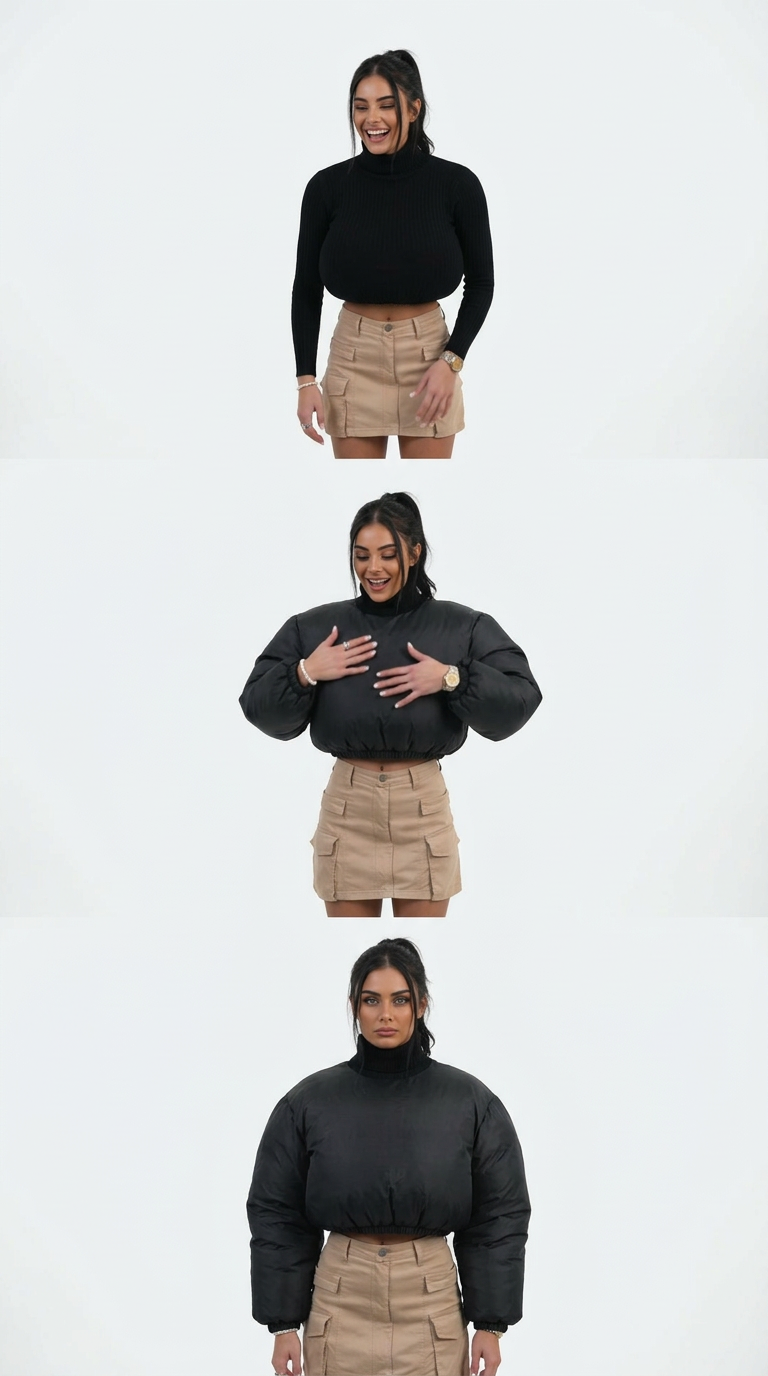
Vertical 9:16, ultra-photorealistic playful transformation video. Use @Lua the strict visual identity reference for the character. Preserve the recognizable face, hairstyle, skin tone and natural body proportions throughout.Begin with the character standing naturally against a clean studio background, facing the camera with a relaxed expression. Fixed front-facing medium-full shot, soft even lighting.A funny magical effect suddenly activates. The character’s clothing begins to inflate outward like an oversized plush costume while the actual body underneath remains unchanged. Sleeves become puffy, the torso area becomes round and cushion-like, and the outfit gains a soft stuffed-toy appearance.The character looks down in surprise, lightly pats the inflated outfit, then laughs and makes a playful turn toward the camera. The puffy costume jiggles naturally with each movement, creating a cute exaggerated bounce effect.VIRAL MOMENT: the costume briefly expands one more time with a soft “poof” effect, then gently settles while the character gives the camera a funny deadpan expression.Realistic fabric, soft plush physics, natural face and hair, smooth transformation, playful social-media tone, premium 4K realism. Keep the person’s real body size and proportions unchanged. No body reshaping, no face reshaping, no extra limbs, no identity drift, no text, logos or watermark.

Any aspect ratio

Overview

The AI Fat Filter creates a playful transformation effect that inflates the clothing of a character in an uploaded photo. The character's body remains unchanged, offering a humorous and exaggerated visual result. Designed for social media, this effect is rendered in premium 4K realism with smooth transitions and natural fabric physics.

How-to Guide

Create a playful image with the AI Fat Filter by following these steps.
    01

    Choose the template

    Open the AI Fat Filter template page.
    02

    Upload your photo

    Upload an image in which you want to apply the transformation effect.
    03

    Generate the image

    Click 'Generate' to create the effect with realistic puffy clothing.

More Like This

Pixar-Style Character
6
Pixar-Style Character
Life Simulator Character
1
Life Simulator Character
Style Shift
Style Shift
Style Shift
Dual-Head Dream Morph
Flying Banana Chaos
Flying Banana Chaos
Flying Banana Chaos
Pinky Girl Cricature
Game Character
7
Game Character
Game Character
Fantasy Game Character
Photorealistic Cosplay Transformation
11
Photorealistic Cosplay Transformation
Dual Persona
58
Dual Persona
Dual Persona
Mini Me In Hand
1
Mini Me In Hand
Mini Me In Hand
3D Animated Character
NEW
3D Animated Character

AI Image Editor