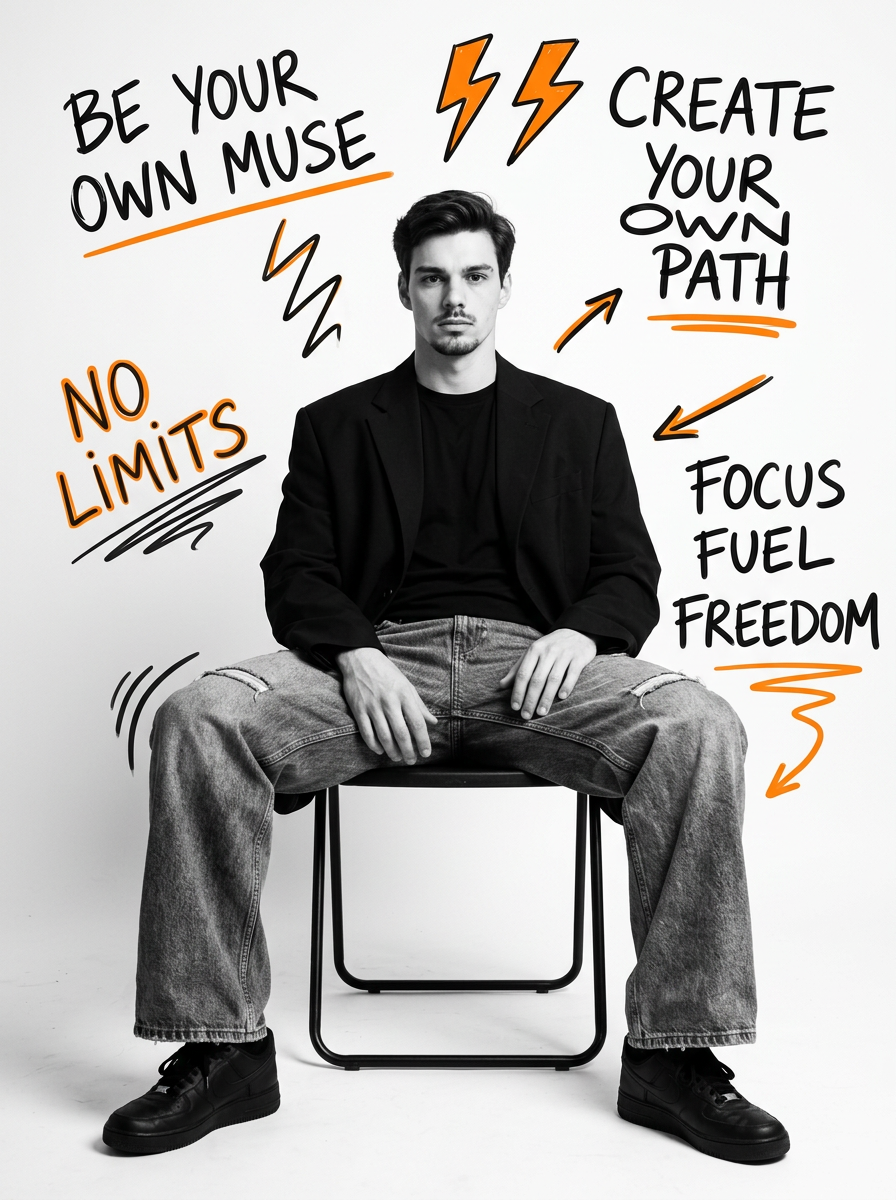
BW Doodle Editorial
- Model
- Nano Banana 2
- Image
- 896 × 1200 px
Prompt
Hyper-realistic cinematic DSLR portrait photography — subject rendered in full black and white with orange and black hand-drawn doodle/text elements overlaid on the background. Photorealistic — subject must look physically present in the scene, real studio light, real shadow, real depth of field. POSE & EXPRESSION — EXACT: Full-body seated portrait, man sitting on a simple black metal folding chair, body facing forward, both legs spread apart naturally and relaxed, both hands resting on the thighs/knees, posture open and confident. Calm, composed, direct gaze looking straight into camera, lips closed, cool quiet confidence, editorial magazine mood. BODY: Athletic and fit masculine build — broad shoulders, natural proportionate physique visible even while seated. NOT skinny — well-built natural male body. The blazer should look worn by someone broad-shouldered and well-built. OUTFIT: Oversized black blazer worn over a plain black crew-neck t-shirt, no tie, relaxed smart-casual styling, wide-leg grey acid-wash denim jeans with a distressed worn texture, chunky black lug-sole sneakers/trainers, a thin bracelet on one wrist, small ring on one finger. CHAIR — EXACT: Simple black metal folding chair, clean minimal industrial design, positioned slightly angled. PHOTO STYLE — EXACT: The ENTIRE photograph is rendered in black and white — deep rich blacks, bright clean whites, full tonal range monochrome, medium-heavy analog film grain, high contrast editorial black and white. Only the hand-drawn doodle and text overlays are in color — orange and black. DOODLE/TEXT OVERLAY ELEMENTS — EXACT: Hand-drawn marker/pen style doodles and text scattered around the background surrounding the subject — in orange and black ink: Bold text "BE YOUR OWN MUSE." upper left, "NO LIMITS." upper right, "CREATE YOUR OWN PATH." center right, "FOCUS FUEL FREEDOM." lower left. Doodle elements: lightning bolt symbols scattered throughout, arrow doodles pointing in various directions, a hand-drawn crown symbol, circle/spiral doodles, star outline doodles, zigzag lines, double underline strokes under text. All doodles look hand-drawn and rough, not digital/perfect. LIGHTING — EXACT: Clean bright studio lighting, soft and even, white seamless backdrop, professional studio setup, shadows falling naturally below the chair and subject. BACKGROUND — EXACT: Plain white seamless studio backdrop, clean and bright, no other elements except the hand-drawn doodle overlays described above. COLOR GRADE: Full black and white on subject and photo, orange (#FF6B00) and black doodle text elements in color on the white background, clean high-contrast monochrome, heavy analog film grain. Shot on Sony A7R IV, 50mm f/2 — subject tack sharp, white background clean, natural color science converted to monochrome. Ultra photorealistic — every skin pore, every fabric texture, every chair detail real, zero AI artifacts, no watermark. IMPORTANT — Use ONLY my uploaded face reference image for the facial structure and identity. My face must remain EXACTLY the same as my real appearance with zero identity change. Preserve my exact hairstyle, hairline, forehead shape, eyebrows, eye shape, nose structure, lips, beard density, moustache style, jawline, skin tone, facial texture, masculine proportions, and all natural imperfections exactly as shown in the uploaded image. Do NOT beautify, cartoonize, smooth skin, feminize, or replace my face with a random celebrity or model face. Identity preservation is the highest priority. The final result must look like a real cinematic professional portrait of ME, not AI art. Gnrat ratio 3:4
Any aspect ratio
Overview
The BW Doodle Editorial template allows you to create striking black-and-white portrait photography with distinct hand-drawn doodle elements. Crafted using the nano-banana-2 model, this template blends hyper-realistic photography with artistic overlays of text and illustrations, making it perfect for those who want to mix traditional editorial style with a modern, edgy twist.
What It Does
This template leverages powerful AI Image Editing capabilities to produce black-and-white portraits featuring vibrant doodles. It maintains the authentic appearance of the subject's face and details, emphasizing texture, shadow, and depth while adding colorful text and doodle overlays. The result is a photorealistic image that looks as if it were captured with a DSLR in a professional studio setting.
Who It's For
The BW Doodle Editorial template is ideal for photographers, designers, and content creators looking to produce distinctive editorial-style images. It suits fashion and lifestyle brands wanting unique content for campaigns or individuals aiming for creative self-expression. This template supports projects needing intricate detail, such as AI Product Photography and editorial magazine shoots.
Summary
With the BW Doodle Editorial template, you can easily generate photorealistic images with a creative edge. Ideal for both personal and professional uses, this template provides high-quality results made possible by the nano-banana-2 model’s capacity to deliver ultra-detail and accuracy. Experiment with AI-driven elements by pairing this template with AI Image Editor functionalities.
How To
Choose Template

Customize Elements

Generate Image

Use Cases
Editorial Magazine Shoots
Fashion Campaigns
Social Media Content
Best Practices
Ensure Identity Preservation
Always use a high-resolution reference image to maintain the subject's authentic appearance.Consider Color Contrast
Maximize impact by carefully placing orange and black doodle elements against the monochrome background.Adjust Lighting and Shadow
Experiment with virtual lighting settings to achieve the natural studio look described in the template's prompt.