Alpine Cable Car Crossover
- Model
- Nano Banana 2
- Image
- 928 × 1152 px
Prompt
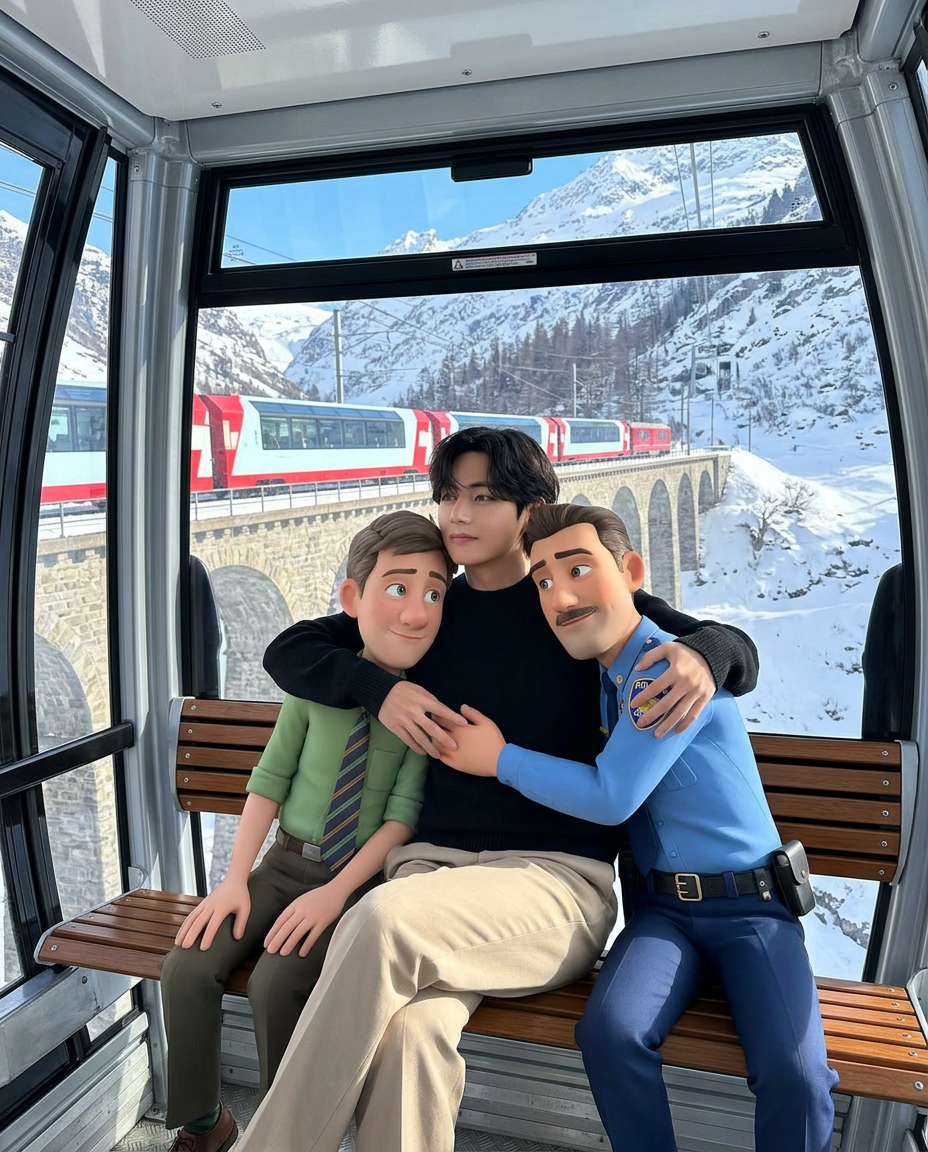
Photorealistic eye-level medium shot from inside a modern glass cable car. The subject sits on a slatted wooden bench, wearing a black long-sleeve crewneck sweater and light beige trousers, arms wrapped affectionately around two highly detailed 3D animated characters—one seated on the right in a blue police-style uniform, the other on the left in a green shirt with a striped tie. Through the panoramic windows, a bright snow-covered alpine landscape stretches into the distance, with a red-and-white passenger train crossing an arched stone viaduct in the mid-ground. Bright natural daylight fills the cabin, casting soft shadows and seamlessly blending the stylized characters into the photorealistic live-action environment. Cinematic realism, clean composition, 4:5 aspect ratio.
Any aspect ratio
Overview
Experience the breathtaking scenery of a snowy alpine landscape with the Alpine Cable Car Crossover, an AI Image Editor template that brings cinematic realism to your projects. Tailored for those passionate about adventure and storytelling, this template captures the essence of natural beauty and compelling character interaction.
What It Does
Transform ordinary images into stunning visuals by integrating 3D animated characters into a photorealistic setting. The template leverages the AI Image Editor capabilities to ensure a seamless blend between live-action and animated elements, achieving a cinematic look. The sophisticated AI Video Generator technology enhances dynamic scenes, while AI Photo Relighting adjusts lighting for perfect harmony.
Who It's For
This template is ideal for creative professionals, video editors, and storytellers in the adventure and travel sectors. It's perfect for those aiming to create engaging content for social media, tourism promotions, or film projects that showcase the grandeur of alpine environments and character-driven narratives.
Summary
The Alpine Cable Car Crossover template crafts a picturesque scene inside a modern cable car, seamlessly merging CGI and reality. It utilizes the advanced capabilities of the AI Meme Generator for character placement and narrative storytelling, making it a powerful tool for captivating visual content creation.
How-To
Choose Your Template

Customize Your Scene

Generate Your Image

Use Cases
Adventure Travel Content
- Travel agency campaigns
- Adventure tour promotions
- Travel influencer posts
Social Media Storytelling
- Instagram posts
- Facebook stories
- YouTube thumbnails
Film and Animation Projects
- Short films
- Animation storyboards
- Concept art
Best Practices
Focus on Composition
Ensure characters are placed naturally within the frame to enhance the believability of the scene. Consider balancing elements like the train and landscape for a cohesive look.Optimize Lighting
Use the AI Photo Relighting tool to adjust the lighting conditions, making sure the animated characters blend seamlessly with the natural lighting.Select Proper Wardrobe
When customizing, choose wardrobe colors that complement the snowy landscape to maintain visual harmony and prevent clashing.