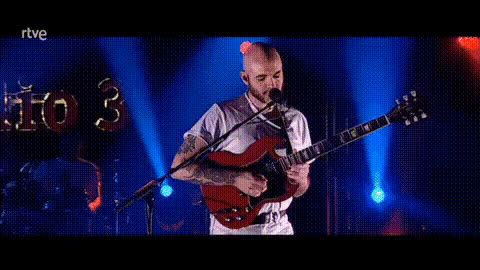
Girl Playing One by Metallica on Guitar

face-swap

1 clip
8 uses

Any aspect ratio

Tags

music video

Girl Playing “One” by Metallica on Guitar – Face Swap Video Template

Overview

This template turns a performance of Metallica’s “One” into a customizable, face-swapped guitar video you can repurpose for content, marketing, or fun. Built on Magic Hour’s AI Face Swap technology, it lets you replace the guitarist’s face with your own, a client, a character, or anyone else—while keeping the original performance, timing, and expression.

Use it to:

  • Make short-form content for TikTok, Instagram Reels, or YouTube Shorts
  • Create personalized fan videos or gifts for metal and guitar lovers
  • Prototype music video ideas for campaigns or product launches
  • Generate eye-catching clips for brand pages, bands, or creator profiles

This template is built with Magic Hour’s Face Swap Video workflow, so you can remix it in a few clicks and adapt it to your own use case.

Why “One” by Metallica?

“One” is one of Metallica’s most iconic tracks, originally released on the 1988 album …And Justice for All. It’s widely cited as a milestone in metal guitar playing thanks to its dynamic structure and layered guitar work:

  • Clean arpeggios and melodic intro: Great for visually readable fretwork and emotional build-up
  • Gradual intensification: The song moves from ballad-like sections to aggressive riffs and double-time parts
  • Recognizable riffs and solos: Even non-musicians often recognize the main themes and structure

Because the guitar lines are so recognizable, face-swapped performances of “One” are instantly understandable and highly shareable. This makes the template a strong starting point for meme content, performance edits, or branded “hero” clips.

What This Template Does

  • High-quality face swap on a guitar performance
    The template uses a pre-recorded video of a girl playing “One” on guitar, then applies AI-driven facial replacement so your chosen face matches the angle, motion, and expressions of the player while preserving the original performance.
  • Drop-in customization
    Swap in your own headshot, a client photo, a character generated with tools like the AI Character Generator, or even stylized avatars from the Avatar Generator.
  • Creator- and brand-friendly output
    Ideal for:
    • Music channels and guitar educators
    • Bands promoting tours, singles, or merch
    • Agencies creating fast-turn social content with a rock/metal angle
    • Founders and marketers who want a distinct “signature” clip

How to Remix This Template in Magic Hour

You can use this template as-is, or as a starting point to build your own custom face swap performance video. Here’s a practical workflow:

  1. Start from the Face Swap Video tool
    Open Face Swap Video. This is the core workflow used behind this template.
  2. Upload or select your performance video
    Use the “Girl Playing ‘One’ by Metallica on Guitar” video as your base, or upload your own performance (e.g., different song, different camera angle). For more stylized or animated input, you could first generate content via:
    • Image to Video – turn a still guitarist image into a short video
    • Video to Video – stylize or transform an existing guitar clip before face swapping
    • AI Talking Photo – for simpler, talking-head-style performance riffs or commentary
  3. Prepare your face source
    For best results, use:
    • A clear, front-facing image with good lighting
    • Minimal obstructions (no heavy sunglasses or full-face masks)
    • High-resolution files (you can enhance older photos with the AI Image Upscaler or Old Photo Restoration)
    If you need a face from scratch (for characters, mascots, etc.), generate one using the AI Face Generator.
  4. Run the face swap
    Apply your chosen face to the performance video with the Face Swap pipeline. The system automatically handles tracking, alignment, and blending while preserving the original guitarist’s body and hand movements.
  5. Refine the look
    After generating your first pass, you can:
  6. Export and repurpose
    Render your final video, then:

Advanced Remix Ideas for Creators & Marketers

  • Multi-face campaign variants
    Generate multiple versions featuring different faces (band members, influencers, brand characters) and A/B test performance in paid or organic campaigns.
  • Teaching or breakdown content
    Overlay on-screen notation or commentary in your editor of choice, then stack with:
    • Auto Subtitle Generator to add captions for accessibility and watch-time boost
    • Text to Video for quick intro/outro explainer segments (e.g., “How to play the intro riff to ‘One’”)
  • Stylized or genre-bending edits
    Transform the video style with Video to Video or create parallel “universes”:
  • Branded personas and mascots
    Use the AI Logo Generator, Animated Characters Generator, or AI Character Generator to design a recurring brand persona, then face swap that character into this template for a consistent, recognizable series.

Best Practices for High-Quality Face-Swapped Guitar Videos

  • Use clean, consistent visuals
    Avoid very low-light or heavily compressed source videos. If you’re shooting your own guitarist footage, try stable framing, clear lighting on the face, and minimal motion blur.
  • Optimize face source images
    Use sharp, in-focus faces. Improve older or low-res faces with Unblur Image and the AI Image Upscaler.
  • Align content with rights and policies
    When working with recognizable people (artists, celebrities, public figures), ensure you have the appropriate rights and permissions, especially for commercial or promotional use.
  • Pair the video with strong supporting assets
    Create accompanying thumbnails, cover art, and promo graphics using:

Who This Template Is For

  • Content creators & streamers – Add a high-impact “metal” clip to your content library without needing to play the song yourself.
  • Music educators – Create attention-grabbing intros or promo creatives for guitar lessons and courses.
  • Marketers & startup teams – Use the recognizability of “One” to prototype bold, scroll-stopping ads or social posts.
  • Bands & labels – Generate fast, customizable performance visuals for social campaigns and fan engagement initiatives.

Related Magic Hour Tools Worth Exploring

To go beyond this template and build a full, cohesive content system around it, you may also want to explore:

  • AI Voice Generator – for voiceovers or commentary explaining riffs and techniques
  • AI Voice Cloner – to maintain a consistent creator or brand voice across assets
  • Lip Sync – sync another voice performance to a face for intros, outros, and talking segments
  • Video Upscaler – upgrade older or lower-resolution guitar clips for modern platforms
  • AI Headshot Generator – create professional source faces to swap into the guitarist

Summary

The “Girl Playing ‘One’ by Metallica on Guitar” Face Swap template gives you a ready-made, high-impact performance video that you can instantly personalize with your own face or character. It’s built on Magic Hour’s Face Swap Video workflow, and it integrates seamlessly with other tools like Video to Video, AI GIF Generator, and the Thumbnail Maker to support full campaigns—from short-form clips to thumbnails and memes.

Remix it, reskin it, or use it as a reference to build your own guitar performance templates in Magic Hour’s ecosystem, and quickly ship polished, on-brand content that stands out in any feed.

More Like This