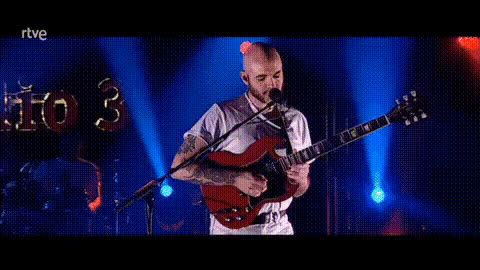
Girl Playing Crazy Train on Guitar
face-swap
Any aspect ratio
Tags
music videoGirl Playing “Crazy Train” on Guitar – Face Swap Video Template
Create your own rock guitar hero moment in seconds. This template turns the classic “Crazy Train” performance into a personalized Face Swap video, so it looks like you (or your character, client, or brand mascot) is shredding the iconic riff on stage.
What This Template Does
The “Girl Playing Crazy Train on Guitar” template is built on Magic Hour’s Face Swap engine. You start with a high-energy performance of a young guitarist playing “Crazy Train,” then automatically swap the performer’s face with your own (or any face you provide). The result is a realistic, high‑quality video that’s ideal for:
- Social content (TikTok, Instagram Reels, YouTube Shorts)
- Music marketing and fan engagement
- Creator branding and thumbnails
- Fun “rockstar” moments for friends, teams, or communities
This template is especially useful for:
- Creators & influencers who want eye‑catching, scroll‑stopping video content
- Musicians & music educators who want to illustrate songs or riffs in a memorable way
- Marketers & startups running campaigns around nostalgia, rock, or high‑energy visuals
About the Song: Ozzy Osbourne’s “Crazy Train”
“Crazy Train” is one of Ozzy Osbourne’s most recognizable songs, first released in 1980 on the album Blizzard of Ozz. It has become a staple of classic rock radio and guitar teaching curricula because of:
- Its instantly recognizable opening riff, written with guitarist Randy Rhoads
- A technically demanding solo that has been analyzed in countless lessons and masterclasses
- Frequent use in sports broadcasts, films, games, and pop culture, which keeps it culturally relevant
For musicians, “Crazy Train” is often recommended as a benchmark track for intermediate players learning palm muting, alternate picking, and phrasing. Tutorials and analyses from guitar educators and professionals break down its riffs and solo section for structured practice.
The Guitar Solo & Performance Appeal
The guitar solo in “Crazy Train” is a key reason the song is so enduring among players and fans. It combines:
- Fast scalar runs and arpeggios
- Distinctive phrasing and bends
- Memorable melodic motifs rather than pure speed for its own sake
Modern virtuosos and online guitar educators frequently revisit the solo, creating rearrangements, “shred” versions, and detailed breakdowns that highlight its nuances and timing quirks. This makes it a compelling visual performance piece: even non‑musicians instantly recognize that something technically impressive is happening on screen.
By pairing this iconic solo and riff with Face Swap, the template lets you step into that role visually—even if you’re not yet at Randy Rhoads level on the instrument.
How the Face Swap Template Works
This template is powered by Magic Hour’s Face Swap technology, which uses AI to map facial features and expressions onto the performer in the video. In practice, that means:
- Your face is blended into the performance with realistic lighting and motion
- Facial expressions and head movements of the guitarist are preserved
- You don’t have to record or act yourself—the template supplies the performance
If you want to go deeper with face‑driven content, you can also explore:
- AI Face Editor – refine or stylize faces before swapping
- Face Swap GIF – create short looping reactions or memes from your rockstar moment
- Gender Swap or AI Face Generator – generate entirely new characters to star in the performance
How to Remix This Template in Magic Hour
You can use this template as‑is, or treat it as a starting point for your own variations. To create your version using Magic Hour’s Face Swap tools:
- Open the Face Swap Video creator
Go to the Face Swap Video page in Magic Hour. Choose this “Girl Playing Crazy Train on Guitar” template from the template library, or start a new Face Swap and upload a similar guitar‑performance clip if you have one. - Prepare a good source face
For best results, use:- A clear, front‑facing photo with neutral lighting
- No heavy shadows, masks, or large sunglasses
- High resolution (the higher, the better for detail)
- Apply the Face Swap
Upload your chosen face, run the swap, and preview the result. Ensure the expressions and angles look natural throughout the performance. - Extend or chain with other Magic Hour tools (optional)
To build a fuller piece of content around this video:- Turn the clip into a talking intro or outro with AI Talking Photo or Lip Sync
- Generate a rock‑themed intro/outro animation using AI Animation or Text‑to‑Video
- Upscale and sharpen for YouTube or big screens with the Video Upscaler
- Export and publish
Once you’re happy with the result, export your video and publish it to TikTok, Instagram Reels, YouTube Shorts, or wherever your audience is most active.
Ideas for Creators, Marketers, and Teams
Because this template is composable with the rest of Magic Hour, it can slot into larger content systems, not just one‑off clips:
- Personal brand building
Use your “Crazy Train” clip as a recurring intro bumper for guitar lessons, music commentaries, or tech content with a rock motif. Combine it with custom visuals from the AI Art Generator or Album Cover Generator to unify your aesthetic. - Campaigns & product launches
For startups in audio, gaming, or creator tools, a Face Swap guitar solo makes an eye‑catching “hero” asset. Chain multiple face swaps to feature different team members or community leaders in a single campaign. - Educational content
Music educators can blend the Face Swap video with on‑screen tabs, fretboard diagrams, or breakdowns. Create supplemental lesson content using the AI Image Editor to annotate fretboards, or Photo to Sketch for illustrated diagrams. - Community challenges
Run a “Be the Guitar Hero” challenge where your audience remixes the same template with their own faces. Provide the template link, then ask followers to share their version and tag your account.
Best Practices for High‑Impact Rock Videos
- Think in sequences, not single clips
Surround this guitar performance with short intros, outros, or memes made via AI GIF Generator or AI Meme Generator. That makes the content more reusable across platforms. - Polish visuals for distribution
If your source assets are older or low‑res, clean them up with:- AI Image Upscaler for thumbnails and stills
- Video Upscaler for the final guitar video
- Unblur Image to rescue soft photos used for Face Swap
- Optimize for platform formats
Create multiple aspect‑ratio versions from the same base video and use tools like Auto Subtitle Generator for accessibility and retention on social feeds. - Combine visuals with voice
Pair your “Crazy Train” performance with a voiceover using AI Voice Generator or clone your own voice for intros and CTAs with AI Voice Cloner.
Advanced Remix Paths
If you’re building more sophisticated or automated pipelines, you can extend this template further:
- Character‑driven channels
Use AI Character Generator, AI Anime Generator, or Disney‑style AI Generator to create a unique character. Then swap that character’s face into the guitar performance for a consistent “virtual artist.” - Branded visual systems
Generate matching cover art, logos, and thumbnails for the series with: - Storytelling & worldbuilding
If you’re turning this into part of a narrative universe (for example, a fictional band or game world), you can generate supporting visuals with tools like Dark Fantasy AI, Fantasy Map Generator, or Comic Book Generator.
Why Use This Template Instead of Filming Yourself?
For many creators and teams, this template is more efficient than a full live shoot:
- No need for advanced guitar skills – the performance is captured for you
- No studio, lighting, or camera setup – you just supply a face image
- Consistency at scale – easily generate multiple variations for A/B tests, different regions, or different personas
- Faster iteration – you can test concepts rapidly before committing to a full production
Next Steps
To get started:
- Open the Face Swap Video creator in Magic Hour.
- Select the “Girl Playing Crazy Train on Guitar” template (or a similar performance clip).
- Upload your face (or a generated/edited one) and run the swap.
- Optionally enhance, extend, or stylize using the other Magic Hour tools linked above.
- Export and publish your rock performance wherever your audience lives.
Use this template as a plug‑and‑play asset, or as a building block in a larger AI‑assisted content pipeline. Either way, it gives you a fast, convincing way to put yourself—or your brand—on stage for one of rock’s most iconic guitar tracks.