"Oh baby baby" - Britney Spears
face-swap
Any aspect ratio
Tags
music video“…Baby One More Time” – Britney Spears AI Face Swap Video Template
Turn the Classic Britney Video Into Your Own Performance
This template lets you drop your own face into an homage to Britney Spears’ “…Baby One More Time” era using Magic Hour’s AI Face Swap technology. In a few clicks, you can generate a high‑quality video where it looks like you are starring in an iconic late‑90s pop video – ideal for social campaigns, nostalgia‑driven content, fan tributes, or brand experiments.
The template is built on Magic Hour’s Face Swap Video workflow, so you don’t need editing skills, motion tracking, or VFX experience. Just upload a face photo, apply the template, and export a share‑ready video.
What This Template Does
- AI face replacement: Replaces the original performer’s face in the video with your own (or any photo you provide) while preserving expressions, lighting, and head motion.
- High‑quality output: Uses Magic Hour’s production‑grade models to keep skin texture, makeup, camera motion, and overall cinematography intact.
- Creator‑friendly: Designed for quick experiments, A/B tests, memes, and storytelling concepts that lean on 90s pop nostalgia.
- Remixable: You can duplicate this template, swap in different source faces, change the target clip, or chain it with other Magic Hour tools.
For more flexible experiments beyond this specific video, you can use:
- Face Swap – general‑purpose face swapping for images and videos.
- Face Swap GIF – turn GIFs into fast‑looping meme content.
- AI Face Editor – refine facial features before or after your swap.
About “…Baby One More Time” (for Context & Inspiration)
Britney Spears’ debut single “…Baby One More Time” was released in 1998 and quickly became a global pop landmark. Written by Max Martin and produced by Martin and Rami, it topped charts in countries including the US, UK, and across Europe, and is widely cited in music journalism (e.g., Rolling Stone, Billboard, and academic studies on late‑90s teen pop) as one of the defining tracks of the era.
The song’s themes center on teenage heartbreak and longing for reconciliation after a breakup. The memorable line “Hit me baby one more time” is often misunderstood; interview retrospectives have clarified that it refers to “hit me up” / “call me again,” expressing emotional frustration rather than physical violence.
The Original Music Video: Why It Works So Well Visually
The official video, directed by Nigel Dick, helped cement Britney’s image as a pop icon. Key elements that make it ideal for AI face swapping and creative remixes include:
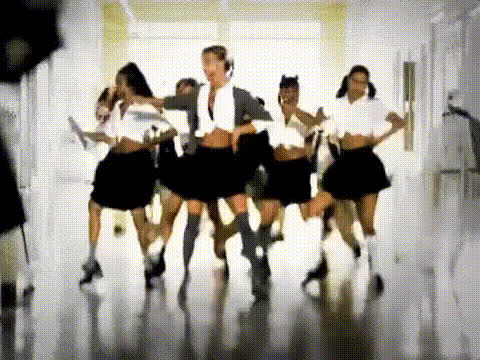
- Strong visual identity: The school hallway choreography, gymnasium dance scenes, and school‑uniform styling became instantly recognizable cultural references.
- Expressive close‑ups: Frequent face‑focused shots, eye contact with the camera, and lip‑sync moments work particularly well with AI face swap pipelines.
- Rhythmic editing: Clear beat‑driven cuts make it easy to sync new faces, memes, or narrative overlays with the existing structure.
When you use this Magic Hour template, you’re effectively dropping yourself into a visual format that has already proven to be engaging, shareable, and instantly legible to global audiences.
How to Use This Template in Magic Hour
- Open the Face Swap Video flow
Start from the Face Swap Video page. Select the “…Baby One More Time” template from the available options. - Upload your face photo
Use a clear, front‑facing image of the person you want in the video. For the best results:- Good, even lighting (avoid heavy shadows or color tints).
- Neutral or slight expression (smile is fine; avoid extreme expressions).
- Face not obstructed by large sunglasses, masks, or heavy filters.
- Generate your swapped video
Run the face swap. Magic Hour will automatically track the performance and map your face onto the original performer, keeping lip movement, head turns, and emotion aligned with the music. - Review and iterate
Watch the result and, if needed, try a different source photo (e.g., different angle, makeup style, or lighting) to refine realism or stylization. - Export and share
Download your final video and post it to TikTok, Instagram Reels, YouTube Shorts, or wherever your audience is.
How to Remix This Template Into Your Own Version
You can treat this template as a starting point and build your own variant tailored to your brand or project:
- Swap the target footage: Replace the “…Baby One More Time”‑style video with any other performance footage (for example, a dance clip you’ve shot yourself or licensed stock footage).
- Create a full campaign: Generate multiple versions with different faces (team members, influencers, fictional characters) and test which combinations drive the highest engagement.
- Combine tools:
- Use AI Image Generator or AI Photo Generator to create stylized faces or characters, then feed those into the Face Swap template.
- Turn a static promo image into motion with Image to Video, and then apply Face Swap Video on top.
- For animated or stylized looks, generate source clips via Animation or Video to Video and then perform face swaps on the output.
Use Cases for Creators, Marketers, and Builders
- Content creators: Make nostalgia‑driven skits, fan tributes, or “what if I was in this video?” content that stands out in feeds.
- Marketers & brands: Run themed campaigns around 90s pop culture, A/B test multiple “faces” on a single concept, or localize content with regional ambassadors.
- Product & startup teams: Prototype new ideas quickly: personalized onboarding videos, interactive fan experiences, or proof‑of‑concepts for music and entertainment partnerships.
- Educators & analysts: Demonstrate media synthesis, generative AI, and digital identity concepts using a globally recognized reference point.
Best Practices for High‑Quality Face Swap Results
- Pick strong source photos: Higher resolution, sharp focus, and natural lighting significantly improve realism.
- Match vibe and styling where possible: If you want a more convincing look, use photos with similar makeup, angle, or hairstyle to the target footage.
- Mind expression extremes: Extremely exaggerated expressions in the source photo can reduce quality; let the video drive the emotion.
- Respect rights & likenesses: Always ensure you have permission to use the faces and footage you’re working with, especially for commercial or public campaigns.
Going Beyond Face Swap: Add Voice, Lip Sync, and More
If you want to push the concept even further, you can combine this template with other Magic Hour capabilities:
- Lip Sync – match mouth movements to custom audio (e.g., voiceovers, fan covers, local language versions).
- AI Talking Photo – turn album art or promotional stills into speaking or singing characters.
- AI Voice Cloner and AI Voice Generator – prototype personalized or character voices to pair with your swapped video.
- Video Upscaler – enhance resolution for better clarity when you plan to distribute on large screens or high‑res channels.
Cultural Impact & Why This Template Resonates
“…Baby One More Time” is consistently referenced in lists of the most influential pop songs of all time and has been covered or reinterpreted across genres, from rock to jazz. The school‑hallway choreography and uniform look have been recreated in TV shows, films, and viral videos for over two decades. By using this template, you are tapping into:
- Instant recognition: Viewers understand the reference in seconds, making it ideal for short‑form platforms where attention spans are limited.
- Shared nostalgia: The late‑90s aesthetic activates a strong emotional response in audiences who grew up with MTV, CD singles, and early internet pop culture.
- Memetic flexibility: The structure of the video supports parody, commentary, and remix culture while still being rooted in a familiar format.
Related Magic Hour Tools Worth Exploring
If this template fits your workflow, you may also find these tools helpful:
- AI GIF Generator – cut your favorite moments into looping GIFs for reactions and memes.
- Thumbnail Maker – design YouTube or TikTok thumbnails featuring your swapped face.
- Avatar Generator – create stylized avatars that you can later insert into music or dance videos.
- AI Image Editor and Image Background Remover – refine promo imagery around your video content.
Try the “…Baby One More Time” Template
Start with the “…Baby One More Time” face swap template on Face Swap Video, upload your face, and generate your own version of a pop classic. From there, remix it, chain it with lip sync, voice, or animation tools, and use Magic Hour as your sandbox for fast, production‑quality experiments in AI‑driven video.