Aristocratic Power
- Model
- GPT Image 2
- Image
- 1024 × 1024 px
Prompt
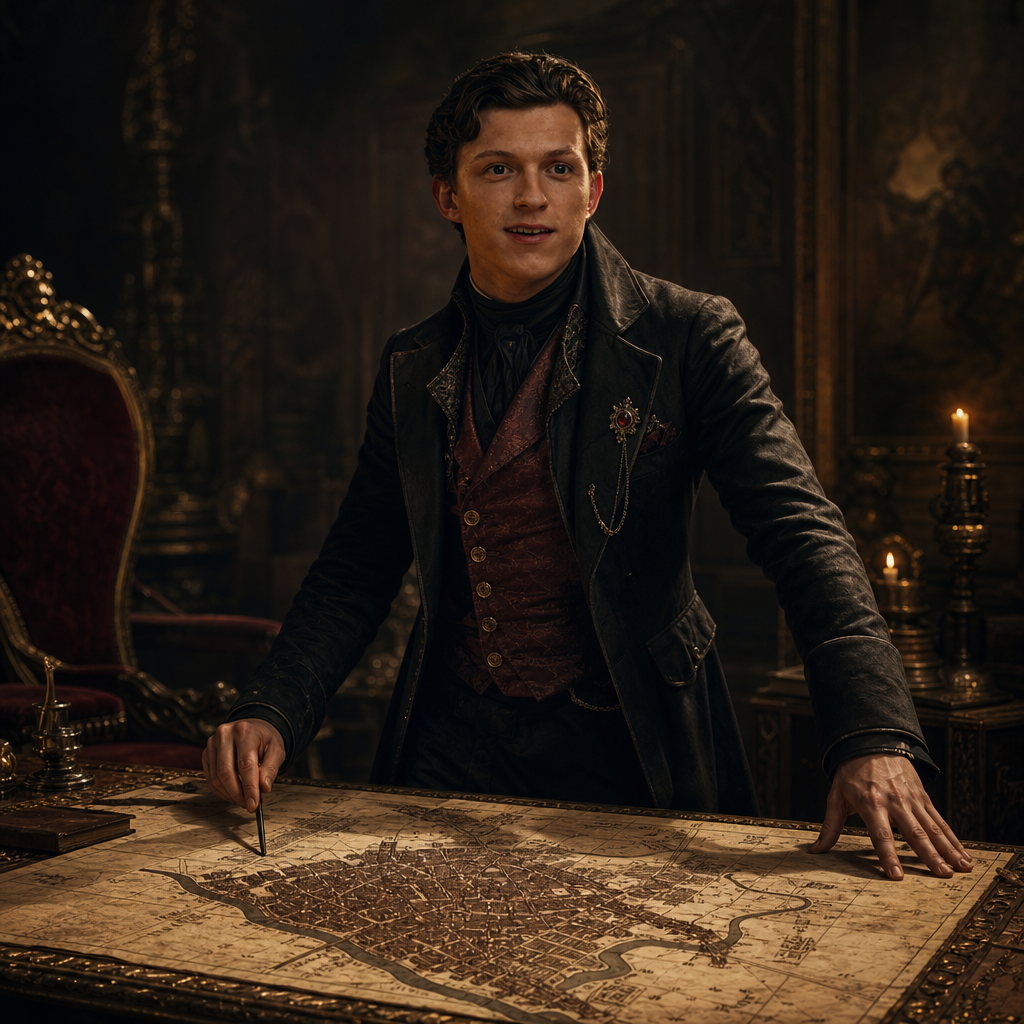
A cinematic painterly-realism scene featuring the subject as a wealthy nobleman in an elegant, historically inspired dark Count’s attire, standing over an ornate detailed map of a sprawling city laid across a richly decorated table. The subject maintains a commanding posture, with cold, calculating eyes and a restrained expression suggesting intelligence, authority, and subtle moral ambiguity. Use dramatic power lighting from above and slightly to one side, creating strong sculptural highlights across the face, tailored clothing, hands, map, and ornate table while allowing portions of the room to disappear into deep shadow. Emphasize rich charcoal blacks, deep burgundy, aged parchment, muted gold, and warm brown tones, with restrained saturation and refined chiaroscuro. The environment should feel aristocratic, mysterious, and politically charged, with subtle period architectural details fading into the background. Preserve realistic facial anatomy, natural skin texture, intricate fabric construction, metallic accents, parchment texture, and fine map details. Use cinematic depth, atmospheric shadow, controlled film grain, painterly brushwork blended with realistic photographic detail, and a sophisticated historical-drama aesthetic. Wide cinematic composition with the subject dominant in frame and the city map clearly visible as a narrative focal point, 16:9 aspect ratio.
Any aspect ratio
Overview
Step into the immersive world of aristocratic grandeur with the "Aristocratic Power" template. Designed for the AI Image Editor, this template utilizes the gpt-image-2 model to capture a dramatic and painterly-realism scene. Your subject will transform into a noble figure presiding over a city map, bringing sophistication and a hint of mystery to your images.
What It Does
The "Aristocratic Power" template generates cinematic images portraying your subject as a commanding nobleman. With detailed historical attire, dramatic lighting, and a strategic pose, this template emphasizes authority and sophistication. The use of the AI Image Editor ensures rich texture, intricate fabric and map details, blending painterly with realistic photographic effects.
Who It's For
This template is ideal for creative professionals, historians, filmmakers, and artists looking to evoke a classic yet vibrant scene. Whether you are developing historical content or creating marketing imagery with an air of mystery and power, the "Aristocratic Power" template delivers excellent results.
Summary
Explore historical narratives or enrich character designs with the "Aristocratic Power" template. It's perfect for projects requiring a blend of historical realism with a cinematic flair, transforming scenes into dramatic stories at the click of a button using the AI Image Editor.
How to Use
Choose Your Template

Customize the Scene

Generate and Download

Use Cases
Historical Reenactments
- Create promotional material for historical films.
- Design book covers for period novels.
Character Concept Art
- Enhance storytelling with richly textured visuals.
- Express character attributes through attire and environment.
Marketing and Advertising
- Elevate brand imagery with sophisticated themes.
- Develop dramatic advertising material with an air of authority.
Best Practices
Focus on Lighting
Utilize dramatic lighting settings to highlight textures and create depth, ensuring the ambiance matches the theme.Select High-Resolution Images
Start with quality source images to allow the model to achieve the best detail and depth in the final product.Emphasize Historical Accuracy
Incorporate accurate historical and architectural details to enhance realism and believability of the scene.