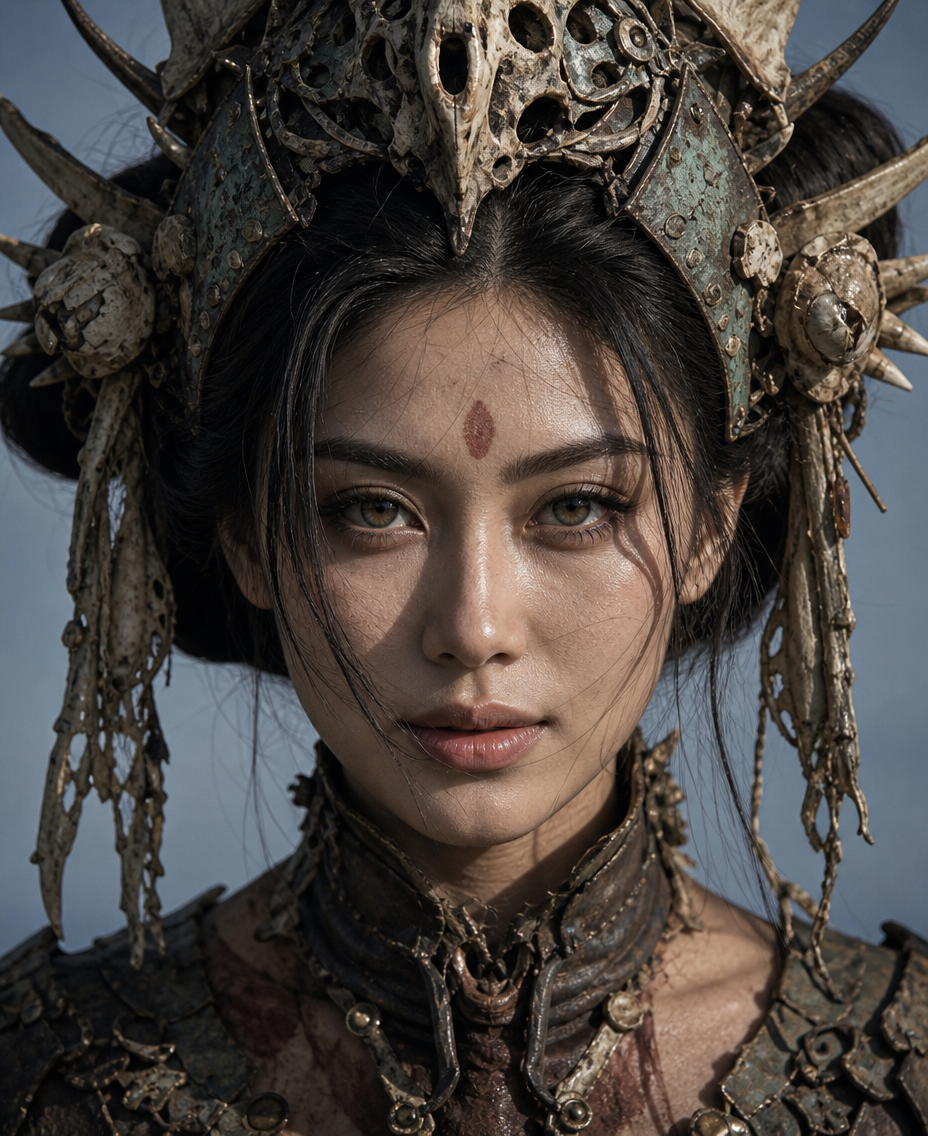
Bone Crown Cinematic
- Model
- GPT Image 2
- Image
- 928 × 1136 px
Prompt
Ultra-realistic live-action fantasy portrait of an adult East Asian subject, wearing practical aged headpieces, weathered props, and subtle prosthetic makeup. 16:9 horizontal, eye-level head-and-shoulders extreme close-up, 85mm portrait perspective, centered subject, face occupying ~60% of frame, shoulders cropped at bottom, oversized crown extending sideways and partially cropped by the top edge. Subject slightly lowers the head with chin tucked, staring directly into camera with realistic gray-green irises, restrained expression, slightly lowered upper eyelids, subtle lower-eyelid tension, thick straight black brows, narrowly parted lips without visible teeth, and natural facial asymmetry. Preserve realistic narrow facial structure with defined cheekbones, jawline, and masseter; no sharp V-shaped chin. Natural pale skin with visible pores, fine facial hair, under-eye texture, slight redness around nostrils, subtle uneven pigmentation, and realistic skin sheen. Black center-parted hair forms large side buns with varied strands, natural clumping, flyaways, frizz, gravity, and a few loose strands crossing the forehead and nose without covering the eyes. Keep an irregular dark-red oval mark centered on the forehead. Frame the head with symmetrical large organic bone-and-armor crowns combining real animal bone, dried shell, and oxidized aged copper, with outward-pointing spikes and worn hanging fragments. Show realistic joints, weight, weathering, stains, and damage. Neck and shoulders feature practical prosthetic structures combining aged copper plates, translucent keratin, and skin tissue, with visible seams, pressure marks, and mild irritation; never liquid metal. Directional natural sunlight from the upper right creates defined highlights on the nose, cheek, and crown, with fine hair shadows across the face. Background is a simple gray-blue sky with compressed depth of field. Maximum sharpness on eyes, brows, nose bridge, and lips; moderate detail at skin-crown transitions; progressively softer hair tips, bone spikes, and background. Cool restrained cinematic color grade, natural dynamic range, extremely subtle film grain. Avoid CGI/game-cutscene aesthetics, plastic skin, perfect digital symmetry, oversized glassy eyes, liquid-metal elements, repetitive hair strands, global HDR sharpening, and excessive skin smoothing.
Any aspect ratio
Overview
Explore the "Bone Crown Cinematic" AI Image Editor template designed to create ultra-realistic fantasy portraits. This template leverages the capabilities of the GPT Image 2 model, delivering intricate details and a rich cinematic feel. The portrait is a stunning 16:9 horizontal composition featuring an East Asian subject adorned with organic bone-and-armor crowns, set against a simple gray-blue sky.
What It Does
This template transforms any image into a high-definition fantasy portrait, focusing on detailed facial features and worn crowns made of animal bones and aged metal. The AI Image Editor provides precise control over lighting and textural details like skin pores and hair flyaways, achieving a lifelike film-quality result.
Who It's For
The "Bone Crown Cinematic" template is perfect for filmmakers, digital artists, and photographers looking to create cinematic portraits rich in detail and authenticity. Whether you're working on fantasy films or need standout portraits for promotional materials, this template offers the tools you need for visually impactful storytelling. Discover more possibilities using our AI Talking Photo tool to add dynamic elements.
Summary
This AI Image Editor template offers a robust solution for creating ultra-realistic fantasy images with detailed crown and portrait elements. It focuses on realistic textures, subtle color grading, and high dynamic range to produce a cinematic effect. For anyone in the creative industry, our AI Headshot Generator can further enhance your portraits with professional-grade quality.
How to Use
Choose Template

Customize Inputs

Generate Image

Use Cases
Fantasy Filmmaking
- Enhance character depth with detailed crowns and props
- Achieve consistent aesthetic across film shoots
Digital Art Illustrations
- Explore new artistic styles
- Add layers of realism to digital paintings
Photography Enhancements
- Highlight subtle facial textures
- Incorporate complex lighting setups
Best Practices
Focus on Lighting
Carefully balance your lighting inputs to enhance the realistic appearance of the subject's facial features and crown.Detail-Oriented Editing
Pay attention to minor details such as pores and flyaway hairs for maximum realism.Consider Backgrounds
Ensure the background complements the portrait to maintain focus on the subject.