High-End TV Interview
- Model
- Nano Banana 2
- Image
- 768 × 1365 px
Prompt
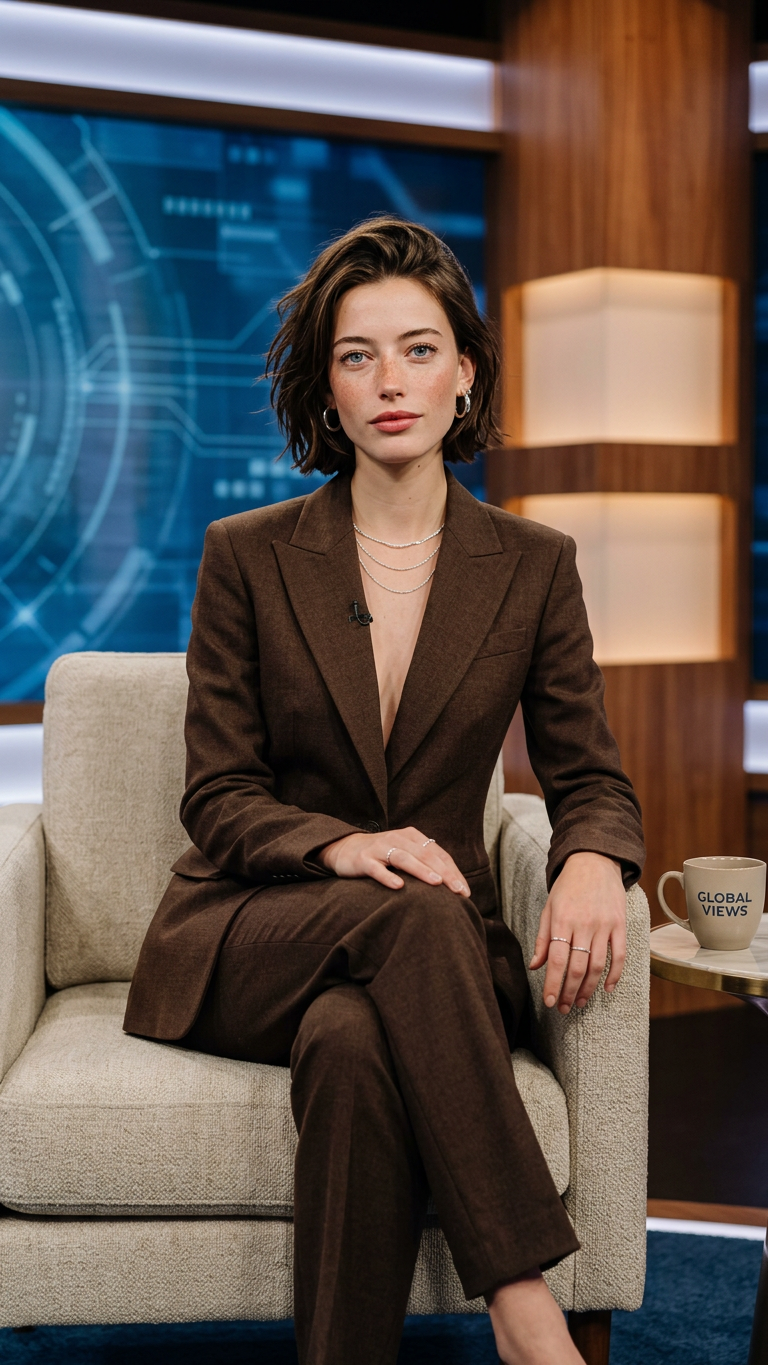
Based on the subject in the uploaded image, recreate a new image while preserving their facial features, overall appearance, temperament, and hairstyle. The scene is set in a professional indoor television interview studio. The subject is seated on a light-colored single sofa, with the body slightly turned to one side. The legs are elegantly crossed, one hand resting naturally on the knee, and the other lightly placed on the armrest. The overall posture is composed, confident, and relaxed. The background features a modern TV studio setup, including a blue-toned abstract, tech-inspired screen and warm-toned wooden wall structures, creating a clear sense of layering and depth. Lighting is soft studio lighting, with a key light coming from the front upper angle, combined with side fill light and background rim light, creating a bright, refined, and high-end visual quality. The skin appears smooth and subtly luminous. The subject is wearing a dark brown tailored suit set, designed with a deep V-neck cut, featuring clean and elevated lines. Accessories include layered silver necklaces, earrings, and rings, all with a delicate shine that enhances the overall texture and sophistication. Next to the subject, there is a small interview table and a branded coffee cup as decorative elements, reinforcing the authentic interview setting. The composition is a medium to slightly full-body shot, with the camera positioned slightly below eye level to emphasize the subject’s presence and aura. The background is slightly blurred with natural depth of field. The overall color balance is harmonious, and the image is clean, polished, and highly commercial, presenting a high-end interview program visual style.
Any aspect ratio
Overview
Craft an impeccable interview visual with the High-End TV Interview template. Utilizing the AI Image Editor, this template recreates your images with precise attention to detail and aesthetic fidelity, placing subjects in a refined, professional studio setting.
What It Does
The template processes uploaded images to generate a sophisticated TV interview scene. It meticulously retains your subject's facial features and overall appearance while placing them in a modern studio setting. The subject is adorned in a tailored suit, surrounded by a tech-inspired background, with professional lighting enhancing their presence.
Who It's For
This template is perfect for media professionals, social media influencers, and anyone involved in content creation that requires high-quality interview visuals. It's also great for mock interview setups for Instagram Reels or TikTok videos, offering a professional touch to personal branding projects.
Summary
Elevate your interview visuals with the High-End TV Interview template. Whether for marketing, social media, or digital content creation, this template ensures your images convey authority, professionalism, and sophistication, supported by the robust capabilities of AI Image Generator technology.
How to Use
Choose Your Template

Customize Your Image

Generate Your Image

Use Cases
Social Media Branding
- Create polished visuals for LinkedIn profiles
- Boost aesthetics of Instagram and TikTok content
Professional Portfolio
- Ideal for media professionals and models seeking sleek visuals
Corporate Presentations
- Use in presentations where impactful visuals are key
Best Practices
Quality Uploads
For best results, choose high-resolution images with clear detail to ensure the recreated subject is crisp and detailed.Detail Orientation
Adjust the initial image for precise facial features and ensure suitable lighting to complement the studio setting.Styling Consistency
Accentuate the final image with consistent wardrobe styling and accessory choices to maintain the professional tone.