Crown of Frost
- Model
- Nano Banana 2
- Image
- 1856 × 2304 px
Prompt
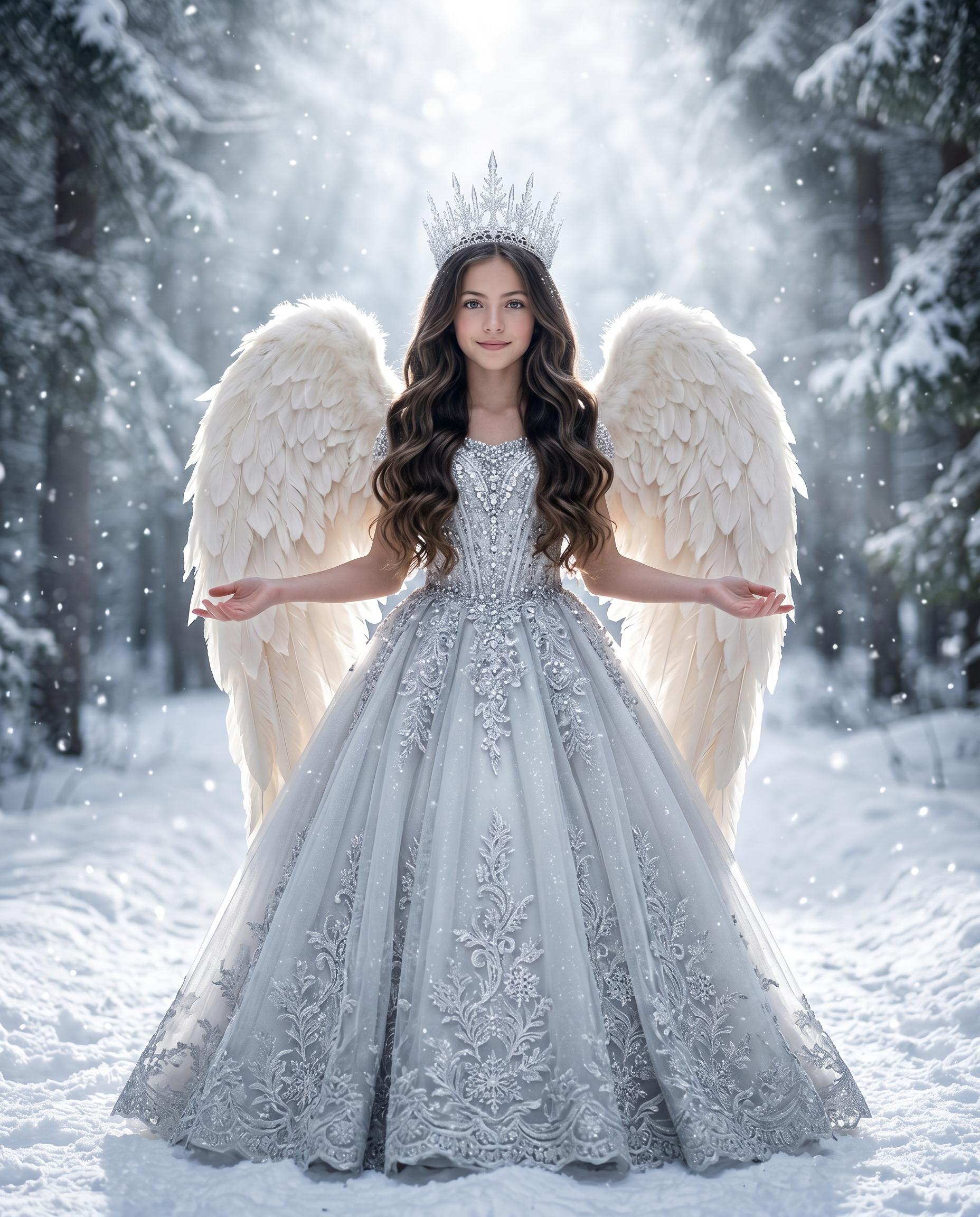
Create a full-body portrait of an angelic young girl standing centered on a snowy forest path, fantasy realism, cinematic composition, face matching the reference image, aspect ratio 4:5. A girl around 6–10 years old with the same facial features as the reference image, natural luminous skin, gentle smile, and expressive eyes. Long dark-brown hair parted in the middle, styled in thick, glossy waist-length waves. Crown: She wears the crown — a tall, delicate silver crystal tiara with intricate snowflake geometry. The crown is composed of thin metallic branches rising upward into pointed crystal-like spikes, resembling frozen icicles and snowflakes. The structure is airy and symmetrical, with small reflective gemstone details that catch the backlight. The crown appears elegant, lightweight, and ice-inspired rather than heavy royal metal. Wings: Large soft ivory-white angel wings, positioned naturally from the shoulder blades. The wings are rounded and plush near the top, with dense layered feather structure. The inner feathers are short, fluffy down feathers, transitioning into medium-length contour feathers, and finally into long, gently curved primary feathers at the lower edges. The wings extend outward slightly from the body and curve downward to about waist-to-skirt level, not overly spread, maintaining a calm resting posture. Feather texture appears soft, velvety, and realistic, with subtle cool white rim lighting along the feather edges. She wears an ornate winter ballgown in frosty silver, pale grey, and ice white. The Gown: A magnificent, floor-length ballgown in frosty shades of silver, platinum, and pale grey. The Bodice: It features a sheer illusion neckline that blends into a fitted bodice. The entire chest and waist area is heavily encrusted with sparkling silver crystals, beads, and complex metallic embroidery. The Skirt: The voluminous, A-line skirt appears to be made from layers of sheer fabric, likely tulle or organza. It is covered in intricate, symmetrical silver lace appliques and embroidery that look like spreading frost patterns, delicate vines, and snowflakes cascading down to the structured hem. Pose: Standing upright facing camera, centered composition, arms slightly extended outward, elbows gently bent, palms facing upward in a calm ethereal gesture. Environment: Snowy pathway in a dense winter pine forest, snow-covered evergreen trees forming a natural corridor, ground fully blanketed in snow. Atmosphere: Gentle snowfall, floating snow particles in foreground and background, faint winter mist, subtle stylized snowflakes. Lighting: Dramatic cool white ethereal backlight from the top center behind the subject creating a radiant halo effect, icy volumetric light rays passing through winter mist, soft white rim lighting outlining hair, wings, and dress, gentle frontal fill light illuminating the face, snow reflecting cool white light, sparkling white highlights scattered across the snow surface, subtle luminous snow reflections, crisp winter glow, no warm tones, clean frosty illumination, cinematic cold-light atmosphere. Depth of field: Subject in sharp focus, background trees softly blurred, atmospheric perspective, snow particle bokeh. Color grading: Cool monochromatic palette of ice white, silver, pale grey, and soft cyan tones, natural warm skin tones preserved. Style: Fantasy realism, cinematic lighting, ultra-detailed textures, photorealistic rendering, symmetrical composition, magical winter atmosphere, high dynamic range, dress, face, and wings rendered in ultra-high 4K detail.
Any aspect ratio
Overview
The Crown of Frost template in Magic Hour's AI Image Editor creates a stunning, cinematic portrait featuring a young girl in a snowy forest setting. Powered by the nano-banana-2 model, this template blends fantasy realism with photorealistic detail, capturing the magic of winter in a high-resolution 4K image.
What It Does
With this template, users can generate an exquisite portrait of an angelic young girl in a winter wonderland. It focuses on maintaining the facial likeness to a reference image, while adding fantastical elements such as a crystal tiara and angelic wings. The template expertly combines an ornate silver gown, detailed textures, and a dramatic lighting setup to bring the composition to life.
Who It's For
"Crown of Frost" is designed for creators in the fields of fantasy art, visual storytelling, and character design. Whether you're crafting assets for a gaming cinematics project, producing scenes for a fantasy film, or exploring mood boards, this template offers the tools to innovate with high-impact visuals.
Summary
Employing advanced composition techniques and sophisticated textures, "Crown of Frost" uses the nano-banana-2 model to produce striking visual effects. From the reflective snowflake crown to the serene snowy forest environment, it is an ideal tool for those seeking to amplify the realism and fantasy elements in their visual projects.
How-To Structure
Choose Your Template

Customize Your Inputs

Generate Your Image

Use Cases
Fantasy Art Projects
- Detailed character illustrations
- Scene enhancement for novels
- Conceptual art for game development
Storyboarding for Visual Narratives
- Film pre-production storyboards
- Animated series concept art
- Visual storytelling for ad campaigns
Promotional and Marketing Materials
- Unique ad visuals
- Social media content
- Impressive cover art
Best Practices
Select a High-Quality Reference Image
Choose a clear, well-lit image for the reference. This ensures the new image maintains facial fidelity and blends naturally with the template's fantasy elements.Use Descriptive Prompts
Detail specific elements like gown texture and environmental lighting in your prompt to fully customize the artwork's outcome.Opt for High-Resolution Downloads
Always download in the highest resolution options provided to retain all intricate details and textures, crucial for professional outputs.