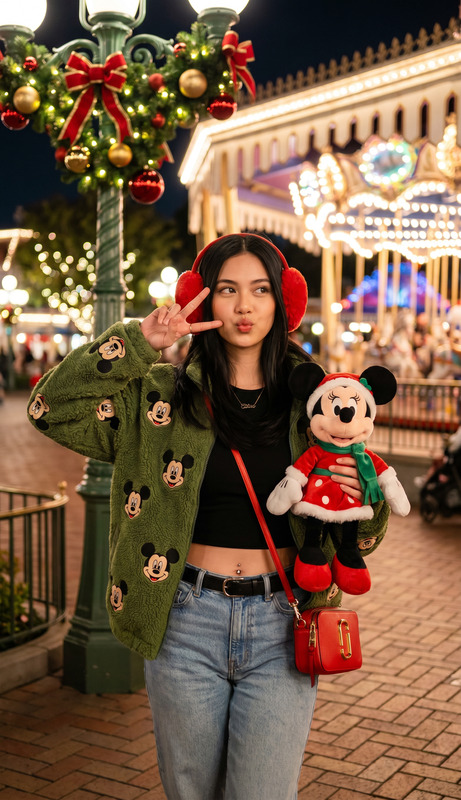
Christmas Theme Park Minnie Portrait

Christmas Theme Park Minnie Portrait

ai-image-editor

1 clip
10 uses

Any aspect ratio

Prompt

Subject centered in festive nighttime theme park character store during Christmas. Holding plush Minnie Mouse in Santa outfit, making peace sign and cute kiss pose. Wearing black crop top with navel piercing and high-waisted light blue jeans. Eye-level waist-up Fujifilm-style portrait, shallow depth of field, brick ground, warm bokeh lights, green lamppost with Christmas garlands and twinkling lights, joyful cinematic holiday atmosphere, ultra-detailed.

AI Image Editor Template: Turn Any Image Into a Polished, On‑Brand Visual in Minutes

Use this template as a starting point to quickly clean up, enhance, and repurpose any image with the AI Image Editor. Whether you’re a marketer, founder, or designer moving fast, this flow is built to help you go from “rough asset” to “publish‑ready creative” without opening Photoshop.


What this template is for

This AI Image Editor–based template is ideal when you need to:

  • Remove distracting objects, people, or text from a photo
  • Replace or blur backgrounds to match your brand or campaign
  • Fix faces, lighting, or composition in user‑generated content
  • Create multiple on‑brand variants of a single visual (for ads, landing pages, thumbnails)
  • Clean up images for product launches, pitch decks, and social posts

If you regularly repurpose content across channels, this template helps you standardize your workflow and keep visuals consistent.


How this template works in Magic Hour

This template is built on top of the AI Image Editor, which combines:

  • Inpainting & object removal – erase unwanted elements and let AI realistically fill the gap
  • Background editing – swap, blur, or simplify backgrounds while keeping the subject intact
  • Style & color adjustments – align tone, contrast, and colors with your brand or campaign
  • Detail enhancement – sharpen soft areas, restore clarity, and make images look more professional

Because it’s template‑based, you can reuse the same flow to keep a consistent look across campaigns and teams.


How to remix this template in Magic Hour

You can easily create your own version of this template by remixing it in Magic Hour:

  1. Duplicate the template
    Start from this AI Image Editor template and duplicate it in your Magic Hour workspace. This gives you a safe sandbox to experiment without affecting the original.

  2. Swap in your own images

    • Upload product shots, team photos, UGC, screenshots, or mockups
    • For low‑res assets, run them through the AI Image Upscaler first so edits stay crisp
  3. Define your typical edits as a repeatable flow
    Common examples you can bake into your remix:

    • Clean product shots: remove backgrounds and stray objects, then export on white or brand color using Image Background Remover in combination with the editor
    • Social content cleanup: remove watermarks (via the Watermark Remover), polish the main subject, and standardize aspect ratios for your channels
    • UGC enhancement: fix lighting, sharpen faces, and remove clutter in the background so testimonials and community photos look professional
  4. Add complementary AI tools to your flow (optional)
    Depending on your use case, you can chain other Magic Hour tools around this template:

  5. Save your remix as a reusable template
    Once your edits reflect your brand standards (lighting, background, overall tone), save it as your own template. Your team can then apply the same flow to any new image with minimal manual work.


Example workflows using this template

Below are practical, repeatable workflows you can implement by remixing this template:

1. High‑conversion ad creatives

2. Founder / team headshots at scale

  • Create or refine portraits with AI Headshot Generator or AI Selfie Generator
  • Use this template to:
    • Standardize backgrounds (solid brand color, office environment, gradient)
    • Adjust color balance and contrast for consistency
    • Lightly retouch and crop to your preferred framing
  • Ideal for startup websites, pitch decks, and LinkedIn updates

3. Product & e‑commerce imagery

  • Remove clutter and backgrounds via Image Background Remover
  • Use the AI Image Editor to:
    • Place products on neutral, seasonal, or campaign‑themed backgrounds
    • Align lighting and colors across your catalog
    • Prepare images for marketplaces and ads
  • For lifestyle shots, combine with AI Clothes Changer to swap outfits and then refine visuals with this template

Going from static image to motion

Once your image is polished in this template, you can quickly extend it into video and animated content:

This lets you start with one strong, edited visual and branch out into an entire content set.


Related tools worth knowing

If you’re building a more complete creative stack around this template, these tools integrate well conceptually:


Who this template is for

This AI Image Editor template is designed for:

  • Growth & performance marketers who need on‑brand creatives at high volume
  • Founders & startup teams who don’t have full‑time design resources but still need professional visuals
  • Content creators & agencies managing multiple brands and channels
  • Developers & product teams building prototypes, internal tools, or demo visuals quickly

If you’re already working with large volumes of images, this template gives you a repeatable, auditable workflow that scales with your content needs.


How to get the most from this template

To maximize value when you remix this template:

  • Standardize your “finished” look
    Decide what a “ready to publish” image should look like (background style, contrast, color temperature). Bake that into your version of the template so anyone on your team can hit the same standard.

  • Start with the best possible input
    Run noisy or small images through Unblur Image and AI Image Upscaler before heavy editing. Better inputs give more reliable AI results.

  • Use templates as building blocks
    Pair this AI Image Editor template with video templates like Animation or Video to Video to build end‑to‑end creative pipelines.

By remixing and extending this template inside Magic Hour, you can turn a single image into a full set of polished, multi‑format assets in a fraction of the usual time.

More Like This

Insufficient credits