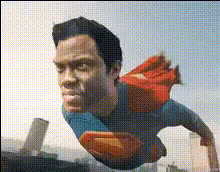
Wonder Woman Flying
face-swap
Any aspect ratio
Tags
moviesWonder Woman Flying – AI Video Face Swap Template
Step into the role of a flying superhero in seconds. The Wonder Woman Flying – Video Face Swap Template lets you place your own face (or any face you have rights to use) onto a cinematic flying heroine, powered by Magic Hour’s AI Face Swap technology.
This template is built for creators, marketers, and startup teams who want high-impact, short-form video without a full film crew. Use it for:
- Social media campaigns and brand launches
- Product promos with a “superhero saves the day” narrative
- UGC-style content and community challenges
- Pitch decks and demo videos with a memorable visual hook
What This Template Does
This template uses Magic Hour’s Face Swap Video workflow to:
- Take a source video of a flying heroine (pre-built into the template)
- Overlay a new face on the character, frame by frame
- Preserve expressions, head turns, and motion while matching lighting and perspective
- Produce a ready-to-share short video or clip for social, ads, or presentations
The underlying tech is similar to state-of-the-art research in face reenactment and deepfake-style synthesis, but packaged for creators so you can ship content, not models.
How to Remix This Template in Magic Hour
You don’t need this exact template to get the same effect. You can remix the idea in Magic Hour in a few minutes:
- Start with Face Swap Video
Go to Face Swap Video. This is the core tool behind the template and works with any compatible video clip. - Choose your “flying hero” clip
Use the built-in template clip, or upload a video where a character is:- Clearly visible from the front or 3/4 angle
- Relatively stable in frame (flying, jumping, running, etc.)
- Well lit, with minimal heavy motion blur
- AI Image Generator → then animate it via Image to Video
- Or generate a full-body hero pose via the Full Body Generator
- Upload your face (or talent’s face)
Provide a clear, front-facing photo:- Good lighting, minimal shadows
- Neutral or slight smile expression
- Face unobstructed (no large sunglasses, masks, etc.)
- AI Face Editor for small cosmetic adjustments
- AI Face Generator to create fictional or brand characters
- Run the Face Swap
Let Magic Hour handle alignment, blending, and expression mapping. The model tracks the original character’s motion and maps your chosen face onto each frame. - Enhance & repurpose (optional)
Once you have your flying-hero clip, you can:- Upscale it with Video Upscaler for sharper output
- Create vertical or thumbnail assets with the Thumbnail Maker
- Turn moments into GIFs with the AI GIF Generator
- Add auto captions with the Auto Subtitle Generator
Example Use Cases for Creators & Teams
- Marketing & Growth
Turn your founder, spokesperson, or mascot into a flying hero to:- Announce product launches (“supercharges your workflow”)
- Create scroll-stopping paid social creatives
- Run A/B tests with different faces for different regions or audiences
- Community & UGC Campaigns
Invite your users to “be the hero” by:- Letting fans submit photos for face-swapped hero clips
- Combining with Lip Sync so the hero also speaks their message
- Turning the best entries into memes via the AI Meme Generator
- Content Creators & Streamers
Use the template as:- Intro/outro sequences for YouTube or Twitch
- Short “I’m coming to the rescue” clips for announcements
- Animated channel art in combination with the Album Cover Generator or AI Logo Generator
- Product & Startup Storytelling
Use a superhero metaphor in:- Pitch videos and investor updates
- Internal product launch reels
- Onboarding flows that visually explain “we do the heavy lifting”
How This Differs from Other Magic Hour Tools
This template is specifically built on video face swapping, but can be combined with other Magic Hour products:
- Face Swap GIF – Create looping flying-hero GIFs for chats and reactions.
- AI Talking Photo – Make your hero deliver a line straight to camera.
- Text to Video – Generate a custom superhero scene from text, then face swap onto it.
- Video to Video – Stylize your flying scene (comic-book, anime, cinematic) before or after face swap.
- AI Voice Generator and AI Voice Changer – Give your hero a distinctive synthetic voice.
- AI Image Editor and Image Background Remover – Build supporting visuals, posters, and key art.
Creative Inspiration: Superhero Lore & Visual Style
While this template is inspired by classic flying superheroes, it’s flexible enough to support multiple aesthetics:
- Golden-age comic look – Combine with the Comic Book Generator for panels, speech bubbles, and retro halftone textures.
- Modern cinematic style – Use AI Art Generator or AI Background Generator to create dramatic skies, cityscapes, or cosmic backdrops to intercut with the video.
- Animated or anime hero – Generate a stylized hero look with the AI Anime Generator or Animated Characters Generator, then animate via Image to Video and face swap onto that sequence.
For general background on superhero media and tropes, resources like DC Comics’ official archives and academic work on superhero narratives in film (e.g., journals on media studies) can provide additional storytelling ideas you can then visualize with Magic Hour.
Best Practices & Ethical Notes
- Use faces you have rights to – Your own, collaborators, or properly licensed talent. Avoid impersonating real individuals without consent.
- Label synthetic content – For brands and campaigns, clearly indicate that the video uses AI face swap, to maintain trust.
- Check platform policies – Social networks and ad platforms have specific rules about AI-generated and face-swapped media. Review their guidelines before running paid campaigns.
- Respect trademarks and IP – You can create “flying hero” content without using protected logos, costumes, or brand names. Combine generic costumes, colors, and symbols generated via tools like the AI Fashion Generator or AI Outfit Generator.
Level Up Your Hero Template
Once you’re comfortable with this flying-hero face swap, you can extend the concept:
- Build a full hero identity with:
- Avatar Generator for profile pictures
- Album Cover Generator or Book Cover Generator for posters and cover art
- AI Icon Generator for logos and emblems
- Create a full storyline:
- Intro: Face-swapped hero flying in (this template)
- Dialogue scenes using Lip Sync and AI Talking Photo
- Action variations with Animation or Video to Video stylization
- Repurpose across formats:
- Shorts/Reels/TikToks from the main clip
- Stills exported and polished via AI Image Upscaler
- Reaction GIFs produced via AI GIF Generator
Relevant Magic Hour Tools
- Face Swap Video – Core workflow behind this template.
- Face Swap – Overview of Magic Hour’s face swap capabilities.
- Face Swap GIF – Turn your hero into looping reactions.
- Lip Sync – Make your hero talk, sing, or deliver lines.
- Video to Video – Restyle your flying scene.
- AI Talking Photo – Photo-based hero speeches.
- AI Voice Generator & AI Voice Cloner – Synthetic voices for your hero.
Suggested Tags
- AI face swap video
- superhero video template
- marketing video automation
- UGC campaigns
- Magic Hour templates
- AI video production
- founder-led content