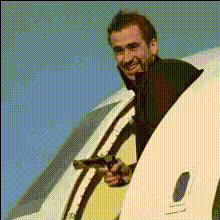
Mission Impossible Airplane Scene

Magic Hour Profile Picture
by kpop_stan

face-swap

1 clip
10 videos
Share On

Any aspect ratio

Tags

movies

Mission Impossible Airplane Scene – Face Swap Video Template

Turn the Rogue Nation Plane Stunt into Your Own Action Hero Moment

This template lets you drop your face straight into the legendary airplane takeoff scene from Mission: Impossible – Rogue Nation. Built on Magic Hour’s AI Face Swap technology, it creates a high‑quality, frame‑accurate face replacement so you look like you’re hanging off the side of a cargo plane just like Ethan Hunt.

Use it for short‑form content, memes, fan edits, trailers, or as a proof of concept for AI‑assisted filmmaking. The goal: cinematic, shareable output in minutes, without VFX or editing skills.

What This Template Does

  • Automatic face swap on the full airplane shot – Every frame is processed so your expressions, angle, and lighting track the original performance.
  • Consistent identity across the clip – The AI preserves your face across motion, wind, and camera movement for a coherent look.
  • Cinematic quality output – The template is optimized for video platforms and can be easily repurposed for YouTube Shorts, TikTok, Instagram Reels, and trailers.

How to Remix This Template in Magic Hour

You can use this template as‑is, or treat it as a starting point for your own action sequence. To build your own version inside Magic Hour:

  1. Start with Face Swap Video
    Open Face Swap Video. This is the core workflow used to power the Mission Impossible airplane scene template.
  2. Upload your source video
    Use the Rogue Nation airplane clip provided in the template, or upload a different action shot (run‑and‑gun scene, car chase, rooftop jump, etc.). Any clip with a clear face will work.
  3. Add your face
    Upload a selfie, portrait, or headshot. For best results, use a well‑lit, front‑facing image with your real skin tone and no heavy filters.
  4. Preview and export
    Generate a preview, then export your final video for posting, embedding, or editing in your standard NLE (Premiere Pro, Final Cut, DaVinci Resolve).

Once you’re comfortable with the template, you can chain it with other Magic Hour tools for more complex workflows—such as turning a still into a talking character, then swapping that face into action scenes.

Ideas for Creators, Developers, and Marketers

  • Fan trailers & UGC campaigns – Put your community into famous stunts and collect their clips as part of a launch, contest, or movie promotion.
  • Product‑placement parodies – Drop founders, clients, or fictional mascots into the airplane scene to demo “mission‑critical” features.
  • AI film experiments – Prototype AI‑driven casting: generate faces with the AI Face Generator or Avatar Generator, then insert them into blockbuster‑style shots.
  • Pitch and investor content – Open a deck or explainer video with your own Mission Impossible stunt to frame your product as a high‑stakes solution.

About the Original Mission: Impossible Airplane Stunt

The opening sequence of Mission: Impossible – Rogue Nation (2015), directed by Christopher McQuarrie, shows Ethan Hunt clinging to the side of an Airbus A400M as it takes off. Tom Cruise actually performed the stunt multiple times on a real plane, secured with a harness and safety rigging, while VFX teams cleaned up the gear and composited background plates in post. This blend of practical stunt work with digital compositing is widely cited in stunt and VFX breakdowns as a benchmark for modern action filmmaking.

By combining that iconic visual with AI face swapping, this template recreates the structure of a professional VFX shot—without the need for tracking markers, roto, or manual compositing.

Combine with Other Magic Hour Tools

You can build a full AI‑driven action sequence around this template by chaining other Magic Hour products:

Best Practices for High‑Quality Face Swaps

  • Use sharp, well‑lit face photos – Avoid blurry, low‑resolution, or heavily filtered selfies. Clean, neutral lighting yields the most realistic swaps.
  • Match approximate age and gender – While the model can generalize, closer matches typically look more believable when mapped to the original actor’s expressions and motion.
  • Ensure clear facial visibility – Shots where the actor’s face is mostly visible (not fully covered by goggles, masks, or heavy motion blur) will swap more convincingly.
  • Respect IP and likeness rights – Before using real people’s faces (actors, colleagues, customers), make sure you have the necessary consent and comply with platform policies.

How to Build Your Own “Mission Impossible–Style” Template

If you want to generalize this beyond the airplane scene and create your own reusable face‑swap template:

  1. Pick a clear hero shot
    Choose a short, visually distinctive clip (e.g., rooftop run, bike chase, slow‑motion jump) and run it through Face Swap Video.
  2. Test with multiple faces
    Try different inputs: selfies, AI‑generated faces from the AI Face Generator, or fictional avatars from the Animated Characters Generator.
  3. Package as a repeatable workflow
    Document your steps for your team or community—what kind of source clips work best, and how to pair them with other tools like Video to Video or Text to Video for variations.

Who This Template Is For

  • Creators & editors – Fast, high‑impact content around film, action, and pop culture.
  • Marketers – Attention‑grabbing openers for campaigns, product launches, and UGC challenges.
  • Founders & startup teams – Memorable intros and explainers that humanize complex products.
  • Developers & researchers – A concrete example of production‑grade face‑swap output for demos, internal tools, or experiments.

Start Your Mission

Load the Mission Impossible Airplane Scene Face Swap Template, upload your face, and generate your clip. From there, you can remix it with other tools like AI Talking Photo, AI GIF Generator, and Face Swap GIF to cover every content format—from cinematic shorts to reaction GIFs.

Your mission, should you choose to accept it: turn one of cinema’s most famous stunts into a reusable, AI‑powered storytelling asset for your brand, channel, or product.

More Like This