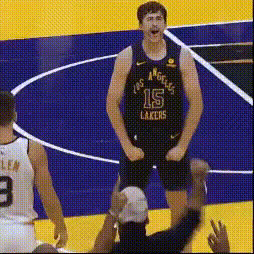
Late Night Finds - Kobe Free Throw

face-swap

1 clip
7 uses

Any aspect ratio

Tags

sports

Late Night Finds – Kobe Free Throw (Face Swap Video Template)

Overview

“Late Night Finds – Kobe Free Throw” is an AI face swap video template on Magic Hour that lets you drop yourself, a friend, or a character right into an iconic Kobe Bryant free throw moment. Built on Magic Hour’s AI Face Swap technology, this template is designed for fast, high‑quality content creation for:

  • Sports creators and meme accounts
  • Marketers and brands running basketball or NBA-themed campaigns
  • Founders, creators, and agencies experimenting with AI-native content formats

You can remix this template directly with Magic Hour’s Face Swap Video tool, or use it as a blueprint for your own series of basketball highlight edits.

What This Template Does

This template recreates a late‑game Kobe Bryant free throw scenario, then uses AI face replacement to swap Kobe’s face with any face you provide. The result is a short, shareable clip where:

  • The body, motion, and shot mechanics stay true to Kobe’s form
  • The face, identity, and expressions are replaced with your chosen person
  • The video is processed to preserve lighting, angle, and realism as much as possible

It’s ideal for “what if” moments—What if your friend took the last shot at Staples Center? What if your favorite creator was at the line? What if your brand mascot is the one icing the game?

Why It Works (and Why Creators Use It)

  • High engagement format: Short, surprising face swap clips consistently perform well on TikTok, Reels, and Shorts. Sports + recognizable motion = instant scroll‑stopper.
  • Fast to produce: You can go from idea to export in minutes inside Face Swap Video, then duplicate and remix variations.
  • Reusable structure: The “Kobe free throw” framing becomes a template you can reuse with:
    • Different people (friends, clients, creators, influencers)
    • Different messaging overlays (CTAs, jokes, quotes, promos)
    • Different campaigns (playoffs, product launches, birthdays, events)

Ethical & Legal Note

When using face swap tools, always consider:

  • Consent: Only use faces of people who’ve agreed to appear in AI‑generated content.
  • Context: Avoid misleading viewers into thinking an altered clip is real footage.
  • Rights: Respect platform policies, likeness rights, and applicable laws in your region.

These principles align with best‑practice guidance discussed by organizations like the Partnership on AI and are increasingly reflected in platform policies for synthetic media.

How to Remix This Template in Magic Hour

You can’t edit this specific video frame‑by‑frame, but you can easily rebuild and customize your own version using Magic Hour tools. Here’s a practical workflow:

1. Start from Face Swap Video

  1. Open Face Swap Video.
  2. Import a short basketball free throw clip (your own footage or licensed/rights‑cleared video).
    • For best results: stable camera, clear view of the shooter’s face, and good lighting.
  3. Upload the face source image (the person you want to insert into the scene).
  4. Run the face swap to generate your AI‑edited clip.

2. Enhance the Visuals

To polish the look and keep quality high across platforms:

  • Use the AI Image Upscaler and Video Upscaler to improve resolution and clarity for larger screens or ad use.
  • If you’re creating thumbnails, use Thumbnail Maker to design an eye‑catching cover image with bold text and reaction shots.

3. Create a “Series” Format

Turn this into a repeatable content series for your brand or channel:

  • “Startup Founder at the Line”: Face swap different founders or team members into Kobe’s free throw moment for funding announcements or milestone posts.
  • “Client of the Week”: Swap your client’s face into the clip as a playful way to celebrate wins.
  • “Legend vs. Legend”: Generate multiple versions featuring different friends, creators, or fictional characters and post them as A/B tests on social platforms.

Advanced Remix Ideas Using Other Magic Hour Tools

If you want to go beyond a straightforward face swap, you can chain this template with other Magic Hour products:

  • Add lip‑sync commentary: Combine your face‑swapped clip with Lip Sync to make the shooter “talk” before or after the free throw (e.g., give a speech, drop a punchline, deliver a brand CTA).
  • Transform style or motion: Use Video to Video to re‑render the clip in a different visual style (cartoon, anime, stylized broadcast look).
  • Animate a still photo instead: Don’t have video? Use AI Talking Photo to animate a still of a player or fan, and then frame it with your Kobe‑inspired concept.
  • Create GIF reactions: Convert your best moments into short loops via AI GIF Generator or the Face Swap GIF tool to use in chats, community channels, and Slack.
  • Build matching avatars and artwork: Use Avatar Generator, AI Art Generator, or AI Anime Generator to design stylized versions of the “player” that match your brand or content style.

Technical Tips for Better Face Swaps

  • High‑quality source face: Use a clear, front‑facing photo with even lighting. Avoid heavy filters, sunglasses, or extreme angles.
  • Consistent lighting: If your Kobe‑style clip is under arena lighting, pick a source photo shot in similar or neutral light for more realistic blending.
  • Short, focused clips: Keep clips tight (a few seconds around the free throw) for better results and higher social performance.
  • Test multiple faces: Try several faces to see which expressions and bone structures translate best to the original motion.

Use Cases for Creators, Brands, and Startups

  • Social campaigns: Launch playoff or Finals campaigns where each post features a different community member at the line.
  • Internal culture content: Put your team into classic moments for company all‑hands, offsites, or hiring campaigns.
  • Performance marketing: Use face‑swapped sports clips as hooks in UGC‑style ads, then transition into product messaging.
  • Community engagement: Run contests where followers submit their photos and you drop winners into the Kobe free throw template.

Related Magic Hour Tools Worth Exploring

If you like this template, you may also find these useful for building a full AI content stack:

  • AI Image Generator – create courtside scenes, jerseys, and backgrounds for your social posts.
  • AI Face Editor – tweak expressions or facial details before swapping them into video.
  • AI Headshot Generator – generate clean, on‑brand faces that you can then use in your free‑throw swaps.
  • AI Voice Generator and AI Voice Cloner – add voice‑over reactions, commentary, or play‑by‑play audio.
  • Text to Video – turn script ideas for sports skits into fully generated clips you can then remix with face swap.

Celebrating Kobe’s Legacy with Responsible AI

Kobe Bryant’s career with the Los Angeles Lakers (1996–2016) included five NBA championships, two Finals MVPs, and 18 All‑Star selections. This template is a creative homage to the intensity and ritual of his late‑game free throws. When you remix it, you’re not just making a meme—you’re building a repeatable content asset that taps into a familiar, emotionally charged sports moment.

Use this template as a starting point, then expand it into your own series, brand language, or campaign concept using Magic Hour’s Face Swap Video, Video to Video, and related tools. The goal isn’t just to replicate a clip—it’s to prototype a format you can own.

More Like This