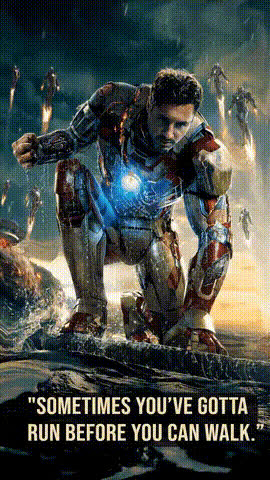
Iron Man Edit
face-swap
Any aspect ratio
Tags
moviesIron Man Edit – AI Face Swap Video Template
Turn Yourself into Iron Man in Seconds
The “Iron Man Edit” template lets you drop your own face into an Iron Man–style edit using AI-powered face swapping. Whether you’re a content creator, marketer, or developer experimenting with synthetic media, this template gives you a fast way to create high-impact, superhero-themed videos without manual VFX work.
This template is built on Magic Hour’s AI Face Swap technology and can be customized, remixed, and extended with other Magic Hour tools.
What This Template Does
With the Iron Man Edit template, you can:
- Replace the original character’s face with your own (or a friend’s) in a cinematic Iron Man–style shot.
- Maintain realistic expressions, head motion, and lighting for a believable result.
- Create short, shareable clips for social media, intros, memes, or fan edits.
- Use it as a building block in a larger edit, ad concept, or prototype for a creative project.
The template is ideal for TikTok/Reels creators, YouTube editors, agencies testing character-led campaigns, and startups exploring AI video workflows.
How the AI Face Swap Works (In Plain Language)
The Iron Man Edit uses the same core tech as Magic Hour’s Face Swap Video templates:
- Face detection and tracking – The AI finds the face in every frame and tracks it across the video.
- Facial feature mapping – It builds a detailed representation of key features (eyes, nose, mouth, jawline, skin tone).
- Deep generative synthesis – A generative model renders a new version of the character’s face that matches your identity but preserves the original motion and expression.
- Blending and compositing – The swapped face is blended into the shot with consistent lighting, color, and perspective.
This is similar in spirit to modern deepfake and “face reenactment” pipelines described in research like DeepFaceLab and first-order motion models, but wrapped in a browser-based, no-code interface.
How to Use (or Remix) This Template in Magic Hour
You don’t need video-editing expertise to use or adapt this template. Here’s how to create your own Iron Man–style edit:
- Start from a Face Swap template
Go to the Face Swap Video creator. Pick the Iron Man Edit template if available, or choose a similar cinematic/hero-style clip as your base. - Upload your face source
Provide a clear image or video of the person you want to appear as Iron Man. For best results, use:- Sharp, high-resolution images (no heavy filters or beauty apps).
- Neutral or mildly expressive faces (not extreme expressions).
- Good, even lighting with minimal shadows.
- Apply the Face Swap
Use the built-in face swap workflow to map your face onto the Iron Man character in the template video. The AI automatically tracks the character’s movement and synchronizes your identity to each frame. - Refine your result
If you want to push polish further:- Enhance image detail with the AI Image Upscaler for thumbnails or stills.
- Use the Video Upscaler if you’re aiming for higher-resolution output.
- Fix distracting elements in stills with the AI Image Editor or Remove Object from Photo tools.
- Export and share
Download your edited video, then publish it to TikTok, Instagram Reels, YouTube Shorts, or embed it in a larger edit or presentation.
Advanced Remix Ideas for Power Users
If you’re a creator, developer, or marketer building more complex flows, you can combine this Iron Man Edit with other Magic Hour tools:
- Turn your Iron Man clip into a talking character
Pair the face-swapped video with AI Talking Photo or Lip Sync to match dialogue or voiceovers to Iron Man’s mouth movements. Combine with the AI Voice Generator or AI Voice Cloner for character-specific or branded voices. - Create a full superhero sequence
Use Text-to-Video or Image-to-Video to generate additional sci‑fi scenes, then face-swap yourself into each shot with Video-to-Video or face-swap templates for a mini trailer or storyline. - Design custom Iron Man–inspired suits
Prototype armor or outfits with the AI Outfit Generator, AI Clothes Changer, or AI Fashion Generator. Then drop those designs into your scenes using AI Image Editor or AI Art Generator. - Create marketing assets around your edit
Turn your Iron Man persona into:- Channel artwork with the Thumbnail Maker or Album Cover Generator.
- Landing page imagery using the AI Background Generator or AI Illustration Generator.
- GIFs and memes via the AI GIF Generator and AI Meme Generator.
Best Practices for High-Quality Face Swaps
To get results that look production-ready instead of experimental, keep these guidelines in mind:
- Use high-quality source faces
Prefer DSLR or recent smartphone photos over screenshots. Avoid heavy beauty filters, extreme makeup, or low-light selfies that obscure facial structure. - Match lighting and angles
If possible, choose reference photos where the lighting direction and head angle roughly match the Iron Man shot. Better alignment reduces visual artifacts and makes skin tones blend more naturally. - Avoid occlusions
Try to use faces without objects covering them (hands, microphones, large sunglasses). Partial occlusions can confuse the face tracking and produce distortions. - Test multiple inputs
For client work or campaign assets, run a few variations of the same subject (different expressions, slightly different angles) and pick the best-performing output. - Upscale for distribution
If you’re publishing on YouTube or for paid campaigns, run stills through the AI Image Upscaler and videos through the Video Upscaler before final export.
Ethical, Legal, and Brand-Safety Considerations
Face swap is powerful and should be used responsibly:
- Respect IP and character rights
Iron Man, Tony Stark, and related imagery are owned by Marvel and its rights holders. Use this template for personal, non-commercial, and fan-style content unless you have explicit licenses or permissions. - Get consent for real people
If you swap in another person’s face (friends, clients, influencers), obtain clear consent. This aligns with best practices reflected in emerging global AI and deepfake regulations. - Avoid misleading or deceptive uses
Don’t use face-swapped content to impersonate individuals, fabricate endorsements, or spread misinformation. - Be transparent with your audience
Many creators now label AI-generated or AI-edited media in descriptions or captions, which can help preserve audience trust and comply with platform policies as they evolve.
Who This Template Is For
This Iron Man Edit template is especially useful if you are:
- A creator testing character-based hooks for Shorts, Reels, or TikTok.
- A marketer prototyping superhero-style concepts, UGC campaigns, or pitch visuals.
- A startup builder exploring how AI video and identity transformation can be integrated into products or experiences.
- A developer benchmarking face swap quality as part of a larger synthetic media or avatar pipeline.
Explore Related Magic Hour Tools
If you like the Iron Man Edit, you may also want to explore:
- Face Swap GIF – Create quick, looping superhero GIFs for social or messaging.
- Animation Templates – Turn stylized or comic‑book‑inspired scenes into animated clips.
- AI Anime Generator or Disney AI Generator – Reimagine yourself as animated or stylized heroes.
- Superhero Generator – Design entirely new hero identities, suits, and powers to extend beyond Iron Man–style edits.
Start Suiting Up
The Iron Man Edit template gives you a fast, realistic way to step into a superhero role using AI face swap. Start with a strong face source, run it through the Face Swap Video creator, and then remix with other Magic Hour tools to build full scenes, campaigns, or character-based experiments.
Use it as a fun fan project or as a serious prototype in your creative or product workflow—the same underlying AI stack supports both.