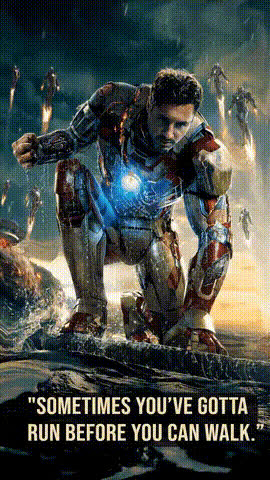
Iron Man Dancing
face-swap
Any aspect ratio
Tags
moviesIron Man Dancing AI Face Swap Video Template
Turn yourself into Iron Man in a few clicks. This “Iron Man Dancing” template uses Magic Hour’s AI Face Swap technology so you can drop your own face onto a dancing Iron Man-style character and instantly generate a short, shareable video for TikTok, Reels, YouTube Shorts, or internal memes.
This page explains what the template does, how to remix it into your own version inside Magic Hour, and how it fits into a broader workflow for creators, marketers, developers, and startup teams.
What You Can Do With the Iron Man Dancing Template
- Create a dancing Iron Man version of yourself for social content, fan edits, and office jokes.
- Make Marvel-inspired promos for product launches, events, or campaigns (e.g., “Suiting up for our new release”).
- Produce fast concept tests for UGC-style ads or motion tests without organizing a shoot.
- Generate custom variants at scale for A/B testing creatives with different faces, hooks, or overlays.
The template is built on the same core tech that powers Magic Hour’s Face Swap Video creator, so you get high‑quality, frame‑accurate facial replacement optimized for internet video.
Key Features
- High‑fidelity AI face swapping
Magic Hour’s AI Face Editor stack analyzes facial structure, lighting, and motion to place your face onto the Iron Man-style dancer with smooth, consistent results across the entire clip. - Automatic motion & expression tracking
The system tracks head turns, expressions, and micro‑movements so your swapped face follows the original choreography naturally—no manual keyframing required. - Remixable as your own template
You can take this base template and:- Swap in different faces for teammates, creators, or customers.
- Export and re‑use it as a base asset in other Magic Hour tools (e.g., Video Upscaler, Auto Subtitle Generator).
- Combine it with Lip Sync or AI Talking Photo content in edits.
- Fits standard social formats
Ideal for short‑form platforms (9:16 vertical, Stories, Shorts, Reels) and easy to integrate into longer edits. - Works with a single face image
You only need one clear photo to generate the swap—no need for video shoots or motion capture.
How to Use and Remix This Template in Magic Hour
- Open the Face Swap Video creator
Go to the Face Swap Video page. This is where all video‑based face swap templates live, including the Iron Man Dancing preset. - Choose the “Iron Man Dancing” base clip
In the template gallery, locate the Iron Man Dancing option. Select it as your base video for the swap. - Upload your face (or your talent’s face)
Use a sharp, front‑facing image with:- Good, even lighting on the face.
- No heavy filters, masks, or extreme angles.
- Visible eyes, nose, and mouth (no sunglasses if possible).
- Generate the face swap
Run the face swap process. Magic Hour automatically tracks the original dancer’s motion and applies your face across every frame. - Export and reuse
Download your finished Iron Man Dancing clip, then:- Edit it in your normal stack (Premiere, Final Cut, CapCut, etc.).
- Incorporate it into other Magic Hour workflows, such as:
- Video-to-Video for stylizing the clip (e.g., anime or comic-book look).
- Video Upscaler to enhance resolution.
- Auto Subtitle Generator if you combine it with voiceovers or dialogue.
How to Remix This Template Into Your Own Variants
You can treat this template as a starting point and build custom, reusable variations that fit your brand or project:
- Swap multiple faces
Generate versions for different teammates, creators, or audience segments using the same Iron Man dance base. This is useful for:- Personalized shoutouts or thank‑you videos.
- Localized marketing where the “hero” matches the audience.
- Internal team celebrations (e.g., “Engineer of the Month as Iron Man”).
- Combine with other Magic Hour tools
- Use AI Image Editor and AI Background Generator to design custom thumbnails (Iron Man dancing with your logo, app UI, or product packaging).
- Generate themed stills of your Iron Man persona with the Avatar Generator or AI Character Generator for cover art and profile images.
- Turn still promo art into short loops with the AI GIF Generator to tease your full video.
- Stylize or re-theme the concept
Use additional Magic Hour tools to reimagine the same idea:- Generate comic‑style or anime Iron Man‑inspired versions with the Comic Book Generator or AI Anime Generator, then build a matching face‑swap video using Video-to-Video.
- Create alternative “armors” or suits using the AI Outfit Generator or AI Clothes Changer and composite them into new concepts.
- Add voice and audio layers
- Generate a Tony‑Stark‑inspired voiceover with the AI Voice Generator or clone your own voice using the AI Voice Cloner.
- If you repurpose the video for dialogue, sync the character’s mouth to speech using Lip Sync or AI Talking Photo on still frames.
Best Practices for Realistic, Share‑Ready Results
- Use high‑quality face photos
Crisp, well‑lit images with neutral expressions improve identity matching and reduce artifacts. Avoid low‑res screenshots and heavy beauty filters. - Match lighting and angle where possible
If you can, choose a source image where your face is oriented similarly to the character’s most common position in the clip. This helps the model produce more natural shading. - Think in terms of campaigns, not one‑offs
For marketing and creator workflows:- Build a mini‑series (e.g., “Iron Man dancing into launch day,” “Iron Man celebrating milestones,” “Iron Man reacting to product features”).
- Localize for different channels: slightly different hooks or overlays for TikTok, Instagram, LinkedIn, and email.
- Combine with other Magic Hour capabilities
Consider these workflows:- Use the AI QR Code Generator to embed a scannable code into the scene or thumbnail that points to your product, event, or landing page.
- Enhance screenshots or still frames from your video with the AI Image Upscaler before using them in ads or decks.
Inspiration and Context
This template is an homage to the expressive, high‑energy moments associated with the Iron Man character in the Marvel films—Tony Stark’s confident entrances, party scenes, and “suiting up” sequences. It’s designed for parody, fan‑style edits, and creative marketing, not for claiming official affiliation or endorsement.
If you want to expand beyond this specific template, you can explore:
- Animation workflows to turn illustrated or stylized Iron Man‑inspired characters into animated sequences you can then face swap onto.
- AI Art Generator and AI Illustration Generator to create original armor designs, HUD interfaces, or futuristic backgrounds.
- AI Manga Generator or Dark Fantasy AI if you want more stylized, graphic‑novel‑like interpretations.
Ethical and Legal Considerations
- Respect IP and likeness rights
Use the template for parody, fan content, and internal fun, and avoid implying official endorsement from Marvel, Disney, or any specific actor. - Be transparent with your audience
For commercial or client work, disclose when a video uses AI face swap. This builds trust and can be a differentiator for forward‑thinking brands. - Use your own or authorized faces
Only upload faces you have rights to use (your own, teammates with consent, or properly licensed talent).
Where This Fits in a Modern AI Video Stack
For creators, marketers, and product teams, the Iron Man Dancing template is a fast way to prototype and deploy high‑impact motion content without a production budget. Paired with other Magic Hour tools—like Text-to-Video, Image-to-Video, and AI Voice Generator—it becomes part of a repeatable pipeline for testing creative concepts, personalizing campaigns, and shipping content at scale.
Open the Face Swap Video creator, pick the Iron Man Dancing template, upload a face, and you’ll have a ready‑to‑share clip in minutes that you can remix into any number of variants for your brand, channel, or community.