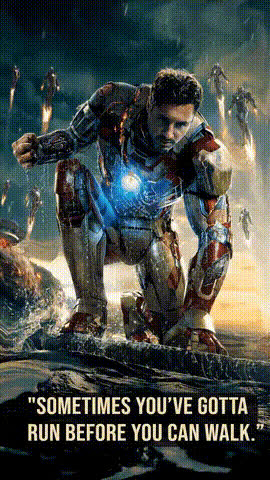
Tony Stark - I am Iron Man

face-swap

1 clip
73 uses

Any aspect ratio

Tags

movies

Tony Stark “I Am Iron Man” Face Swap Video Template

Step Into the “I Am Iron Man” Moment

Turn yourself into Tony Stark at his most iconic moment with this “I Am Iron Man” face swap video template. In a few minutes, you can drop your face into a cinematic shot inspired by the Marvel Cinematic Universe and share a studio-quality clip that feels straight out of an Avengers movie.

This template is built on Magic Hour’s production-grade AI Face Swap engine, so the result looks natural, expressive, and ready to post on TikTok, Instagram Reels, YouTube Shorts, or as part of a bigger edit.

What You Can Do With This Template

  • Become Tony Stark in seconds – Automatically map your face onto a Tony Stark–style performance, matching expressions, angles, and timing.
  • Create shareable Marvel-style content – Perfect for fan edits, memes, reaction clips, campaign teasers, or intro videos for your channel or product demos.
  • Use it as a building block – Remix the template with other Magic Hour tools (lip sync, video-to-video, AI image tools) to build your own custom Iron Man–inspired sequence.
  • Scale content production – Marketers and creators can quickly generate multiple personalized versions (for different team members, influencers, or customers) without reshooting video.

Key Features (Built for Creators & Teams)

  • High‑fidelity face swap
    Powered by Magic Hour’s AI Face Swap, the template preserves lighting, perspective, and subtle facial motion for a realistic Tony Stark effect.
  • Template-based workflow
    Start from this pre-built scene instead of a blank canvas. All you do is bring a face and optionally add more scenes around it.
  • Works with photos or frames
    If you don’t have a video of yourself ready, you can generate or upload a still and use that face across the whole clip. You can also create faces with the AI Character Generator or Avatar Generator and drop those into the template.
  • Remix-friendly
    You can combine this face swap clip with:
    • Lip Sync – make your Tony Stark say your script or a trending audio.
    • Video-to-Video – stylize the clip into comic, anime, or other visual styles.
    • Text-to-Video – generate additional MCU‑style shots and cut them together.
  • Optimized for major platforms
    Export in formats that work well for TikTok, Instagram, X, YouTube Shorts, or as part of a longer YouTube edit. You can further enhance resolution with the Video Upscaler or sharpen stills with the Unblur Image tool.

Lore & Creative Inspiration

In Iron Man (2008), Tony Stark ends his press conference by ignoring his prepared cover story and saying three words that define the MCU’s tone going forward: “I am Iron Man.” That line, improvised in production and later echoed in Avengers: Endgame, marks a shift from secret identities to full transparency and responsibility.

Why it works so well in content:

  • Instantly recognizable – The line and pose are deeply familiar to Marvel audiences, making it perfect for memes, intros, and fan content.
  • Signals confidence & reveal – Creators often use Iron Man–style reveals to launch products, side projects, new branding, or major announcements.
  • Flexible for parody – You can replace “Iron Man” with your own “identity”: founder, developer, marketer, meme lord, or your brand.

For deeper context on the scene’s impact in film and fandom, see coverage from sources like Marvel Studios commentaries and analysis from outlets such as Variety, Vulture, and the MCU wiki. These explain how the “I am Iron Man” line reshaped superhero storytelling and fan culture.

How to Remix This Template in Magic Hour

You don’t need to start from scratch. Use this template as a foundation, then adapt it to your use case.

  1. Open a Face Swap project
    Go to the Face Swap Video page and start a new project using this Tony Stark “I Am Iron Man” template from the template gallery.
  2. Add your face (or a generated one)
    Upload a clear, front-facing photo or video of your face. For stylized or fictional faces, you can generate one first with: Then apply that face to the template’s Tony Stark performance.
  3. Refine the hero shot
    Once the face swap is applied, play back the clip to ensure expression and timing feel right. You can:
  4. Extend the scene around the moment (optional)
    To turn this into a full narrative or ad:
  5. Export and publish
    When the video looks right, export it. For best engagement:
    • Use it as a hook in short-form content.
    • Embed in product launch videos or pitch decks to personify your “hero moment.”
    • Add subtitles with the Auto Subtitle Generator for accessibility and better watch time.

Advanced Use Cases for Creators, Developers & Marketers

  • Founder / team reveals
    Swap each team member into the Iron Man moment to introduce your leadership or dev team on your website, in pitch materials, or on social.
  • Campaign intros & hooks
    Use the face swap clip as the opening 3–5 seconds of an ad or explainer, then cut to real product footage. Pair this with AI-branded assets from the AI Logo Generator, Thumbnail Maker, or Album Cover Generator for cohesive visuals.
  • Personalized fan experiences
    For communities or SaaS products, you can invite users to generate their own “I Am Iron Man” clip as part of onboarding, loyalty rewards, or UGC contests. Because the template is reusable, every user can get a custom version with minimal friction.
  • Character & IP experiments
    Use Magic Hour’s AI Manga Generator, Comic Book Generator, and AI Illustration Generator to design alternate suits, universes, or personas, then swap those faces into the same core performance to A/B test different aesthetics.

Tips for Best Results

  • Start with a clean face image
    Use a well-lit, high-resolution image with your face clearly visible. If needed:
  • Match the vibe of the original shot
    Iron Man’s reveal is confident and composed. Choose a face photo where your expression roughly matches that mood; this tends to yield more natural swaps.
  • Use complementary AI tools for polish
    After generating the main face swap clip:
  • Experiment with tone
    The same template works for serious founder reveals, tongue‑in‑cheek memes, or high‑concept sci‑fi intros—just change your script, captioning, and surrounding edits.

Build Your Own Version of This Template

If you want to design a custom Iron Man–style reveal sequence instead of using the default layout:

  1. Design a hero frame with the AI Background Generator, AI Art Generator, or AI Illustration Generator (arc reactors, lab interiors, holograms, etc.).
  2. Animate that frame using Image-to-Video or the Animation template to add camera motion or subtle environmental movement.
  3. Face-swap yourself in with Face Swap Video, applying your face or a generated character.
  4. Add voice and dialogue by:
  5. Package it as your own reusable template by saving your project in Magic Hour and reusing it for future campaigns, clients, or team members.

Why Use Magic Hour for Tony Stark–Style Face Swaps?

  • End-to-end AI pipeline – From generating concept art and characters to swapping faces, animating stills, adding voices, and upscaling video, you can build the entire sequence in one ecosystem.
  • Designed for serious creators – Tools like Video Upscaler, Auto Subtitle Generator, and Image Background Remover are tuned for production workflows, not just casual experimentation.
  • Fast iteration – Templates like this “I Am Iron Man” scene let you validate ideas, run creative tests, and ship polished content quickly, even with small teams.

Use this Tony Stark “I Am Iron Man” Face Swap template as your starting point, then remix it with Magic Hour’s broader AI toolset to create reveals, intros, and hero moments tailored to your brand, your story, and your audience.

More Like This