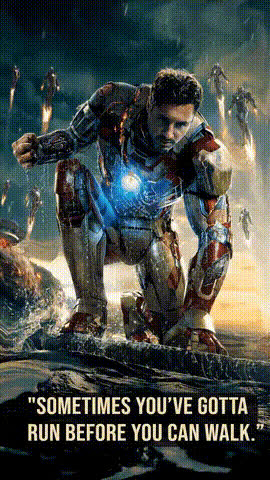
Avengers End Game - I Am Iron Man

Magic Hour Profile Picture
by Anonymous

face-swap

1 clip
665 uses

Any aspect ratio

Tags

movies

“I Am Iron Man” Face Swap Video Template (Avengers: Endgame)

Step Into Tony Stark’s Final Moment

Recreate one of the most iconic scenes in modern cinema — Tony Stark’s “I am Iron Man” snap from Avengers: Endgame — with this Face Swap video template on Magic Hour. In a few clicks, you can place your own face into the shot and generate a share-ready clip that looks like you’re the one wielding the Infinity Stones.

This template is built on Magic Hour’s AI-powered Face Swap engine, so you get realistic skin tone matching, lighting consistency, and natural facial alignment without manual masking or advanced editing skills.

What This Template Does

This “Avengers End Game – I Am Iron Man” template lets you:

  • Swap Tony Stark’s face in the Endgame snap scene with your own (or any face you upload).
  • Generate a short, cinematic clip ready for TikTok, Instagram Reels, YouTube Shorts, or memes.
  • Remix and customize the output with other Magic Hour video tools (lip sync, image-to-video, text-to-video, and more).

The result is a personalized version of the final Iron Man moment that feels like it belongs in the Marvel Cinematic Universe — perfect for fan edits, marketing campaigns, reaction content, or just having fun with friends.

What Is AI Face Swap, Technically?

AI face swap uses deep learning to reconstruct and blend one face onto another in an image or video. Modern systems typically rely on:

  • Face detection & alignment – Locating and normalizing facial landmarks (eyes, nose, mouth).
  • Feature extraction – Encoding identity-specific features into a latent representation.
  • Image synthesis – Generating a new frame where the target face is replaced while preserving pose, lighting, and expression.
  • Compositing – Seamlessly blending skin tones, shadows, and edges so the swap looks natural and stable across frames.

Academic work such as Nirkin et al.’s “On Face Segmentation, Face Swapping, and Face Blending” and the broader deepfake literature provides the theoretical foundation; Magic Hour packages these ideas into an accessible, browser-based interface focused on creators and teams rather than researchers.

How to Use This Template on Magic Hour

You don’t need traditional video editing software. The whole process runs in your browser via Magic Hour’s Face Swap Video creator.

  1. Open the Face Swap Video creator
    Go to Face Swap Video. This is where you’ll find and remix templates like “Avengers End Game – I Am Iron Man.”
  2. Choose or import the Iron Man template
    Select the “I Am Iron Man” scene from the template library. You’ll see a preview of the clip with Tony Stark.
  3. Upload your face (or someone else’s)
    Add a clear photo or video frame of the face you want to insert. For best results, use:
    • Front-facing, well-lit images
    • No heavy motion blur
    • Minimal obstructions (no oversized sunglasses, etc.)
  4. Generate the face swap
    Magic Hour will automatically track Tony’s face in the scene and replace it with your uploaded face, keeping the original acting, expression, and motion.
  5. Download and share
    Export the finished clip and post it to social media, embed it in a landing page, or drop it into your editing timeline for further work.

Because the scene is short and self-contained, it’s ideal for quick experimentation, A/B testing creative concepts, or batch-generating variants for different audiences.

How to Remix This Template for Your Own Use Case

Once you’ve tried the default version, you can remix the concept in multiple ways using other Magic Hour tools:

  • Turn your Iron Man into a talking avatar
    Use AI Talking Photo or Lip Sync to make still images or alternate frames of your Iron Man say custom lines, announcements, or brand taglines.
  • Create alternate “snap” scenes
    Use the AI Image Generator or AI Photo Generator to design new environments (e.g., your office, a product launch stage, a sci‑fi battlefield), then animate them with Image to Video or Video to Video, and finally face swap yourself in.
  • Brand the scene for campaigns
    Add on-brand visuals like your logo, product UI, or stylized armor by creating assets with the AI Logo Generator, Thumbnail Maker, or AI Image Editor, then compositing them into your final video.
  • Generate themed variants for different audiences
    Want a manga-style or anime-style Iron Man moment? Use the AI Anime Generator or AI Manga Generator to restyle frames, then animate and face swap again to match regional or niche fandom aesthetics.
  • Create GIFs and memes
    Turn your customized Iron Man clip into looping reaction GIFs or meme formats using the AI GIF Generator and AI Meme Generator. This is particularly effective for social media engagement and community content.
  • Enhance and upscale for premium channels
    For paid campaigns or presentations, run your final video through the Video Upscaler or sharpen key frames with the AI Image Upscaler and Unblur Image tool.

Why the “I Am Iron Man” Scene Works So Well

The “I am Iron Man” line bookends Tony Stark’s arc across the MCU:

  • It echoes his public reveal in Iron Man (2008), where he first declares “I am Iron Man.”
  • In Avengers: Endgame (2019), the same line is delivered in a completely different context — as a final act of self-sacrifice to defeat Thanos.

From a storytelling and marketing perspective, this makes it a powerful template for:

  • Transformation narratives – Going from selfish to selfless, unknown to known, beta to launch.
  • Hero moments in product or brand storytelling – Positioning your user, customer, or team as the “hero” making the decisive move.
  • Reaction and commentary content – Reacting to big announcements, product reveals, or cultural moments by inserting yourself into the snap.

The scene is widely recognized, meme‑able, and emotionally charged, which makes it ideal for short‑form, high‑impact content.

Practical Tips for Best Results

  • Use high‑quality source photos
    Higher resolution and good lighting give the face swap model more information, improving realism and reducing artifacts.
  • Match expressions when possible
    Upload a source image with a neutral or intense expression, not a wide laugh, to better align with Tony Stark’s performance in the scene.
  • Consider identity and consent
    If you are swapping someone else’s face (e.g., a client, teammate, or influencer), ensure you have explicit permission and that the use aligns with your brand and legal standards.
  • Test on multiple platforms
    Preview your final output on vertical (mobile) and horizontal (desktop) feeds. You can create alternate crops or variants for each without re‑doing the entire workflow.
  • Combine with voice
    Pair the visual swap with AI audio using AI Voice Generator or AI Voice Cloner to create fully synthetic performances, adding custom lines or localized versions.

Going Beyond Iron Man: Build Your Own Cinematic Templates

Once you’re comfortable with this template, you can use the same building blocks to create your own cinematic experiences:

That way, the “I am Iron Man” template becomes not just a one‑off fun clip, but a starting point for an entire pipeline of AI‑assisted storytelling, marketing assets, and fan content.

Use Cases for Creators, Marketers, and Startups

  • Creators & streamers – Channel your on‑screen persona into a recognizable cinematic reference; use the clip as an intro, transition, or channel trailer highlight.
  • Marketers & growth teams – Turn the snap into a metaphor for product launches, “end of old way” campaigns, or security and protection narratives.
  • Startup founders – Use a customized Iron Man moment in pitch decks, social updates, or team videos to underline pivotal milestones.
  • Educators & trainers – Teach storytelling, brand positioning, or AI media literacy by deconstructing how a familiar scene can be repurposed with face swap technology.

Try the “I Am Iron Man” Face Swap Template

If you’re a Marvel fan, a content creator, or a marketer looking for a high‑impact, low‑time‑cost asset, this template is a fast way to produce something visually impressive and culturally resonant.

Open the Face Swap Video creator, choose the “Avengers End Game – I Am Iron Man” template, upload your face, and generate your own version of one of the most memorable scenes in the MCU — no complex editing, no VFX team, just AI‑assisted creativity in your browser.

More Like This