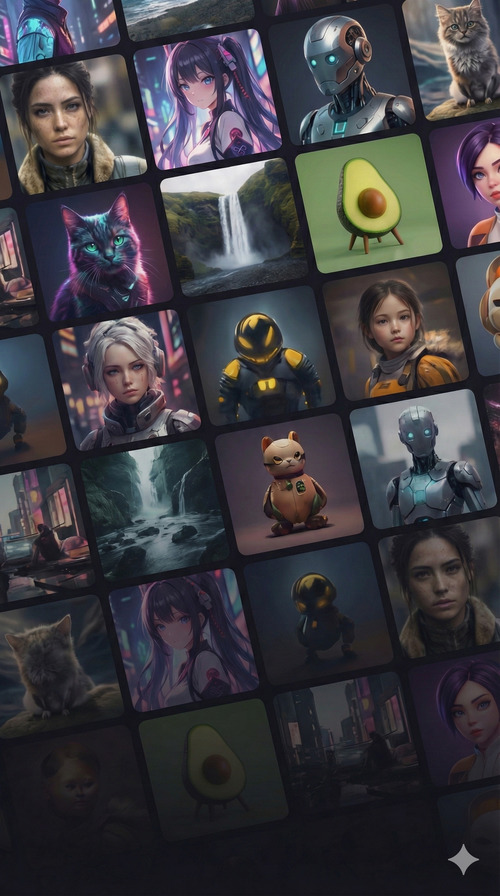
Grid of high quality images generated using Magic Hour Image Generator.

AI Movie Poster Generator

Design professional movie posters in seconds - 100% free, no sign up required

Example of an AI-generated image
4.9/5 on Product Hunt
30M+ AI images generated
500K+ creators in last 30 days
Use Image Generator API:
Fast, easy, and scalable

Trusted by teams at

How AI Movie Poster Generator Works

1
A beautiful photograph of San Francisco, stock photo..

Describe your movie poster idea

Write a prompt for the movie poster you want — include the genre, title treatment, lead character, setting, mood, color palette, and cinematic style. The more specific your prompt, the closer our free AI movie poster generator gets to the poster design in your head.
2
Clicking on generate image button

Generate Movie Poster

Click 'Generate' and create AI movie posters in seconds. You'll receive two poster variations per prompt so you can compare composition, genre fit, cinematic mood, and overall poster impact.
3
Download icon

Download your movie poster

Save your AI-generated movie poster in high quality with one click. Use your poster design for indie films, short films, trailers, pitch decks, thumbnails, or promo campaigns.
Generate Your First Image

Generate Movie Posters with Top AI Models

Use frontier models for AI Image Generator.

Generate bold, high-impact images with Nano Banana Pro — a fast AI image generator for stylized art, cinematic scenes, and eye-catching social content. Write a prompt and create standout visuals in seconds.

Nano Banana Pro

Generate bold, high-impact images with Nano Banana Pro — a fast AI image generator for stylized art, cinematic scenes, and eye-catching social content. Write a prompt and create standout visuals in seconds.
Generate and edit images with Flux 2 Klein — Black Forest Labs' fast model for sub-second generation, prompt-led edits, and low-cost iteration.

Flux 2 Klein

Generate and edit images with Flux 2 Klein — Black Forest Labs' fast model in Magic Hour for sub-second text-to-image runs, prompt-led edits, and low-cost iteration at 640px through 2K.
Create and edit images with GPT Image 2 — OpenAI's image model in Magic Hour for strict prompt adherence, natural-language edits, and high-resolution output up to 4K.

GPT Image 2

Create and edit images with GPT Image 2 — OpenAI's image model in Magic Hour for strict prompt adherence, natural-language edits, marketing comps, and detail-heavy visuals up to 4K.
Make images at high speed with Z-Image Turbo — a turbo AI image generator for rapid iterations, bulk variations, and quick concepting. Ideal when you want volume without long wait times.

Z-Image Turbo

Make images at high speed with Z-Image Turbo — a turbo AI image generator for rapid iterations, bulk variations, and quick concepting. Ideal when you want volume without long wait times.
Try Flux Schnell — a free, ultra-fast AI image generator for quick drafts, style exploration, and rapid creative experiments. Type a prompt, generate multiple options, and refine fast.

Flux Schnell

Try Flux Schnell — a free, ultra-fast AI image generator for quick drafts, style exploration, and rapid creative experiments. Type a prompt, generate multiple options, and refine fast.
Generate expressive, stylized images with Nano Banana — a fast AI image generator for bold compositions, vibrant scenes, and creative prompts. Ideal for social content and concept art.

Nano Banana

Generate expressive, stylized images with Nano Banana — a fast AI image generator for bold compositions, vibrant scenes, and creative prompts. Ideal for social content and concept art.
Create detailed, high-fidelity visuals with Nano Banana 2 — an upgraded AI image generator with improved realism, sharper detail, and stronger prompt adherence for complex subjects.

Nano Banana 2

Create detailed, high-fidelity visuals with Nano Banana 2 — an upgraded AI image generator with improved realism, sharper detail, and stronger prompt adherence for complex subjects.
Produce rich, photo-realistic images with Seedream 4 — a high-quality AI image generator optimized for detailed prompts, product visuals, and polished marketing creatives.

Seedream 4

Produce rich, photo-realistic images with Seedream 4 — a high-quality AI image generator optimized for detailed prompts, product visuals, and polished marketing creatives.

AI Movie Poster Generator Tutorial

Watch our AI Image Generator tutorial:

AI Movie Poster Generator Use Cases

See how our AI Image Generator can be used in different scenarios.

Create posters for indie films

Generate AI movie posters for indie films, short films, student films, and concept trailers in seconds. Use an AI movie poster generator to explore poster directions before hiring a designer.

Create movie poster designs for horror, thriller, sci-fi, action, drama, romance, fantasy, and comedy projects. Test different moods, compositions, and color palettes until the poster fits the genre.

Use an AI movie poster generator to create poster concepts for film pitches, treatments, investor decks, and creative packages. Show the tone of your project faster with cinematic key art.

Test different movie poster styles like minimalist, blockbuster, vintage, festival, illustrated, noir, and dramatic character posters. Compare multiple poster directions before choosing the strongest one.

Generate poster-style artwork for streaming platforms, YouTube thumbnails, trailer covers, and promo banners. Reuse the same AI movie poster direction across all your release assets.

Make AI movie posters for teaser campaigns, announcement graphics, festival submissions, social posts, and launch promos. Create cinematic artwork without starting from a blank canvas.

Produce multiple movie poster variations for team reviews, A/B tests, client feedback, and creative exploration. Iterate on cast focus, title space, mood, and layout until you find the strongest result.

Why Creators Love Our AI Movie Poster Generator

Generate movie posters from text in seconds with our free AI movie poster generator — no sign up required. Create cinematic poster designs, teaser artwork, and film promo visuals in minutes instead of waiting days for first concepts or reusing generic templates.

Skip generic movie poster inspiration hunting

Replace hours of browsing Behance, Pinterest, and old poster references with original AI movie posters tailored to your genre, cast, mood, and visual identity.

No design skills required

Type what you want and get polished images in seconds—no Illustrator or Photoshop.

Explore movie poster styles fast

Generate 30+ movie poster directions in minutes — horror one-sheets, sci-fi key art, festival posters, thriller layouts, minimalist sheets, and more — then keep the best result.

Iterate until the poster sells the story

Refine prompts and generate movie posters again in seconds to adjust mood, composition, title space, subject focus, and genre feel without starting over.

Reuse poster art across campaigns

Download AI movie posters and reuse them across pitch decks, festival submissions, social promos, trailer covers, thumbnails, and release campaigns much faster than creating every variation manually.

All The Features That You Need In An AI Movie Poster Generator

Multi-Model AI Image Generation
Generate images with multiple leading AI models at once, then compare outputs side by side to pick the best result fast.
Batch Image Generation (Up to 16 Variations)
Create up to 16 variations per prompt to explore different compositions, styles, and details in one run.
Text-to-Image + Image-to-Image Inputs
Start from a text prompt, use an image as a reference, or combine both to generate images that match your intent.
Multi-Image Reference Editing
Upload multiple reference images to guide identity, composition, and style for more controlled AI image edits.
Generate → Edit Workflow
Generate an image, then refine it immediately in the same workflow for faster iteration without restarting.
Presets and Artistic Styles Library
Choose from a large library of high-quality presets and AI art styles, including photorealistic, anime, cinematic, and illustration.
Character and Style Consistency
Create consistent characters and visual styles across multiple images for brands, products, and ongoing creative series.
Adaptive Prompt Suggestions
Get suggested prompts that adapt to your input images to improve composition, clarity, and overall image quality.
AI Image Upscaler (Up to 4K)
Upscale images up to 4K with sharper detail and cleaner outputs for marketing, print, and high-resolution use.
Consistent Characters and Storyboards
Create multi-image storyboards with consistent characters across scenes for storytelling, ads, and creative projects.
Task-Specific Image Tools
Use tools tuned for specific outcomes like headshot generation and photo colorization to get better results with fewer steps.
Image-to-Video From Any Generation
Turn a generated image into a short video to create motion content for social and marketing.

Testimonials

Hear what our users have to say

"2 favorite software that I use regularly are Image to video and AI image generation for the past 6 months. I find that the web is getting smoother and the images are getting more and more true to my expectations as well as reducing the time when creating images."
Profile photo of Lân Nguyễn
Lân Nguyễn
Creative
"Magic Hour AI has solid tools for still images. You can generate unique images from scratch for blog posts, so it's a huge help for content marketers who need a unique image for every article or for brands to create professional product mockups and lifestyle shots."
Profile photo of Stevia Putri
Stevia Putri
Data Analyst at Eesel
"I create a lot of lifestyle content and sometimes the photo I need just doesn't exist - wrong lighting, wrong angle, whatever. Now I can generate exactly what's in my head instead of spending two hours searching stock sites or trying to reshoot."
Profile photo of Belle
Belle
Content Creator
"First tool I've found where the free plan actually lets you do real work. I use it in my classroom because students can jump in without creating accounts or dealing with paywalls. Makes my job way easier."
Profile photo of Tania Fang
Tania Fang
Teacher

AI Image Generator in Action

Instant preview of what the AI Movie Poster Generator delivers today

Gallery of diverse AI-generated images from Magic Hour.

Free Online AI Movie Poster Generator

Generate movie posters and cinematic key art straight from your browser with a free AI movie poster generator — no sign up required.
Simple interface showing text prompt field and generated AI images below.

Easy to Use Text to Movie Poster Tool

Type your prompt, refine the results, and download favorites in seconds.

Create Videos from Your Photos

Turn finished movie poster concepts into animations, add music, and export promo visuals for social posts, videos, or presentations.
Generate Movie Posters Now

AI Movie Poster Generator FAQ

Use prompts with elements like 'cinematic composition,' 'bold typography,' and 'dramatic lighting' for an authentic poster look.

AI generates the artwork and titles, but may sometimes forget, or mispell your text. To change or fix the titles and credits, you can use image editing software like Photoshop.

Standard movie poster sizes are 24x36 inches for print and 1080x1600 pixels for digital use.

Yes, AI image generator is free with no sign up required. You get 10 free images per day — no account needed. Sign up for free to unlock account-specific credits and rewards, saved projects, and access to more tools. Upgrade for more credits, higher resolution, and premium features.

No. AI image generator works in your browser with no account, no sign up, and no download. Sign up for free to unlock account-specific credits, rewards, and saved projects.

No watermark on AI image generator results for all users, including free users with no sign up.

An AI image generator is a tool that creates images from text descriptions or reference photos using artificial intelligence. You describe what you want (or upload an image for style or structure), and the AI produces visuals in seconds. Magic Hour’s free AI image generator works in your browser with no sign up required.

Magic Hour offers a strong free AI image generator: no sign up to start, 10 images per day without an account, multiple models (e.g. Flux Schnell, Seedream, Nano Banana Pro), and text-to-image plus image-to-image in one place. You can try it alongside other tools like face swap and video generation on the same platform.

First, open the AI image generator and type a clear prompt (subject, style, mood, lighting). Second, choose aspect ratio and optional style presets. Third, click Generate and wait a few seconds. Fourth, download your favorite result or fine-tune it in our AI image editor. No account is required for the first 10 images per day.

Free users can generate images each day without signing up. Creating an account unlocks account-specific credits, rewards, and saved projects. Paid plans increase or remove limits and add features like higher resolution, priority processing, and advanced customization.

Yes - if you’re a paid user. Commercial usage covers marketing, websites, product designs, merchandise, and more, with no royalties or attribution required. Free users are limited to personal use only. As always, avoid infringing trademarks, copyrighted characters, or brands.

Yes. All images generated with Magic Hour belong entirely to you and can be used for personal or commercial projects. We make no copyright claims, but check your local laws as AI copyright regulations vary by region.

We automatically screen prompts to block inappropriate content and provide guidelines for ethical use. Users can also report issues to help maintain a safe and positive community.

AI excels with clear, specific prompts but may struggle with highly abstract ideas or contradictory instructions. The more precise your description, the better your results. Practice and iteration improve outcomes significantly.

Yes. You can refine images by regenerating variations with new prompts, or edit them for free in our AI Image Editor. You can also download images for use in any design software, allowing you to use traditional editing techniques.

Include brand-specific details in your prompts, such as colors, style, and tone (e.g., 'minimalist design in blue and white with a modern tech feel'). Save effective prompts to ensure consistency across all your visuals.

Type your prompt into the text field and click 'Generate.' Our AI instantly transforms your description into multiple images. Once generated, you can download your favorites in high resolution and share them directly from the platform.

A good prompt is clear and specific and covers subject, style, and details. For example: 'A serene mountain lake at sunset, impressionist style, dramatic lighting.' Structures like 'Subject + Setting + Lighting + Style + Quality' work well. Experiment with both short and detailed prompts to find the best results. See our [AI prompting guide](/blog/how-to-prompt-ai-videos-a-simple-guide) for examples.

AI image generators turn ideas into visuals quickly, removing the need for design skills or long production times. They’re perfect for social media graphics, marketing campaigns, blogs, presentations, storyboards, and quick prototyping of creative concepts.

We Value Your Privacy & Data Security, Always

Commercial use, training, deletion, retention (1 day), and security. Retention:1 day
Commercial use
Paid plans permit commercial use of outputs. Free users can preview and test.
Learn more
No training
We do not use your uploads or outputs to train our models.
Learn more
Delete anytime
You can delete your content or account at any time. Deletion removes content from active storage immediately.
Learn more
Security
Encrypted in transit and at rest. Access is restricted for operations and support.
Learn more