Gisele Bundchen Olympics Catwalk

Magic Hour Profile Picture
by kpop_stan

face-swap

1 clip
27 uses

Any aspect ratio

Gisele Bündchen Olympics Catwalk – Face Swap Video Template

Overview

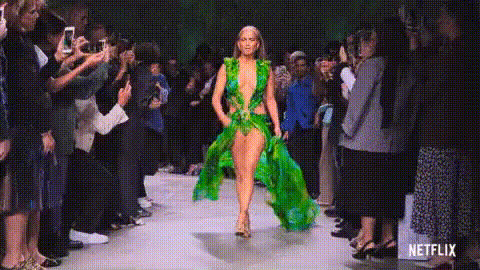
Relive one of the most iconic moments of the Rio 2016 Opening Ceremony – this time with your face on the runway. The “Gisele Bündchen Olympics Catwalk” template uses Magic Hour’s advanced AI Face Swap engine to let you seamlessly replace Gisele’s face with your own (or any face you have the rights to use) in a high‑impact catwalk shot.

This template is built on Magic Hour’s Face Swap Video creation flow, so you can:

  • Turn an instantly recognizable pop‑culture moment into a personalized clip
  • Create short, shareable memes and reaction videos for social
  • Prototype ad and campaign concepts in minutes instead of days
  • Generate variations for A/B testing creatives across platforms

Why This Moment Works So Well in AI Video

Gisele Bündchen’s walk at the Rio 2016 Opening Ceremony has become one of the most replayed visuals of the Games. She crossed Maracanã Stadium’s massive stage in a shimmering gown while Brazilian musician Daniel Jobim performed “Garota de Ipanema” (“The Girl from Ipanema”), one of the country’s most famous songs (originally by Antônio Carlos Jobim and Vinícius de Moraes). The shot is slow, cinematic, and focused on a single subject – which makes it ideal for high‑quality face swapping.

From an AI perspective, this clip is especially strong because:

  • Consistent lighting and camera movement make the swap look natural
  • Clear frontal and profile angles give the model enough reference for realistic expressions
  • Clean background and runway framing keep the viewer’s eye on the performance

What You Can Build With This Template

Creators, marketers, and builders use this template for:

  • Personal brand content – step into an iconic runway moment for Instagram, TikTok, or YouTube Shorts
  • Campaign mockups – test how different talent or personas look in the same hero shot
  • Team & community content – swap coworkers, founders, or fans into the catwalk for launches and events
  • Meme and culture riffs – react to new product drops, sports events, or announcements with a familiar visual

If you want to extend this clip into more complex edits, you can combine it with:

  • AI Lip Sync – make your swapped character sing or speak to custom audio
  • Video-to-Video – stylize the scene (e.g., fashion editorial, anime, comic-book look)
  • AI Video Upscaler – enhance resolution for high‑end social or campaign use

How to Remix This Template in Magic Hour

You don’t need to build anything from scratch. To create your own version of this template using Face Swap:

  1. Open the Face Swap Video creator
    Start from Face Swap Video. This is the same underlying workflow used to power this Gisele Olympics template.
  2. Use the Gisele template as your base
    Select the “Gisele Bündchen Olympics Catwalk” template from the template gallery. This loads the catwalk clip and prepares it for swapping.
  3. Upload your source face
    Add one or more face images (your face, a teammate’s, a character you’ve generated with tools like the AI Character Generator, or avatars made with the Avatar Generator). For best results, use:
    • Clear, front-facing photos
    • Good lighting and no heavy filters or distortions
    • Expressions roughly similar to the mood you want in the final video
  4. Preview your swap
    Generate a preview to quickly check alignment, expressions, and overall realism. If needed, try a different source image for sharper results.
  5. Export and repurpose
    Once you’re satisfied, export the final video and reuse it wherever you need: social posts, ad mockups, internal presentations, or pitch decks.

Advanced Remix Ideas for Builders & Marketers

  • Create multiple variants for testing
    Clone the project and swap in different faces – e.g., various influencers, customer personas, or stylized AI characters from the AI Anime Generator or AI Art Generator – then test which version performs best.
  • Turn it into a talking promo
    Combine this template with AI Talking Photo, AI Voice Generator, or AI Voice Cloner to turn the catwalk moment into a short scripted promo or personal greeting.
  • Pair with static visuals
    Use the video as a hero moment in a campaign alongside images generated via the AI Image Generator or refined with the AI Image Editor and AI Image Upscaler.
  • Build a full “Olympics runway” sequence
    Start from this clip, then extend it using Image to Video or Text to Video to generate additional runway shots or crowd reactions in a similar style.

Best Practices & Ethical Use

Magic Hour’s face swap technology is powerful, and should be used responsibly:

  • Always have permission to use someone’s face, especially for commercial or public content.
  • Avoid misleading viewers in sensitive contexts (news, politics, health, or financial content).
  • Consider adding a note or caption that the video uses AI face swap for transparency.

For purely playful or meme‑style content, this Gisele Olympics catwalk moment is a strong, visually rich clip that clearly reads as a stylized, “cinematic” scene, which helps viewers understand they’re seeing creative AI work rather than real‑world footage.

Related Magic Hour Tools Worth Exploring

If you like this template, you may also find these tools useful:

  • Face Swap GIF – turn short catwalk segments into looping GIFs for social and chats
  • AI GIF Generator – build reaction GIFs from your swapped runway clip
  • AI Meme Generator – add captions and layouts to turn the catwalk into meme formats
  • AI Face Editor – tweak age, expressions, or subtle attributes of your swapped face
  • Video Upscaler – prepare your final runway video for high‑resolution displays

Why Use Magic Hour for Face Swap Olympics Content?

Magic Hour is built for creators and teams who care about quality and speed. With this Gisele Bündchen Olympics Catwalk template, you get:

  • Production‑grade output suitable for professional campaigns, not just casual filters
  • Fast iteration cycles so you can test ideas the same day you think of them
  • Composable tools – face swap, lip sync, image/video generation, and more can be combined into custom workflows

Remix the template, plug it into your creative stack, and use the catwalk moment as a reusable building block for content, campaigns, prototypes, and experiments.

More Like This