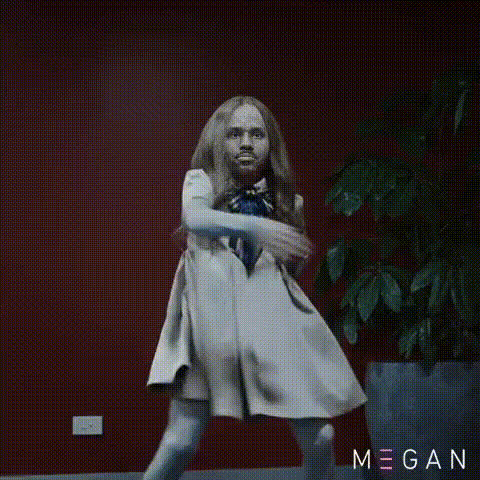
Girl dressed as a cat dancing

face-swap

1 clip
5 uses

Any aspect ratio

Girl in Cat Costume Dancing – Face Swap Video Template

Create a viral-ready, highly shareable clip in minutes. This “Girl in Cat Costume Dancing” template uses Magic Hour’s AI Face Swap to put your face (or any face you choose) onto a dancing girl in a colorful, animated cat outfit — no video editing skills required.

What This Template Does

This template is built on Magic Hour’s Face Swap Video workflow. You upload a face image, and our AI automatically:

  • Detects facial structure and keypoints
  • Maps expressions, gaze, and movement frame‑by‑frame
  • Blends skin tone, lighting, and perspective for a natural-looking swap

The result: a smooth, high-quality video of a girl in a cat costume dancing, but with your face (or your character’s face) realistically composited into the scene.

Ideal Use Cases

  • Creators & influencers: Quick, on-brand meme content or reaction clips for TikTok, Instagram Reels, YouTube Shorts.
  • Marketers & startups: Lighthearted promo snippets, product-launch teasers, seasonal campaigns (e.g., Halloween, themed events).
  • Teams & communities: Fun icebreakers, community challenges, or internal culture videos.
  • VTubers & character creators: Test character concepts before investing in full rigs, or prototype “dance reveal” content.

Key Features of the Template

  • AI face swap on a pre‑animated dancer
    The base animation is a girl performing a looping dance in a bright, stylized, cat-themed costume (ears, tail, and accessories). You only need to provide a face image; no motion capture or recording is needed.
  • Colorful, studio-style background
    The scene is set in a quirky, colorful room, designed to read clearly on mobile feeds and thumbnails. Strong shapes and color contrast make the video easy to recognize even at small sizes.
  • Loopable choreography
    The dance is designed to loop cleanly, which is ideal for Shorts, Reels, TikTok, and GIFs. You can easily convert the result into a GIF using Magic Hour’s AI GIF Generator.
  • High visual fidelity
    The animation is smooth and stable, with consistent lighting and camera framing. For sharper output, you can enhance the final video with the Video Upscaler or upgrade still frames using the AI Image Upscaler.

How to Remix This Template in Magic Hour

You can use this template as‑is, or treat it as a starting point to build your own variations. Here is a practical workflow inside Magic Hour:

  1. Start from Face Swap Video
    Go to Face Swap Video and select this “Girl in Cat Costume Dancing” template from the template gallery (or load it from your saved templates if you’ve favorited it).
  2. Upload your face (or your character)
    Use a clear, front-facing portrait with good lighting. For best results:
    • Face should be fully visible (no heavy sunglasses, minimal occlusions)
    • Resolution high enough that eyes, nose, and mouth are crisp
    • Expression similar to what you want in the final video (neutral or slightly expressive both work well)
    You can also upload:
  3. Generate the face-swapped dance video
    Run the face swap. Magic Hour will analyze facial landmarks and apply your face to every frame of the dancing girl animation, preserving the original motion and timing.
  4. Optional: Add lip sync or voice
    If you want the dancing cat-girl to speak or “sing”:
  5. Export, refine, and reuse
    Once you’re happy with the result:

How to Create Your Own Variant of This Template

If you like the concept (face-swapped dancer in a costume) but want a different style, you can remix the idea directly inside Magic Hour:

  1. Generate a new dancer scene
    Use the AI Image Generator or AI Art Generator to design:
  2. Animate the new character
    Turn your static design into a moving dancer with:
    • Animation – animate a single image into a dance loop
    • Image to Video – add camera motion and stylized transitions
    This gives you a custom dancing character clip similar in structure to the original cat-girl template.
  3. Apply face swap to your new animation
    Once you have your custom dance video, upload it into Face Swap Video and:
    • Swap in your own face, a brand face, or a fictional character (e.g., using AI Face Generator)
    • Save it as your own reusable “dance” template for future campaigns

Best Practices for Realistic Face Swaps

  • Use well-lit, high-resolution source faces: Avoid heavy shadows, motion blur, or extreme angles. Clear eyes and mouth regions significantly improve realism.
  • Match pose and perspective: The closer your reference photo matches a neutral, front-facing pose, the more stable the swap across the dance animation.
  • Stay consistent with style: If the template is stylized or semi-anime, generate your source face with similar aesthetics using tools like the AI Anime Generator or Disney AI Generator.
  • Polish for publishing: For professional use (campaigns, ads), upscale the final frames, generate a strong cover image with the Thumbnail Maker or Album Cover Generator, and add subtitles with the Auto Subtitle Generator if you include voice or lyrics.

Ethical & Brand-Safe Use

Face swap and generative media can be powerful tools, but they should be used responsibly:

  • Only use faces you have the right to use (yourself, consenting collaborators, brand-owned assets).
  • Avoid misleading contexts: don’t present face-swapped clips as real footage when it may cause confusion or harm.
  • For branded work, keep a clear approval flow and maintain on‑brand voices and styles (e.g., by pairing this template with a consistent avatar from the AI Headshot Generator or AI Selfie Generator).

Where This Template Fits in a Content Stack

For creators, marketers, and builders, this dancing cat-girl template is a fast, low-friction way to test concepts and engage audiences. It pairs well with:

  • Video to Video – restyle the cat-dance into different aesthetics (anime, comic-book, dark fantasy via the Dark Fantasy AI, etc.).
  • Text to Video – generate complementary narrative clips or intros around the dancing character.
  • AI Meme Generator – rapidly turn the dance into templated memes with captions and formats.

Use this “Girl in Cat Costume Dancing” face swap template when you need a fast, memorable, and visually distinctive video that feels personal, but takes minutes—not days—to produce.

More Like This