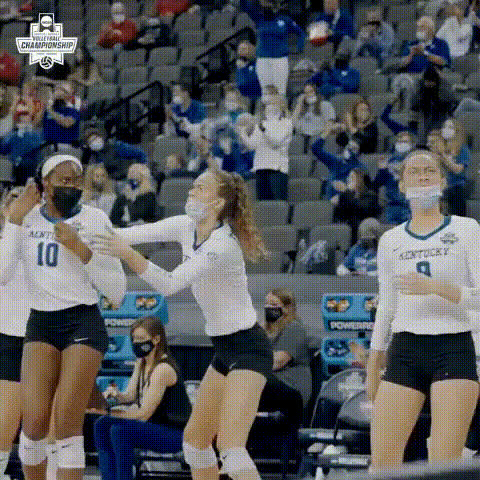
Volleyball Serve Slow Mo

face-swap

1 clip
20 uses

Any aspect ratio

Tags

sports

Volleyball Serve Slow Mo – Face Swap Video Template

Create Viral Volleyball Clips with AI Face Swap

Turn any volleyball jump serve into a viral, slow‑motion highlight with AI face swapping. This “Volleyball Serve Slow Mo” template is built on Magic Hour’s Face Swap Video workflow, so you can drop in your footage, swap faces in a few clicks, and instantly get a share‑ready clip for TikTok, Reels, or YouTube Shorts.

It’s ideal for:

  • Sports creators and editors
  • Social media marketers and brand managers
  • Coaches, clubs, and athletic programs
  • Founders and growth teams testing sports or creator‑led content

What This Template Does

This template combines three things that consistently perform well on social platforms:

  • Slow‑motion action – a clean, cinematic jump‑serve sequence that highlights timing, elevation, and form.
  • Face Swap – powered by Magic Hour’s AI Face Swap, so you can replace the player’s face with any other face you provide.
  • Short‑form video format – optimized for quick, repeatable clips that feel native to vertical video feeds.

Use it for comedic edits (teammates, celebrities, fictional characters) or for more serious brand, fan, or team content where you want the same action but a different on‑screen persona.

How Face Swap Works (In Practice)

Magic Hour’s face swap technology uses deep learning–based facial detection and alignment to:

  • Identify the face in your source volleyball clip across frames
  • Match expression, head angle, and lighting for the new face
  • Blend the swapped face into the original video so it moves naturally with the athlete’s body

You don’t need editing or VFX skills. You provide:

  • Source video – a jump‑serve in slow motion (or any serve you want to stylize as a slow‑mo highlight)
  • Target face – a selfie, team photo crop, brand mascot render, or a character generated with tools like the AI Avatar Generator or AI Character Generator

Key Features of the “Volleyball Serve Slow Mo” Template

  • Cinematic slow‑motion serve
    The template is built around a clear, readable jump‑serve motion. Slowing this moment down makes:
    • Technique easier to see (approach, jump, arm swing, contact)
    • Reactions more expressive, which makes comedy and memes land better
    • Branding elements (text, logos, overlays) more noticeable
  • High‑quality face replacement
    Powered by AI Face Editor and Face Swap technology, the model:
    • Tracks the face through motion, including jumps and torso rotation
    • Preserves expressions, timing, and gaze direction for realism
    • Supports a wide variety of input faces (photos, AI characters, headshots)
  • Optimized for social and campaigns
    The template is built for vertical, snackable sports content. You can easily pair it with:

How to Remix This Template in Magic Hour

You can start directly from this template or build your own variation by remixing it with other Magic Hour tools.

1. Start from Face Swap Video

  1. Go to Face Swap Video.
  2. Upload your volleyball serve clip (or use similar action footage you already have).
  3. Upload or choose the face you want to swap in.
  4. Generate your face‑swapped slow‑mo serve video.

If you don’t have your own serve footage yet, you can:

2. Remix with Other Magic Hour Workflows

To turn this single template into a repeatable content system:

  • Make the player talk before/after the serve
    Use AI Talking Photo or Lip Sync to create short intros/outros where the athlete (or character) speaks to camera, then cut to the face‑swapped slow‑mo serve.
  • Build a highlight reel
    Generate several serves or plays, each with different swapped faces, using:
  • Turn it into stylized animation
    Convert your live‑action serve into a comic, anime, or stylized animation with:

3. Build Your Own “Sports Face Swap” Template

If you want a reusable setup tailored to your brand or team:

  1. Create a clean base clip of a single action (e.g., volleyball serve, soccer penalty, basketball dunk).
  2. Run it through Face Swap Video once and save that project as your base.
  3. For new campaigns, only change:
    • The input face (player, influencer, fan, mascot)
    • Any text/logo overlays you add in your editor of choice
  4. Batch variations for A/B testing ads, organic posts, or creator collabs.

Use Cases for Creators, Teams, and Brands

  • Creator content & memes
    Swap in your own face, your co‑host, or recurring characters. Combine with AI Meme Generator to frame serves as “clutch moments,” “Monday vs Friday,” or fan‑inside jokes.
  • Sports teams and clubs
    Create fan‑engagement clips where:
    • Fans submit selfies, and you drop their faces onto a highlight serve
    • You showcase new signings or MVPs with fun, shareable edits
    • You personalize content for sponsors or partners using their brand mascots
  • Marketers and growth teams
    Use fast, repeatable face‑swapped serves to:
    • A/B test different “faces” or characters in ad creatives
    • Localize campaigns by swapping in region‑specific creators or ambassadors
    • Quickly produce variations for different channels and formats
  • Developers & product teams
    Prototype sports or creator tools by:

Tips for High‑Impact Volleyball Face Swap Videos

  • Choose faces with clear, front‑facing photos
    For the most natural result, use sharp, well‑lit photos. Tools like AI Image Upscaler and Unblur Image can help clean up older or low‑res headshots.
  • Use expressive or unexpected faces for comedy
    Swapping a serious, high‑intensity serve with a calm, bored, or over‑the‑top expressive face usually performs best. Characters from the AI Anime Generator, Disney AI Generator, or Superhero Generator often drive strong engagement.
  • Keep clips short and focused
    For vertical platforms, keep most videos in the 5–15 second range. Focus on the run‑up, jump, and contact. You can always loop the serve or alternate between original and swapped versions.
  • Use consistent branding
    Add simple, repeatable elements:
    • Logo bugs or watermarks (you can prepare assets with AI Logo Generator)
    • On‑screen titles like “Serve of the Day” or “Fan Face Friday”
    • Color‑consistent overlays that match your team or brand palette
  • Chain tools for richer content
    For more advanced stacks:
    • Generate a character → turn it into a talking intro → cut to the face‑swapped serve → close with a branded QR code via AI QR Code Generator.
    • Use Text to Video to storyboard a short sequence, then insert this face‑swapped serve as the hero moment.

Ethical and Legal Considerations

When using face swap on real people:

  • Only swap faces for people who have given you permission, especially for public campaigns.
  • Avoid misleading edits that could be interpreted as real performance, endorsement, or “deepfake” misuse.
  • Consider adding a caption or disclaimer when the intent is comedic or clearly fictional.

Following these guidelines helps you stay compliant with platform policies and maintain audience trust.

Extend Beyond Volleyball

Once you’re comfortable with this template, you can reuse the same approach for:

Get Started

To create your own “Volleyball Serve Slow Mo” face swap:

  1. Open Face Swap Video.
  2. Upload your volleyball serve clip.
  3. Add the face you want to feature.
  4. Generate, download, and share across your channels.

From there, remix it with Video to Video, Animation, or Lip Sync to build an entire series of AI‑powered sports highlights tailored to your audience and brand.

More Like This