Girl Playing Volleyball

Magic Hour Profile Picture
by kpop_stan

face-swap

1 clip
8 uses

Any aspect ratio

Girl Playing Volleyball – Face Swap Video Template

Overview

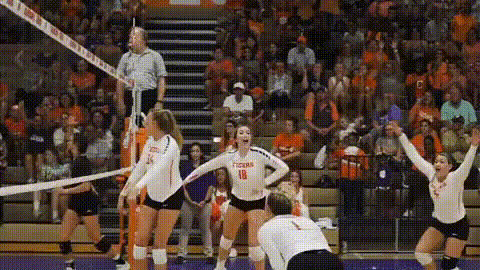
The “Girl Playing Volleyball” Face Swap template is a short, high‑impact video where a skilled volleyball player hits, jumps, and celebrates on court. With Magic Hour’s Face Swap Video tools, you can instantly replace her face with your own, a friend’s, a character, or a brand mascot—no video editing background required.

This template is designed for creators, marketers, and startup teams who want fast, on‑brand, social‑ready content for:

  • TikTok, Reels, and Shorts
  • Sports, fitness, and lifestyle campaigns
  • Influencer promos and UGC ads
  • Meme content and reaction clips

What You Can Do With This Template

  • Drop your face into a sports highlight: Turn yourself (or a customer, influencer, or avatar) into the star volleyball player in seconds using Magic Hour’s AI Face Swap.
  • Make sports memes at scale: Swap in celebrities, fictional characters, or meme faces for quick, repeatable content formats.
  • Test different audiences or personas: Create variants featuring different faces (e.g., “beginner vs pro,” “before vs after”) to A/B test hooks and thumbnails.
  • Build brand‑aligned sports creatives: Add your founder, spokesperson, or VTuber face to the athlete and reuse the video across campaigns.

Template Highlights

  • High‑energy volleyball action
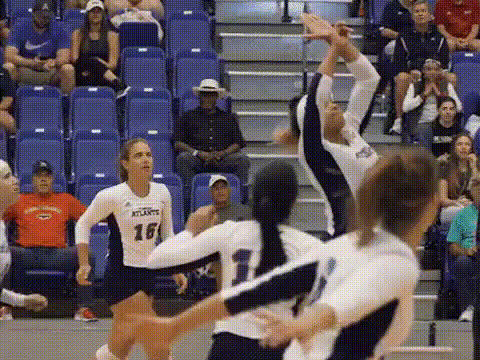
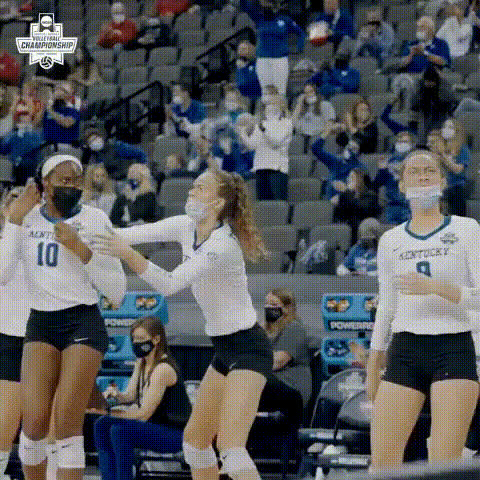
    The base video features a young woman playing volleyball with dynamic movements—jumps, hits, and quick reactions—that keep watch time high on short‑form platforms.
  • Face Swap optimized framing
    The face remains visible and well‑lit throughout the clip, which makes it ideal for accurate swapping with the Face Swap Video tool.
  • Loop‑friendly for TikTok & Reels
    The motion and pacing are designed so the moment can loop naturally, making it perfect for memes, reaction audio, or trending sounds.
  • Works well with other Magic Hour tools
    After swapping the face, you can further enhance the clip with:

How to Remix This Template in Magic Hour

You can either use this exact template or build your own volleyball‑style face swap from scratch. Here’s a simple workflow:

  1. Start with Face Swap Video
    Open Face Swap Video. Upload or select:
    • The volleyball template video (or another sports clip you want to use).
    • A face source: a selfie, headshot, portrait, or character image.
  2. Prepare a strong face source
    For best results:
    • Use a clear, front‑facing image with good lighting.
    • Avoid heavy filters or extreme blur.
    • Keep accessories (huge hats, big sunglasses) minimal if you want a clean swap.
    If you need better source images, you can generate them with:
  3. Apply the face swap
    Run the Face Swap Video process to replace the volleyball player’s face with your selected source. The model automatically tracks expressions and head motion for a natural look.
  4. Optional: extend or stylize your video
    Once you like the core swap, you can:
  5. Export for your channel
    Download your video and share on TikTok, Instagram Reels, YouTube Shorts, or as part of a paid campaign. For crisp delivery, you can improve quality via the Video Upscaler.

Use Cases for Creators, Marketers, and Teams

  • Creator & influencer content
    Drop your face into high‑energy sports scenes to:
    • React to game moments or new product drops.
    • Create recurring “you as the athlete” series.
    • Participate in sports or dance trends quickly without filming from scratch.
  • Brands & performance marketers
    Use this template with different faces to:
    • Test multiple ad creatives with the same motion but different personas.
    • Localize campaigns by swapping in regional talent or UGC‑style faces.
    • Create “day in the life of our user” sports or wellness narratives.
  • Startups & product teams
    Turn your founder, team members, or AI mascots into the volleyball player:
    • For launch videos, feature announcements, or pitch intros.
    • As lightweight content for LinkedIn, X, and community channels.
    • For internal culture clips or sports‑themed event promos.
  • Meme, fandom & character content
    Combine this template with characters generated from: to create sports crossovers, parody edits, and community‑driven memes.

Advanced Remix Ideas

  • Face‑swap series with different sports
    Use this volleyball clip as episode one in a series. Then build additional sports scenes with Text to Video or Image to Video, and face‑swap them all for a consistent campaign featuring the same persona.
  • Talking athlete edits
    Combine this template with:
    • AI Talking Photo – turn still shots of the player into commentary or pre‑game interviews.
    • Lip Sync – sync mouth movement to audio clips or voiceovers.
    to create a mini “player profile” series.
  • Branded covers & thumbnails
    Export a key frame (the moment of the jump or spike) and design:

Best‑Practice Tips for High‑Quality Face Swaps

  • Use clean, high‑resolution faces
    Start from a sharp image. If your photo is low‑quality, restore it first using:
  • Match lighting and angle where possible
    You’ll get more realistic results when your source face roughly matches the template’s lighting and head orientation.
  • Keep expressions natural
    Neutral or slightly expressive faces generally adapt better to the player’s movement than extremely exaggerated expressions.
  • Plan for social platforms
    Think in terms of “hook frames” for:
    • First 1–2 seconds – the most dynamic part of the volleyball motion.
    • Loop point – where viewers might rewatch without noticing the reset.
    Adding captions with the Auto Subtitle Generator can significantly improve retention.

Related Magic Hour Templates & Tools

If you like the “Girl Playing Volleyball” Face Swap template, you may also want to explore:

  • Lip Sync – make the same character sing, talk, or match trending audio.
  • Video to Video – restyle or transform similar sports clips while keeping motion.
  • Animation – turn your athlete or mascot into an animated character for series content.
  • AI Meme Generator – rapidly generate captions and meme variants for your face‑swapped volleyball clip.

Why This Template Works

Short, action‑driven clips with a clear subject and face are consistently favored by social algorithms and viewers. By combining sports motion with AI face swapping, this template gives you:

  • A repeatable format you can customize endlessly with new faces and narratives.
  • Production value comparable to a professional shoot, without needing a camera crew or athletes.
  • A fast way to test concepts, hooks, and personas before investing in full‑scale video production.

Remix the “Girl Playing Volleyball” template in Magic Hour, and turn a single sports moment into a flexible, reusable asset for your content strategy, campaigns, and experiments.

More Like This