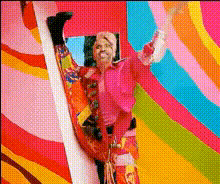
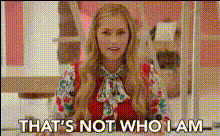
Ken Barbie Edit
face-swap
Any aspect ratio
Tags
moviesKen Barbie Edit – AI Video Face Swap Template
Turn Yourself Into Ken or Barbie with AI Face Swap
The Ken Barbie Edit is a ready‑to‑use AI video face swap template on Magic Hour that lets you instantly transform into a Ken- or Barbie‑style character. It’s built for creators who want fast, polished, and on‑trend content for TikTok, Reels, YouTube Shorts, and campaigns—without manual editing or VFX.
This template uses Magic Hour’s Face Swap Video engine, so you can take any video and swap in your own face (or a client’s, actor’s, or UGC creator’s) while preserving expressions, lighting, and motion.
What You Can Do with the Ken Barbie Edit
- Create “I’m Kenough” style videos for TikTok and Instagram using your own face on Ken‑like characters.
- Join or recreate Barbie trend formats while keeping your content consistent with your brand or persona.
- Produce quick concept tests for campaigns, character reveals, or pitch decks for clients and stakeholders.
- Generate UGC‑style ads that combine a familiar doll aesthetic with your product, logo, or storyline.
Because it’s a template, you don’t start from zero—you simply remix the existing setup and swap in your own assets.
How This Face Swap Template Works
The Ken Barbie Edit is powered by Magic Hour’s AI Face Swap technology, which uses deep learning to:
- Map facial landmarks (eyes, nose, mouth, jawline) between a source face and the target character.
- Preserve motion and expressions so your swapped face still blinks, smiles, moves, and reacts like the original performance.
- Blend lighting and skin tones for a more natural and less “cut‑out” look in video.
- Maintain frame‑by‑frame consistency to avoid typical AI artifacts like flicker or shifting features.
In practice: you choose the Ken Barbie Edit template, upload a video and a face input, and Magic Hour generates a new clip where the character now looks like you (or your chosen subject) while keeping the original scene, camera moves, and timing.
Key Features of the Ken Barbie Edit
- High‑quality face swap for video Built on the same engine as Magic Hour’s Face Swap and Face Swap GIF tools, optimized for short‑form and social‑ready video.
- On‑trend Ken/Barbie aesthetic The template is already styled around the bright, playful doll look, so you can plug in your own face and immediately match current Barbie‑inspired content formats.
- Template‑driven workflow
Instead of configuring everything from scratch, you reuse a pre‑built setup. This is particularly helpful for:
- Marketing teams testing multiple faces/personas on the same creative.
- Creators who want a consistent series format (e.g., “Ken in different jobs,” “Barbie in different cities”).
- Agencies needing repeatable, client‑friendly mockups.
- Compatible with other Magic Hour tools
You can combine this template with:
- Lip Sync – make your Ken/Barbie version sing, speak, or voiceover a script.
- Video‑to‑Video – restyle the output into different visual looks (cinematic, animated, stylized) while keeping the face swap.
- AI Talking Photo – turn a static Ken/Barbie‑style portrait into a speaking character.
- AI Image Editor or Image Background Remover – refine or clean up still frames for thumbnails or promos.
How to Remix This Template in Magic Hour
You can create your own version of the Ken Barbie Edit in a few straightforward steps using Magic Hour’s Face Swap Video creator:
- Start from the template Open the Ken Barbie Edit template inside the Face Swap Video flow. This gives you a pre‑designed doll‑style scene you can personalize.
- Swap in your own face (or multiple faces)
Use a clear photo, selfie, or headshot. For best results, consider:
- Good lighting and a front‑facing angle.
- Unobstructed facial features (minimal sunglasses, masks, etc.).
- High‑resolution images (you can enhance inputs with AI Image Upscaler if needed).
- Adjust to your use case
Remix the underlying concept:
- Change scenes or outfits using additional clips generated with AI Clothes Changer or AI Outfit Generator.
- Create a series of different “Ken roles” (founder Ken, marketer Ken, developer Ken, etc.) by reusing the same structure with new background footage.
- Generate on‑brand characters with AI Character Generator and then face‑swap yourself onto them.
- Add motion, voice, and text
After the face swap:
- Sync speech or music with Lip Sync.
- Clone your own voice with AI Voice Cloner or generate a synthetic one via AI Voice Generator.
- Add auto captions using Auto Subtitle Generator for better watch‑time and accessibility.
- Polish for distribution
Prepare your Ken Barbie Edit for platforms:
- Upscale or sharpen with Video Upscaler.
- Create a matching thumbnail using Thumbnail Maker or Album Cover Generator.
- Turn shorter clips into GIFs to share or embed using AI GIF Generator.
Best Practices for High‑Impact Ken Barbie Face Swaps
- Design around a clear concept
For marketers and founders, map the template to a specific goal:
- Show “Founder as Ken” walking through a product story.
- Use Barbie‑style characters to explain complex features in a playful way.
- Create A/B versions with different faces for audience testing.
- Choose the right source footage
Face swap quality depends heavily on the target video:
- Stable, well‑lit video with visible facial angles yields the best realism.
- Slower camera moves and fewer rapid cuts tend to look more natural.
- Combine with other AI visuals for a full campaign
Surround your Ken Barbie Edit with matching assets:
- Create branded stills using AI Image Generator or AI Photo Generator.
- Generate avatars for profile photos with Avatar Generator or AI Selfie Generator.
- Build themed meme variations with AI Meme Generator.
- Respect ethics and consent If you’re using someone else’s likeness (influencers, customers, public figures), ensure you have the proper rights and approvals before distribution. This is especially important for commercial campaigns and paid media.
Who This Template Is For
- Creators & influencers who want to quickly ride the Ken/Barbie trend with recognizable, high‑quality face swaps.
- Marketers & growth teams testing playful formats for ads, landing pages, or organic social content.
- Startup founders and product teams prototyping brand characters or explainer content without a production studio.
- Agencies & studios building repeatable, on‑brand templates they can reuse across multiple clients and campaigns.
Extend the Ken Barbie Edit with More AI Video Tools
Once you’re comfortable with this template, you can build more advanced workflows inside Magic Hour:
- Generate base footage with AI using Text‑to‑Video or Image‑to‑Video, then apply Face Swap Video to insert your own face into fully synthetic scenes.
- Create stylized animated versions with Animation or Animated Characters Generator, then face‑swap to keep continuity between live‑action and animated assets.
- Experiment with alternative personas by pairing this template with:
Get Started with the Ken Barbie Edit
To use this template:
- Open the Face Swap Video tool on Magic Hour.
- Select the Ken Barbie Edit template from the available face swap templates.
- Upload your face and target video, then generate your Ken/Barbie transformation.
From there, you can iterate, remix, and build your own library of Ken/Barbie‑style edits, ready for marketing campaigns, social content, or creative experiments—all powered by Magic Hour’s AI video ecosystem.