Barbie Edit

Magic Hour Profile Picture
by kpop_stan

face-swap

1 clip
0 uses

Any aspect ratio

Tags

movies

Barbie Edit – High‑Impact Face Swap Video Template

Turn yourself (or your audience) into a hyper-stylized Barbie‑world character in a few clicks. The Barbie Edit template uses Magic Hour’s advanced AI face swap engine to map any face onto cinematic Barbie‑inspired shots, ready for TikTok, Reels, YouTube Shorts, or ads.

This page explains what the template does, how to remix it in Magic Hour, and how to repurpose the same workflow for campaigns, UGC, and character‑driven content.


What This Barbie Edit Template Does

  • AI Face Swap Video – Automatically replaces the original face with your chosen face while preserving expressions, head movement, and lighting using Magic Hour’s Face Swap Video pipeline.
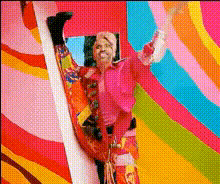
  • Barbie‑Style Visuals – Pre‑built shots inspired by Barbie aesthetics: bright color palettes, glossy lighting, and character‑driven framing that work well on vertical social video platforms.
  • Multi‑Scene Story – The template includes 8 distinct clips, so you can tell a mini‑story: reveal, outfit change, reaction shot, hero close‑up, and more.
  • Flexible Aspect Ratios – Works for vertical (9:16), square, or horizontal content, making it usable for TikTok, Instagram, YouTube, Shorts, and ad placements.
  • Ideal Use Cases – Social trends, influencer collabs, UGC ads, fan edits, cosplay, meme content, and brand experiments with Barbie‑like or doll‑style creative.

Under the hood, this template leverages the same core model as Magic Hour’s AI Face Editor and Face Swap GIF, adapted specifically for high‑quality video.


How AI Face Swap Works (In Plain Language)

Magic Hour’s face swap technology uses modern deep learning techniques (face detection, feature alignment, and generative models) to:

  • Detect faces in each frame of your video and track their motion.
  • Map facial landmarks (eyes, nose, mouth, jawline) and match them to your source face.
  • Generate a new face frame‑by‑frame that preserves the original expression and pose but uses your identity.
  • Blend skin tones and lighting so the result looks natural inside the target scene.

For creators and marketers, this means you can rapidly prototype character‑driven videos without reshooting talent for every variation.


How to Remix This Template in Magic Hour

You can either use this Barbie Edit template directly (if it’s surfaced in your template gallery) or recreate it in minutes by combining Magic Hour tools.

Option 1: Start from Face Swap Video

  1. Open the Face Swap Video tool
    Go to Face Swap Video. This is the core workflow used by Barbie Edit.
  2. Upload your Barbie‑style base video
    Use the existing Barbie Edit base video (if available) or upload your own:
    • Vertical lifestyle shots with strong color and lighting.
    • Close‑ups and mid‑shots that clearly show the face.
    • 8 short clips or a single continuous video you can later cut into 8 segments.
  3. Add the face you want to appear in the video
    Upload a clear portrait or headshot. For best results:
    • Frontal or slight three‑quarter angle.
    • Good lighting and sharp focus.
    • Neutral or light expression to give the model flexibility.
  4. Generate the swapped video
    Let Magic Hour process the video. The system will automatically track the face and apply the swap throughout each clip.
  5. Edit, clip, and export
    Once your output is ready, trim it into 8 scenes (if needed), add captions using the Auto Subtitle Generator, and export for the platforms you care about.

Option 2: Build a Fully Custom Barbie‑Style Sequence

If you want to go beyond the stock Barbie base footage and create your own branded variant, combine these tools:

  • Design your world with AI images
    Use the AI Image Generator or AI Photo Generator to create Barbie‑like environments: pastel bedrooms, dream houses, convertibles, closets, beaches, or stylized cityscapes.
  • Animate stills into clips
    Turn static Barbie‑style images into motion using Image to Video or the Video to Video template for stylized motion and transitions.
  • Add character performance
    If you want your Barbie character to talk or sing:
  • Apply face swap on top
    Once you have your motion shots, return to Face Swap Video and swap in your (or your talent’s) face for a fully custom Barbie sequence.

Best Practices for High‑Quality Barbie Face Swaps

  • Source footage quality matters – Higher resolution, well‑lit videos produce more convincing swaps. If your base footage is low‑res, enhance it with the Video Upscaler.
  • Clean portraits for source faces – Use images without heavy filters or extreme angles. If needed, refine faces with the AI Face Editor or generate new ones via the AI Face Generator.
  • Match style and skin tones – Try to pick source faces whose lighting and skin tone are broadly compatible with the Barbie‑style base footage to minimize visible seams.
  • Respect rights and consent – Only swap faces you are legally allowed to use, and obtain permission from real people whose likeness you feature, especially for commercial campaigns.

Use Cases for Creators, Marketers, and Builders

For Creators & Influencers

  • Trend‑Driven Content – Rapidly participate in Barbie edits, “this is my Barbie self” reveals, or doll‑style glow‑ups.
  • Cosplay & Character Content – Create stylized personas, then repurpose them in short skits, vlogs, and reaction videos.
  • Channel Branding – Generate Barbie‑themed avatars with the Avatar Generator and animate them using AI Talking Photo or Animation.

For Marketers & Growth Teams

  • UGC‑Style Ads – Turn customer photos into Barbie Edit videos to create high‑performing UGC creatives for ad platforms, with clear consent and disclosures.
  • A/B Testing Visual Angles – Swap different personas into the same Barbie sequence to test which demographics or visual styles resonate best.
  • Brand Collaborations – Offer co‑branded Barbie‑style transformations for influencers and partners, scaling output via templates instead of manual editing.

For Product & Startup Teams


Advanced Remix Ideas

  • Barbie vs. Reality Split‑Screens – Pair a “real world” clip with a Barbie Edit version side‑by‑side for transformation videos.
  • Multi‑Character Stories – Use multiple source faces and generate Barbie versions of friends, team members, or community members in one storyline.
  • Genre Mashups – Combine Barbie‑style worlds with tools like Dark Fantasy AI or AI Anime Generator for Barbie‑meets‑anime or dark‑fantasy‑Barbie concepts.
  • Memes & GIFs – Export short segments and repurpose them via AI GIF Generator or AI Meme Generator.

Related Magic Hour Tools for Barbie‑Style Content

To go beyond this single template and build a reusable Barbie or doll‑style content pipeline, explore:


Start Your Own Barbie Edit Now

The Barbie Edit template is a fast way to experiment with high‑impact AI face swap video content without deep video editing skills. Whether you’re:

  • A creator riding trends with rapid‑fire short‑form content,
  • A marketer stress‑testing new creative angles for campaigns, or
  • A builder exploring character‑centric product ideas,

you can remix this template using Face Swap Video, extend it with Lip Sync or Video to Video, and plug it into a broader Magic Hour workflow.

Open Magic Hour, load the Barbie Edit template (or build your own variant with the tools linked above), and start turning everyday faces into polished Barbie‑style video stories in minutes.

More Like This