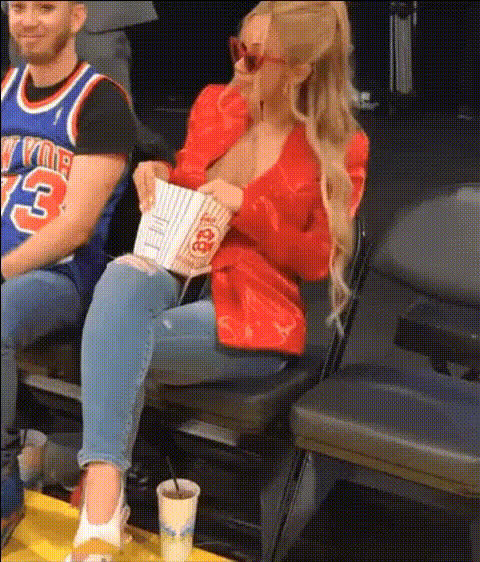
Michael Jackson eating Popcorn
face-swap
Any aspect ratio
Tags
memesMichael Jackson Eating Popcorn – Face Swap Meme Video Template
Create your own version of the classic “Michael Jackson eating popcorn” meme in minutes using Magic Hour’s AI Face Swap Video. Swap in your face, a friend, a fictional character, or a brand mascot, and instantly turn this iconic reaction shot into a high‑impact meme, short, or reaction video.
What This Template Is
This template recreates the famous scene from Michael Jackson’s 1983 “Thriller” music video, where he’s seated in a movie theater, eating popcorn and watching the screen. Online, this reaction has become shorthand for:
- “I’m just here for the drama.”
- Enjoying a heated discussion or controversy from the sidelines.
- Watching events unfold without participating.
With Magic Hour, you can turn that cultural reference into a personalized or branded asset by swapping the original face with any face you choose.
Use Cases for Creators, Marketers, and Builders
- Social media reaction posts: Turn comment-section drama, industry news, or product launches into engaging reaction videos for X, Instagram, TikTok, YouTube Shorts, and LinkedIn.
- Brand and startup content: Put your founder, mascot, or avatar in the seat instead of Michael Jackson to react to competitor news, funding announcements, or hot takes.
- Community & product marketing: Use personalized popcorn clips in Discord, Slack communities, newsletters, and changelog posts as a lightweight, fun reaction asset.
- Meme-native campaigns: Combine the template with your logo and brand colors to run meme-based paid campaigns or organic posts that still look professional.
- Creators & streamers: React to clips from your own streams, fan theories, or gameplay drama with a face-swapped version of yourself in the theater seat.
Key Features of This Template
- AI Face Swap (core feature): Powered by Magic Hour’s AI Face Swap technology. Replace the original face with:
- Your selfie or headshot.
- A teammate, friend, or client (with permission).
- A fictional character or AI-generated face from tools like the AI Face Generator, Avatar Generator, or AI Character Generator.
- High-quality video output: Generate HD video suitable for social feeds, presentations, and campaign creative. You can later upscale with Video Upscaler if needed.
- Flexible remixing: Turn your clip into:
- Short meme videos or GIFs using AI GIF Generator.
- Talking memes by combining with AI Talking Photo or Lip Sync.
- Animated variants with Animation or Image to Video.
- Brandable and meme-ready: Add text overlays, captions, or brand elements after export in your usual editor, or pair with AI Meme Generator to spin out multiple caption variants.
How to Remix This Template in Magic Hour
You can recreate or adapt this template using Magic Hour’s Face Swap Video workflow. At a high level:
- Start from Face Swap Video: Go to Face Swap Video.
- Upload your base clip:
- If you already have this “popcorn” video: upload it as the base video and use Magic Hour to swap the face.
- If you’re recreating the scene: use any short clip of someone watching a screen and eating or reacting. The classic framing is a medium shot in a theater-style environment.
- Choose the face to insert: Upload a clear face image or use a face asset you’ve already generated via:
- AI Headshot Generator for polished founder or team faces.
- AI Selfie Generator for more casual identities.
- AI Anime Generator, Disney AI Generator, or AI Manga Generator for stylized personas.
- Generate your face-swapped clip: Let Magic Hour apply the face swap to all relevant frames in the video.
- Export and repurpose: Download your video and:
- Convert to GIF with Face Swap GIF or AI GIF Generator.
- Add subtitles using the Auto Subtitle Generator.
- Resize, crop, or thumbnail for platforms via Thumbnail Maker.
Creative Variations and Advanced Remixes
Once you have a base face-swapped “popcorn” clip, you can build more advanced content around it:
- Talking popcorn meme: Combine your face-swapped still or frame with AI Talking Photo or Lip Sync to have the character comment on the drama they’re watching.
- Animated character reaction: Generate a fully original character with Animated Characters Generator, then create a “popcorn reaction” variant using Video to Video or Text to Video.
- Branded meme packs: Use the same face identity across:
- Popcorn reaction templates.
- Headshots (AI Headshot Generator).
- Profile avatars (Avatar Generator).
- Campaign visuals (AI Image Generator or AI Art Generator).
- Context-aware versions: Replace the theatrical background using assets from AI Image Editor or generate custom environments with the AI Background Generator and then create a matching video via Image to Video.
Lore, Origins, and Cultural Context
The “Michael Jackson eating popcorn” meme originates from a scene in the “Thriller” music video (1983), directed by John Landis. In that scene, Michael is in a movie theater, calmly eating popcorn while watching a horror film. Decades later, the frame was isolated, turned into GIFs and screenshots, and started circulating widely on early meme platforms like YTMND, forums, and imageboards.
Today, the image is a widely recognized visual shorthand for:
- Watching online arguments without participating.
- Enjoying gossip, drama, or plot twists.
- “Sit back and watch what happens next.”
Because the meme is so culturally embedded, audiences usually understand its meaning instantly, which makes it a powerful tool for engagement when you personalize or localize it via AI face swap.
Practical Tips for High-Impact Memes
- Choose high-quality source faces: Use clear, front-facing images with good lighting for the best swap results. If you need clean input images, generate them with:
- AI Headshot Generator for professional looks.
- AI Face Generator for synthetic but realistic faces.
- AI Image Upscaler if your existing photos are low-res.
- Pair with sharp, concise captions: Most successful popcorn memes use very short captions that frame the “drama” being watched. You can generate caption ideas with AI Meme Generator and then overlay them post-export.
- Optimize for each platform: After generating the clip, reformat for:
- Vertical (9:16) for TikTok, Reels, Shorts.
- Square (1:1) for Instagram feed.
- GIF for Discord, Slack, email, and X replies via AI GIF Generator.
- Combine with audio strategically: While the core meme is visual, adding:
- Subtle theater ambience or popcorn sounds.
- Samples of commentary (generated via AI Voice Generator or AI Voice Cloner).
- Stay on the right side of rights and usage: When you use real people’s faces (employees, influencers, customers), make sure you have their consent and follow your company’s policies for likeness usage.
Related Magic Hour Tools You Can Combine With This Template
- AI Image Editor – Refine frames, edit backgrounds, adjust colors, or remove unwanted elements.
- Remove Object from Photo and Watermark Remover – Clean up materials you’re remixing (where permitted).
- Image Background Remover – Prepare characters or logos you want to integrate into your popcorn scene.
- AI QR Code Generator – Encode links (e.g., to a landing page or newsletter) into stylized QR codes you can add to meme frames.
- Photo Colorizer and Old Photo Restoration – If you’re using archival images or older screenshots as part of your remix, enhance them before swapping faces.
Why Build This in Magic Hour Instead of Doing It Manually?
- Speed: No manual masking, frame-by-frame editing, or compositing. The AI handles facial alignment and blending across the entire clip.
- Consistency: The same identity can be reused across multiple templates and campaigns, ensuring your memes feel like part of a coherent brand system.
- Scalability: Once you’ve set up one “popcorn” variation, you can rapidly generate additional versions with different faces or messages for A/B tests, localization, or segment-specific content.
- Interoperability: The template plugs into the broader Magic Hour ecosystem (face swap, talking photos, GIFs, text-to-video, voice, and image tools), so you can build complete content systems, not just one-off memes.
Use this “Michael Jackson Eating Popcorn” face swap template as a base, then remix it with Magic Hour’s Face Swap Video and related tools to produce fast, on-brand, and highly shareable reaction content for every social channel and campaign.