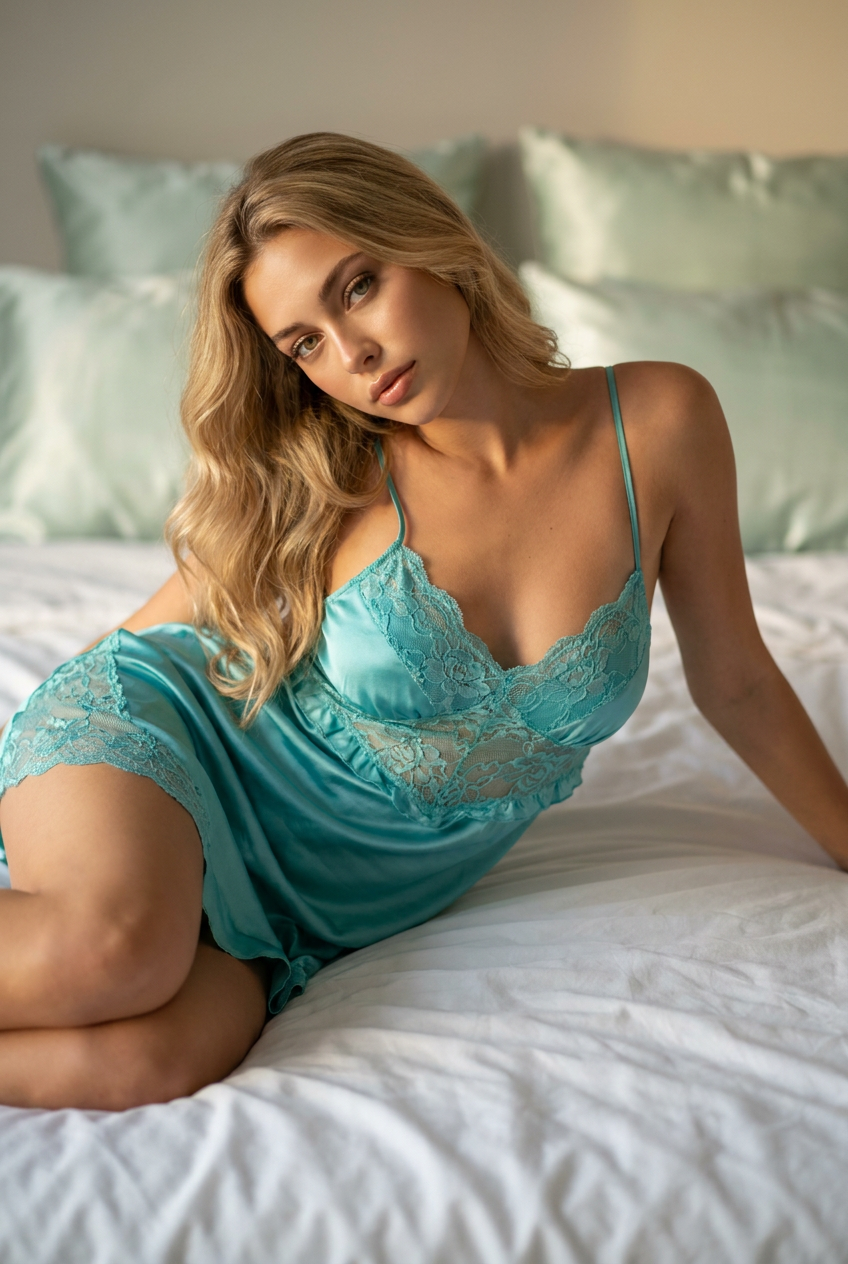
Turquoise Lace Boudoir
- Model
- Nano Banana Pro
- Image
- 848 × 1264 px
Prompt
Use the attached image as the exact facial identity reference. Preserve the subject’s facial structure, eye shape, nose, lips, jawline, skin tone, age, and all recognizable facial characteristics with maximum accuracy. Do not beautify, reshape, replace, or alter her face. Create a photorealistic, high-end luxury bedroom fashion editorial portrait of an adult woman, photographed with a Canon EOS R5 and an 85mm f/1.4 lens. She has warm olive skin, hazel almond-shaped eyes, glossy nude lips, and long softly waved blonde hair cascading naturally over her shoulders. She is resting gracefully on her side across crisp white rumpled bedsheets, with her body angled elegantly toward the camera. One arm rests naturally along the bedding while the other gently supports her head. One knee is softly bent, creating a refined and relaxed fashion pose. She wears an elegant turquoise satin sleepwear dress with delicate floral lace detailing, thin shoulder straps, a tasteful scalloped neckline, opaque lining, subtle ruffled trim, and refined tailoring that provides complete coverage. The vibrant aquamarine color complements her warm skin tone and creates a sophisticated luxury editorial aesthetic. The softly blurred background features pale mint-green satin pillows and a clean, upscale bedroom interior. Soft diffused key lighting from the front-left creates gentle Rembrandt-style shadows and a warm golden-hour glow across her face, hair, and clothing. Cinematic warm-neutral color grading, shallow depth of field, creamy bokeh, subtle Kodak Portra 400-inspired film grain, realistic skin pores, detailed hair strands, premium fabric textures, authentic facial expression, elegant body proportions, natural hands, 8K photorealism, tasteful luxury fashion campaign, sophisticated and non-explicit. Aspect ratio: 2:3 vertical. Negative prompt: nudity, transparent clothing, exposed intimate areas, lingerie, garter straps, explicit pose, exaggerated body proportions, altered face, identity mismatch, plastic skin, over-smoothed skin, distorted anatomy, extra fingers, malformed hands, CGI, illustration, anime, watermark, text, logo.
Any aspect ratio
Overview
Elevate your fashion editorials with the "Turquoise Lace Boudoir" AI Image Editor template, leveraging the superior capabilities of the nano-banana-pro model. This template is perfect for creating stunning, high-end fashion portraits, maintaining the true essence of the subject while craftily embedding them into a luxury boudoir setting.
What It Does
"Turquoise Lace Boudoir" seamlessly transforms your images by ensuring maximum facial detailing and natural expression replication. It maintains key facial features distinctively, adding an extravagant editorial ambience with elements like the refined turquoise satin dress and sophisticated room setting. Explore more similar AI-enhanced editing with our AI Image Editor.
Who It's For
This template is designed for professional photographers, editors, and creative directors in the fashion industry seeking to produce exquisite and photorealistic editorial portraits. Artists looking to push the boundaries of traditional photography with AI precision will find this template particularly beneficial. Those interested in integrating AI into fashion and photography can also consider using the AI Image Generator.
Summary
The "Turquoise Lace Boudoir" AI Image Editor template is your go-to solution for fashion photo shoots. It provides a seamless blend of photorealism and artistic styling, enhancing image quality while preserving essential facial characteristics. This tool is part of our wide suite of creative solutions available through our AI Product Photography offerings.
How to Use
Choose the Template

Customize Your Inputs

Generate and Download

Use Cases
Luxury Fashion Editorials
- Elevate brand campaigns with unique visual aesthetics
- Perfect for high-fashion magazine spreads
Portrait Enhancement
- Ideal for high-end client presentations
- Use in professional portfolio developments
Commercial and Advertising
- Suitable for print ads and digital displays
- Captivating visuals for social media campaigns
Best Practices
Maintain Authenticity
Ensure the subject's true features are maintained by carefully aligning input image angles and lighting with the template design.Optimize Lighting
Replicate soft lighting settings for a warm and inviting appearance. Consider using natural light during image capture for best outcomes.Consider Color Harmony
Ensure that the clothing and background colors harmonize with the subject's skin tone to accentuate visual appeal.