woman-in-blue-sweater
Overview
The Woman in Blue Sweater video template offers a straightforward solution for transforming your content through Face Swap technology. This template is designed to captivate viewers by seamlessly placing different faces in preset videos. Whether you're crafting marketing materials or adding humor to a personal project, this template makes face swapping easy and precise.
What It Does
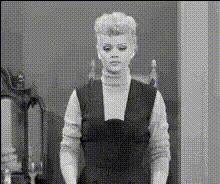
This Video Face Swap template utilizes advanced algorithms to replace the face of a woman wearing a blue sweater with your chosen face in your uploaded content. The result is a cohesive, entertaining video that maintains the original video's context while featuring a new face.
This template supports formats like MP4 and MOV, ensuring compatibility with most video editing tools. Using technologies similar to those found in the Face Swap and Image to Video products, the transformation is both quick and effective.
Who It's For
Ideal for content creators, digital marketers, and social media enthusiasts, this template allows anyone to produce engaging, personalized videos. Small businesses looking to enhance their digital presence will find this tool particularly useful for crafting memorable marketing campaigns or promotional materials.
Educators and trainers can also benefit by integrating AI Video Generation techniques into their materials to make learning more interactive.
Summary
Leveraging AI technology, the Woman in Blue Sweater template provides an innovative approach to video personalization. With a focus on maintaining quality and creative flexibility, this template is suited for a wide range of applications—from entertainment to professional content creation.
How To
Choose the Template

Customize Your Video

Generate and Download

Use Cases
Social Media Campaigns
- Viral video challenges
- Promotional content for brands
- User-generated content engagement
Advertising
- Brand ambassadors try on new contexts
- Reach diverse audiences through localization
Entertainment
- Produce skits with new casts instantly
- Create parody content effortlessly
Best Practices
Select High-Quality Images
Ensure the faces you upload are well-lit and clear to allow the AI to perform accurate swaps.Consider Contextual Relevance
While swapping faces, maintain the original context of the background video for the best audience experience.Review and Edit
Utilize the editing tools in our AI Image Editor to refine swapped elements and ensure seamless integration.