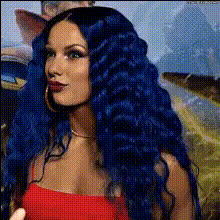
woman-with-blue-hair
Overview
Experience an engaging transformation with our Video Face Swap template featuring a striking woman with blue hair. This tool is perfect for those looking to add a touch of vibrancy and fun to their video content. By leveraging the power of AI, you can quickly replace faces in your videos while maintaining natural expressions and movements.
What It Does
The Video Face Swap template allows users to seamlessly integrate a fun personality into their videos. It uses state-of-the-art AI technology to precisely swap faces, ensuring that features and expressions are preserved accurately. The focus is on transforming your video content into something eye-catching and shareable.
For more comprehensive editing options, consider pairing this with our AI Image Editor or enhance the swap with the AI Face Editor.
Who It's For
This template is ideal for content creators, marketers, and social media enthusiasts who want to captivate their audience with unique video content. It is also great for anyone involved in the entertainment industry, looking to generate playful content quickly without extensive video editing skills.
If you're working with multiple characters, check out our Character Replace tool for even more flexibility.
Summary
Transform your video projects by introducing an element of surprise with our Video Face Swap template. This tool offers a blend of precision and creativity, allowing users to maintain the integrity of their original content while incorporating vibrant new elements. Explore our range of templates like the Face Swap Video to further diversify your creative materials.
How-To
Choose Your Template

Customize Your Inputs

Generate Your Video

Use Cases
Social Media Campaigns
- Engage your followers with unique video posts
- Perfect for quirky campaigns and challenges
Marketing and Brand Promotion
- Highlight new products with a creative twist
- Develop visually engaging ads
Entertainment and Gaming
- Introduce new characters into pre-existing content
- Generate content with alternate identities
Best Practices
Select High-Quality Videos
For the best face swap results, use videos with clear and well-lit subjects.Refine Your Face Selection
Make sure the face being replaced is clearly visible and faces the camera directly for optimal results.Experiment with Angles
Try different video clips to see how the template handles various angles and expressions.