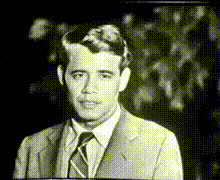
Man In Suit Standing
Overview
The "Man In Suit Standing" template offers a sophisticated Video Face Swap solution ideal for creating professional and impactful business-themed videos. Utilize this template to integrate your or another's face onto a poised figure in a suit, perfect for crafting presentations that demand a polished look.
What It Does
This template allows users to interchange faces within video clips, specifically targeting a man in a suit. The result is a fluid and natural-looking transformation that blends seamlessly into the original setting. Designed for high-impact face swaps in videos, this tool helps create personalized content for various business needs, such as corporate videos and marketing materials.
Who It's For
The "Man In Suit Standing" template is ideal for marketing professionals, business presenters, and content creators who need to produce professional-grade videos with customizable elements. It's perfect for users aiming to craft personalized corporate presentations, brand introductions, and promotional content. AI Video Generator and AI Talking Photo solutions can further enhance the creative scope.
Summary
The "Man In Suit Standing" template simplifies the face swap process, allowing you to easily integrate personalized visuals into business contexts. This tool is part of a versatile suite designed to empower creators with user-friendly adjustments for professional output, alongside other Face Swap products.
How to Use
Choose the Template

Customize Your Inputs

Generate and Download

Use Cases
Business Presentations
- Enhance corporate training materials.
- Add dynamic visuals to keynote speeches.
Marketing Videos
- Develop personalized video pitches.
- Craft targeted digital campaigns.
Product Launches
- Showcase executive presence in launch events.
- Enhance PR visual content.
Best Practices
Use High-Resolution Images
Always upload high-resolution images for better alignment and a natural look. Low-quality images may lead to less convincing swaps.Fine-Tune Settings
Adjust face alignment and size settings to match the template's proportions closely. This ensures a seamless integration.Preview Changes
Take advantage of preview options to make adjustments before finalizing your video, ensuring all elements are fit well together.