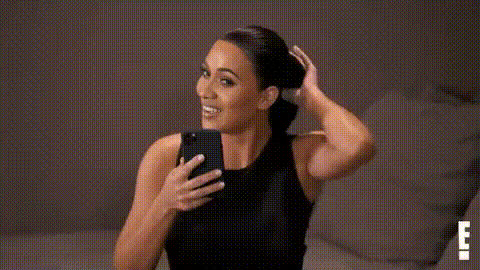
Kim Kardashian Smiling At Phone
Overview
Infuse your video projects with a touch of celebrity allure using the 'Kim Kardashian Smiling At Phone' Video Face Swap template. This tool lets you create captivating content by swapping faces in your videos effortlessly, providing a professional-grade transformation with just a few clicks.
What It Does
This Video Face Swap template empowers you to replace Kim Kardashian's face while she's smiling at her phone with a face of your choice. This feature is perfect for creating engaging content that stands out. The template supports popular formats suitable for GIFs and short video clips.
Explore unmatched customization with options to adjust facial expressions and sync with existing movements. Pair it up with the Lip Sync tool for even more dynamic results, blending perfect lip movements with facial expressions.
Who It's For
Whether you're a content creator, marketer, or social media influencer, this Video Face Swap template is a great choice for adding a unique twist to your videos. It's particularly useful for creating viral content and personalized ads that need a celebrity touch. Businesses looking to spice up their marketing campaigns and engage audiences in a fun way will find this tool invaluable.
Summary
The 'Kim Kardashian Smiling At Phone' template offers a novel way to enhance your video content with professional-grade face swapping capabilities. Use it to make your projects stand out, whether you're aiming for humor, creativity, or attention-grabbing promotional material. Dive deeper with complementary tools like the Video Face Swap and AI Image Editor for a complete editing suite.
How to Use
Choose

Customize

Generate

Use Cases
Social Media Content
- Short skits featuring celebrity interactions
- Humorous clips for Instagram Reels or TikTok
Marketing Campaigns
- Personalized video ads
- Promotional videos highlighting product usage
Event Coverage
- Viral-worthy event recap videos
- Unique interviews and Q&A sessions
Best Practices
Choose the Right Clip
Ensure the original video has clear footage of the subject's face to achieve the best results.Adjust Expression Details
Fine-tune facial details and expressions to match the context and mood of the original footage.Combine with Other Tools
Use with the AI Voice Changer to align sound with visual edits for a complete experience.