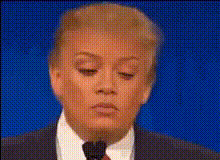
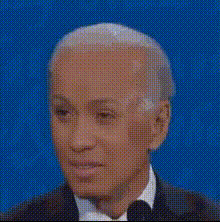
President Lip Sync

face-swap

1 clip
2 uses

Any aspect ratio

President Face Swap Lip Sync Video Template

Overview

This President Face Swap Lip Sync template lets you generate realistic, lip-synced presidential videos in minutes, powered by Magic Hour’s Face Swap Video and Lip Sync tools. Start from this template, swap in any face you have the rights to use (including your own), and sync it to any audio—ideal for explainers, skits, marketing hooks, and educational clips.

Creators, marketers, and product teams use this format to:

  • Prototype “presidential” announcement-style videos for campaigns and product launches
  • Turn scripts into engaging social content without hiring on-camera talent
  • Build concept demos and internal training assets using a familiar “head of state” style

Under the hood, this template combines AI face replacement with phoneme-level lip syncing—techniques described in work like Wav2Lip and neural face reenactment research—to keep speech and expressions aligned and believable.

What This Template Does

  • Face Swap–based “presidential” presenter
    Built on Magic Hour’s AI Face Swap engine, this template replaces the original face in the base video with your chosen source face. Use it to:
    • Test a “presidential address” style with your own face
    • Create fictional heads of state using assets from tools like the AI Character Generator or Avatar Generator
    • Swap facial identities while keeping body posture, framing, and camera movement
  • AI Lip Sync for any audio
    The template works with the Magic Hour Lip Sync pipeline to align mouth shapes with your audio track. It can handle:
    • Spoken narration (tutorials, announcements, UGC scripts)
    • Podcast clips or interview segments
    • Music or parody lines for short-form content
    For synthetic voices, pair it with AI Voice Generator or AI Voice Cloner.
  • Reusable “address to camera” format
    The template is designed for direct-to-camera “speech” style videos. Once you like the framing and pacing, you can:
    • Remix with new faces via Face Swap Video
    • Swap in new audio scripts without reshooting
    • Export for short-form platforms (YouTube Shorts, TikTok, Reels) or longer explainers
  • Brand- and use-case–agnostic
    Because the base structure is neutral “presidential address,” it adapts well to:
    • Product announcements (“State of the Product” updates)
    • Company-wide messages and all-hands intros
    • Educational explainers with historical, fictional, or stylized leaders

How to Remix This Template in Magic Hour

You don’t have to start from scratch. Use this template as a blueprint, then adapt it with Magic Hour tools:

  1. Generate or choose your “president” face
  2. Create or source the audio
    Aim for clean, high‑quality audio with minimal background noise for the best lip sync.
  3. Apply Face Swap to a speaking clip

    Start from a base video of someone speaking to camera, or generate one using other Magic Hour flows:

    • Use an existing talking-head clip (yours or licensed)
    • Or first transform a video with Video to Video for a stylized “presidential broadcast” look
    Then run it through Face Swap Video with your selected portrait as the source face.
  4. Lip sync the final face-swapped video

    With the face-swapped clip ready, use the Lip Sync flow and upload your audio. The model will align mouth movements to the speech, preserving expressions and head motion.

  5. Optional: add motion, animation, or variants

Use Cases and Ideas

  • Marketing & growth
    • “Presidential” product launch or feature announcement videos for social
    • Landing page hero videos delivering a short, authoritative pitch
    • A/B testing different scripts or tones (serious, humorous, satirical) by swapping only the audio track
  • Education & history
    • Concept explainers in civics, economics, or policy using a fictional head of state
    • Interactive classroom content where a character “leader” summarizes key takeaways
    • Revision or recap videos that feel like formal addresses
  • Product & startup teams
    • “State of the Company” internal update videos
    • Investor and stakeholder summaries presented in a structured, memorable format
    • Concept prototypes of avatar-based leadership communications
  • Entertainment & memes
    • Satirical “press briefings” about product releases or community updates
    • Short comedy bits where a fictional president reacts to trending topics
    • Reaction GIFs and looping clips generated with AI Meme Generator plus Face Swap

Best Practices for Realistic Results

  • Use high‑quality source faces
    Start with sharp, well‑lit portraits. If needed, enhance them using:
  • Prioritize clean audio
    Lip sync quality strongly depends on audio clarity. Remove noise, keep one main speaker, and avoid heavy reverb. Synthetic voices from AI Voice Generator or AI Voice Cloner usually perform well.
  • Match pacing and tone
    For a convincing “presidential address,” use:
    • Moderate speaking pace with clear pauses
    • Structured scripts (intro, key points, call to action)
    • Consistent emotional tone—serious, inspirational, or intentionally comedic
  • Optimize for platform
    Consider where you’ll publish:
    • Short, punchy clips (10–30s) for TikTok, Reels, Shorts
    • Longer narrative or educational content for YouTube, websites, or internal portals
    • Higher resolution for paid campaigns; pair with Video Upscaler when needed

Ethics, Rights, and Responsible Use

Face swapping and lip syncing are powerful techniques. When using this template:

  • Use faces and voices you own or have explicit permission to use
  • Avoid misleading viewers about what is real vs. synthetic, especially in political or news-like contexts
  • Follow Magic Hour’s terms of use and any applicable local regulations on synthetic media and deepfakes

For brand-safe content, many teams prefer fictional or stylized presidents created with tools like the AI Face Generator, AI Manga Generator, or Disney AI Generator.

Related Magic Hour Tools to Extend This Template

Who This Template Is For

  • Creators and YouTubers who want repeatable, high‑engagement “speech” formats without filming every time
  • Marketing and growth teams testing narrative angles and hooks using a recognizable “address to camera” style
  • Educators and course builders creating memorable explainers and interactive lessons
  • Startup teams and PMs rapidly prototyping avatar-based communication and content concepts

Use this President Face Swap Lip Sync template as your starting point, then remix it with Magic Hour’s Face Swap Video, Lip Sync, Text to Video, and Image to Video capabilities to build your own repeatable, on-brand “presidential address” content pipeline.

More Like This